cancel
Showing results for 
Search instead for 
Did you mean: 

July 7 - July 17 | Round 2 of the Power BI Dataviz World Championships. Don't miss your chance! Learn more

Reply
kintela
Helper II
Helper II

error adding a column

Hi


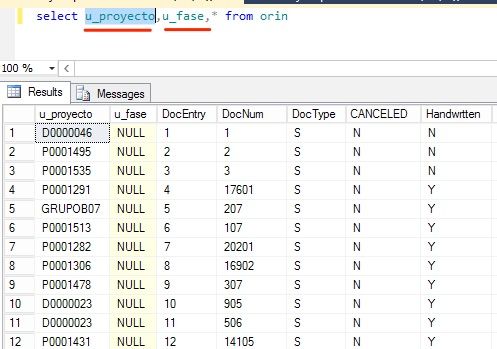
I want to add two columns in my model specifically these ones:


captura.jpg


But whe I try it:


captura.jpg


Any sense???


Regards


1 ACCEPTED SOLUTION

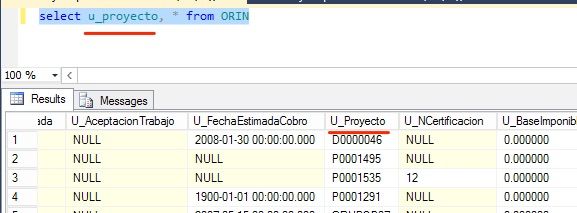
Sorry the field was U_Proyecto not u_proyecto but in SQL this sentence lied me:


captura.jpg

Thanks

View solution in original post

5 REPLIES 5
JazminMarquez
Frequent Visitor

In your query at the end you are adding a comma before * from..


Try to.. 


Select u_proyecto, u_fase * from orin

Hi


My problem is not in that query is in to add those columns in my model in Power BI...


Thanks

@kintela


I suggest you use query to retrieve the data so that you can directly add the columns into T-SQL query in Advanced Editor.


let
    Source = Sql.Database("Severname", "Database", [Query="Select u_proyecto, u_fase * from orin"])
in
    Source

Regards, 

Sorry the field was U_Proyecto not u_proyecto but in SQL this sentence lied me:


captura.jpg

Thanks

Just go to the query editor and step through the query.  If you go to the second step, you should see what is returned by your query (before selecting the columns you wish to keep).  PBI is not detecting the column based on the name, so perhaps the source table has changed.

Helpful resources

Announcements
FabCon and SQLCon Barcelona 2026

FabCon & SQLCon – Barcelona 2026

Join us in Barcelona for FabCon and SQLCon, the Fabric, Power BI, SQL, and AI community event. Save €200 with code FABCMTY200.

60 days of Data Days Carousel

Data Days 2026

Join Fabric Data Days 2026: 60 days of free live/on-demand sessions, challenges, study groups, and certification opportunities.

Power BI DataViz World Championships carousel

Power BI DataViz World Championships - June 2026

A new Power BI DataViz World Championship is coming this June! Don't miss out on submitting your entry.