cancel
Showing results for 
Search instead for 
Did you mean: 

We've captured the moments from FabCon & SQLCon that everyone is talking about, and we are bringing them to the community, live and on-demand. Starts on April 14th. Register now

Reply
kintela
Helper II
Helper II

error adding a column

Hi


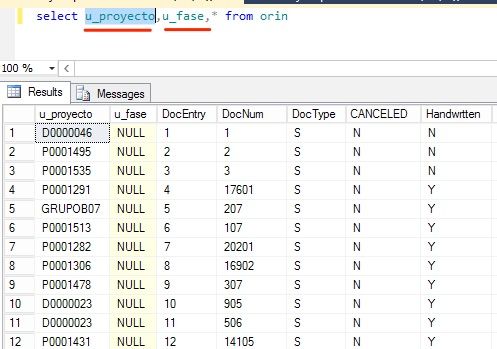
I want to add two columns in my model specifically these ones:


captura.jpg


But whe I try it:


captura.jpg


Any sense???


Regards


1 ACCEPTED SOLUTION

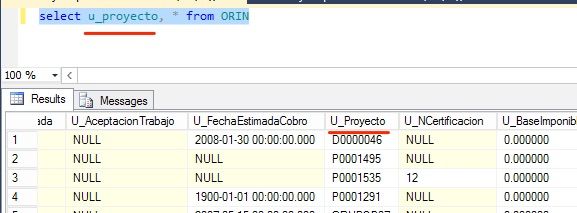
Sorry the field was U_Proyecto not u_proyecto but in SQL this sentence lied me:


captura.jpg

Thanks

View solution in original post

5 REPLIES 5
JazminMarquez
Frequent Visitor

In your query at the end you are adding a comma before * from..


Try to.. 


Select u_proyecto, u_fase * from orin

Hi


My problem is not in that query is in to add those columns in my model in Power BI...


Thanks

@kintela


I suggest you use query to retrieve the data so that you can directly add the columns into T-SQL query in Advanced Editor.


let
    Source = Sql.Database("Severname", "Database", [Query="Select u_proyecto, u_fase * from orin"])
in
    Source

Regards, 

Sorry the field was U_Proyecto not u_proyecto but in SQL this sentence lied me:


captura.jpg

Thanks

Just go to the query editor and step through the query.  If you go to the second step, you should see what is returned by your query (before selecting the columns you wish to keep).  PBI is not detecting the column based on the name, so perhaps the source table has changed.

Helpful resources

Announcements
New to Fabric survey Carousel

New to Fabric Survey

If you have recently started exploring Fabric, we'd love to hear how it's going. Your feedback can help with product improvements.

Power BI DataViz World Championships carousel

Power BI DataViz World Championships - June 2026

A new Power BI DataViz World Championship is coming this June! Don't miss out on submitting your entry.

Join our Fabric User Panel

Join our Fabric User Panel

Share feedback directly with Fabric product managers, participate in targeted research studies and influence the Fabric roadmap.

March Power BI Update Carousel

Power BI Community Update - March 2026

Check out the March 2026 Power BI update to learn about new features.