FabCon is coming to Atlanta
Join us at FabCon Atlanta from March 16 - 20, 2026, for the ultimate Fabric, Power BI, AI and SQL community-led event. Save $200 with code FABCOMM.
Register now!- Power BI forums
- Get Help with Power BI
- Desktop
- Service
- Report Server
- Power Query
- Mobile Apps
- Developer
- DAX Commands and Tips
- Custom Visuals Development Discussion
- Health and Life Sciences
- Power BI Spanish forums
- Translated Spanish Desktop
- Training and Consulting
- Instructor Led Training
- Dashboard in a Day for Women, by Women
- Galleries
- Data Stories Gallery
- Themes Gallery
- Contests Gallery
- QuickViz Gallery
- Quick Measures Gallery
- Visual Calculations Gallery
- Notebook Gallery
- Translytical Task Flow Gallery
- TMDL Gallery
- R Script Showcase
- Webinars and Video Gallery
- Ideas
- Custom Visuals Ideas (read-only)
- Issues
- Issues
- Events
- Upcoming Events
The Power BI Data Visualization World Championships is back! Get ahead of the game and start preparing now! Learn more
- Power BI forums
- Forums
- Get Help with Power BI
- Desktop
- Re: equal "=" operator didn't seem to work on calc...
- Subscribe to RSS Feed
- Mark Topic as New
- Mark Topic as Read
- Float this Topic for Current User
- Bookmark
- Subscribe
- Printer Friendly Page

- Mark as New
- Bookmark
- Subscribe
- Mute
- Subscribe to RSS Feed
- Permalink
- Report Inappropriate Content
equal "=" operator didn't seem to work on calculate and filter functions
I have problem to apply more than one filter (<filter2>....) to my FILTER and CALCULATE functions using the equal "=" operator. They only take the first filter but not the subsequence filters.
To make it work I had to go opposite way using multiple no equal "<>" operator which make my programme very long. Instead of saying I want to keep 2 things out of 20, now I have to say remove 18 things out of 20.
CALCULATE(<expression>,<filter1>,<filter2>…)
FILTER(<table>,<filter1> && <filter2>) or FILTER(<table>, AND(<filter1>, <filter2>)
I working with the latest April 2019 Power BI Desktop version. I am still learning DAX but logic tell me if it can take multiple "<>" conditions it should take multiple "=" conditions and other multiple of other operators.
Please help.
Solved! Go to Solution.


- Mark as New
- Bookmark
- Subscribe
- Mute
- Subscribe to RSS Feed
- Permalink
- Report Inappropriate Content
Hi @Jeff_Ng,
The filter conditions in CALCULATE(<expression>,<filter1>,<filter2>…) are performed with AND operation.
You can modify the Calculate_2 as below:
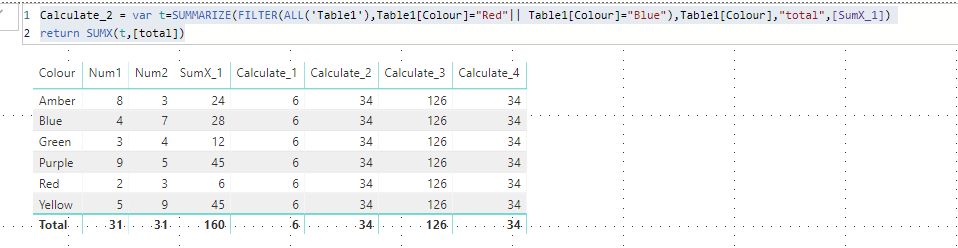
Best Regards,
Qiuyun Yu
If this post helps, then please consider Accept it as the solution to help the other members find it more quickly.
- Mark as New
- Bookmark
- Subscribe
- Mute
- Subscribe to RSS Feed
- Permalink
- Report Inappropriate Content
Hi @Jeff_Ng,
I have modified the measure below:
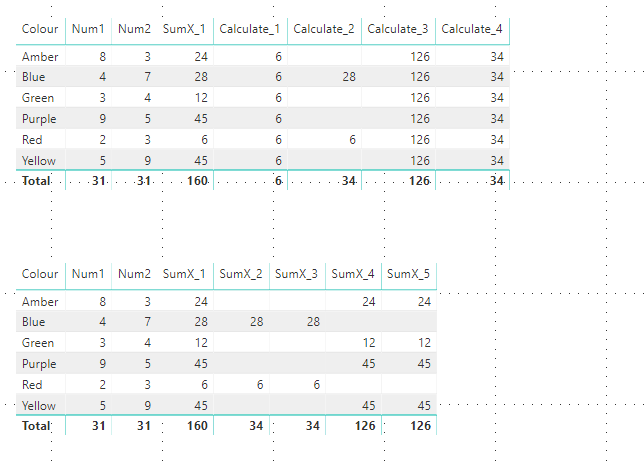
Qiuyun Yu
If this post helps, then please consider Accept it as the solution to help the other members find it more quickly.
- Mark as New
- Bookmark
- Subscribe
- Mute
- Subscribe to RSS Feed
- Permalink
- Report Inappropriate Content
hi @v-qiuyu-msft ,
Not quite. I,m expecting Calculate_2 is equal to Calculate_4 which is 34 in all rows. Similarly SumX_2 = SumX_4, and SumX_3 = SumX_5.
In fact my concern is not about the results. I want explaination why multiple filters with "=" operators not working in Case 1 but multiple filters with "<>" operators worked in the Case 2.
Sybtax for CALCULATE(<expression>,<filter1>,<filter2>…)
- Mark as New
- Bookmark
- Subscribe
- Mute
- Subscribe to RSS Feed
- Permalink
- Report Inappropriate Content
Hi @Jeff_Ng,
The filter conditions in CALCULATE(<expression>,<filter1>,<filter2>…) are performed with AND operation.
You can modify the Calculate_2 as below:
Best Regards,
Qiuyun Yu
If this post helps, then please consider Accept it as the solution to help the other members find it more quickly.
- Mark as New
- Bookmark
- Subscribe
- Mute
- Subscribe to RSS Feed
- Permalink
- Report Inappropriate Content
- Mark as New
- Bookmark
- Subscribe
- Mute
- Subscribe to RSS Feed
- Permalink
- Report Inappropriate Content
Hi @Jeff_Ng,
If the report doesn't contain any sensitive data, you can upload it to your OneDrive and paste the share link here.
Best Regards,
Qiuyun Yu
If this post helps, then please consider Accept it as the solution to help the other members find it more quickly.
- Mark as New
- Bookmark
- Subscribe
- Mute
- Subscribe to RSS Feed
- Permalink
- Report Inappropriate Content
Hi @v-qiuyu-msft ,
Thanks for taking time to response. Attached is the pbix file with ficticius data with some of my measures explaning the problems I mentioned above.
Please explain why "=" operator is not working in measures
- Calculate_2
- SumX_2
- SumX_3
ohh..How do I attach file?
- Mark as New
- Bookmark
- Subscribe
- Mute
- Subscribe to RSS Feed
- Permalink
- Report Inappropriate Content
Hi @Jeff_Ng,
Is it possible for you to share a pbix file to clarify the issue? Please remove sensitive data in the report before you share it.
Best Regards,
Qiuyun Yu
If this post helps, then please consider Accept it as the solution to help the other members find it more quickly.

Helpful resources

Power BI Dataviz World Championships
The Power BI Data Visualization World Championships is back! Get ahead of the game and start preparing now!

Power BI Monthly Update - December 2025
Check out the December 2025 Power BI Holiday Recap!

FabCon Atlanta 2026
Join us at FabCon Atlanta, March 16-20, for the ultimate Fabric, Power BI, AI and SQL community-led event. Save $200 with code FABCOMM.

| User | Count |
|---|---|
| 38 | |
| 38 | |
| 36 | |
| 28 | |
| 28 |


| User | Count |
|---|---|
| 124 | |
| 88 | |
| 74 | |
| 66 | |
| 65 |


