
cancel
Showing results for 
Search instead for 
Did you mean: 

July 7 - July 17 | Round 2 of the Power BI Dataviz World Championships. Don't miss your chance! Learn more

Reply
Tarunika
Helper II
Helper II

empty table values

Hi all ,

here in power query editor iam able to see the table values but when i view it in the table view my table is empty please let me know how can i resolve this

Tarunika_0-1660896071517.png

Thanks and Regards

1 ACCEPTED SOLUTION
AlexanderPrime
Solution Supplier
Solution Supplier

I think you have some empty rows and in table view they've jumped up to the top. If you scroll down is there any data further down? Or if you select one of the filters in the column headers, try unselecting blanks to see if this is the case.


If you have got blank rows, go into Power Query and select "Remove Blanks" on the table in question. 


Please note - I am not affiliated with Microsoft, I'm just an end user like yourself.
Just a regular guy doin' Data Science.

If my post has helped you, please don't forget to thumbs up or click "Accept as solution" if it solved your problem!

View solution in original post

5 REPLIES 5
MahyarTF
Memorable Member
Memorable Member

Hi,

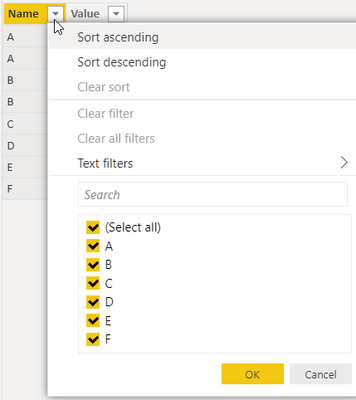
it seems the null rows are shown at the top of your column.

As I see in the print screen that you shared, the particular column has 7 distinct value.

MahyarTF_0-1660897805398.png

Scroll down or click on icon on top of the column, so you could see the value in that column

MahyarTF_1-1660897875327.png

Appreciate your Kudos


Mahyartf
AlexanderPrime
Solution Supplier
Solution Supplier

I think you have some empty rows and in table view they've jumped up to the top. If you scroll down is there any data further down? Or if you select one of the filters in the column headers, try unselecting blanks to see if this is the case.


If you have got blank rows, go into Power Query and select "Remove Blanks" on the table in question. 


Please note - I am not affiliated with Microsoft, I'm just an end user like yourself.
Just a regular guy doin' Data Science.

If my post has helped you, please don't forget to thumbs up or click "Accept as solution" if it solved your problem!

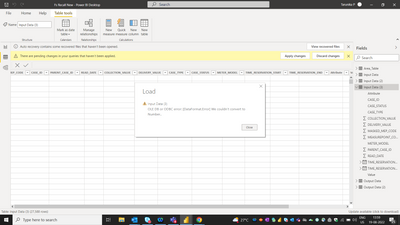
hi @AlexanderPrime i had some empty rows at the top but while removing the blank rows from power query editor iam getting this error

Tarunika_0-1660897866412.png


It sounds like one of your number columns may have an invalid character hiding in it (like a letter or a comma) 


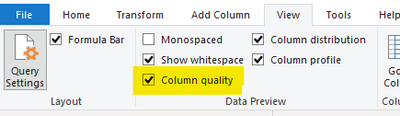
I would check in Power Query to see which column contains it and amending it where possible. One way to help find is to use the Column Quality View in Power Query. Screenshot below for where to enable this 

AlexanderPrime_0-1660899737879.png

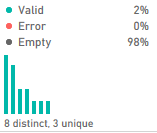
This will give you a breakdown over every column if the data is valid, empty or has an error and should help you find where the data isn't translating into a number. 

AlexanderPrime_1-1660899824676.png


Please note - I am not affiliated with Microsoft, I'm just an end user like yourself.
Just a regular guy doin' Data Science.

If my post has helped you, please don't forget to thumbs up or click "Accept as solution" if it solved your problem!

Helpful resources

Announcements
FabCon and SQLCon Barcelona 2026

FabCon & SQLCon – Barcelona 2026

Join us in Barcelona for FabCon and SQLCon, the Fabric, Power BI, SQL, and AI community event. Save €200 with code FABCMTY200.

60 days of Data Days Carousel

Data Days 2026

Join Data Days 2026: 60 days of free live/on-demand sessions, challenges, study groups, and certification opportunities.

Power BI DataViz World Championships carousel

Power BI DataViz World Championships - June 2026

A new Power BI DataViz World Championship is coming this June! Don't miss out on submitting your entry.

Top Solution Authors
Top Kudoed Authors