Join us at FabCon Atlanta from March 16 - 20, 2026, for the ultimate Fabric, Power BI, AI and SQL community-led event. Save $200 with code FABCOMM.
Register now!The Power BI Data Visualization World Championships is back! Get ahead of the game and start preparing now! Learn more
Hello Team,
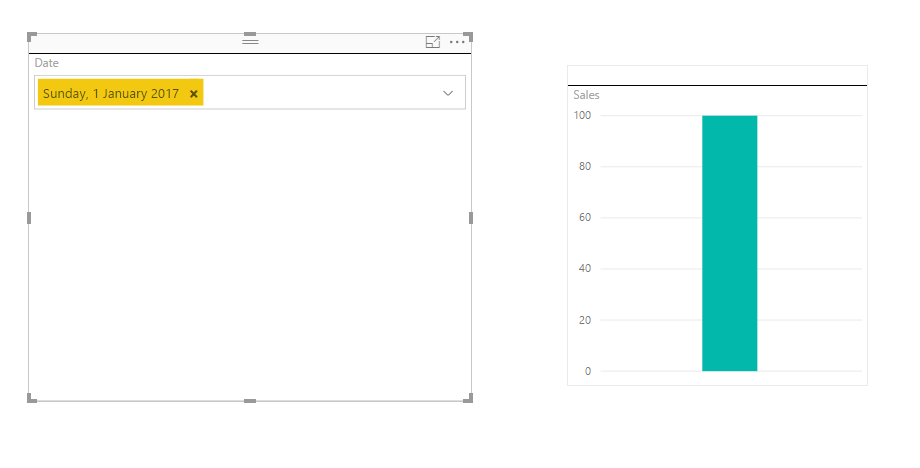
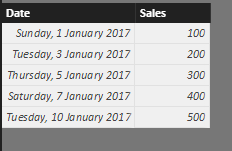
I'm trying put a chart which filters with dates. But in my dataset there are few dates missing. Is there a way to get the values(Sales) which are very close to previous day(earliest previous day) in case user enters a date9in the date filter) which is not in the dataset.
Thanks,
Kalyan..
Solved! Go to Solution.
You may use the following DAX.
Measure =
VAR d =
MAX ( Sheet2[Date] )
RETURN
MAXX (
TOPN ( 1, FILTER ( ALL ( Sheet3 ), Sheet3[Date] <= d ), Sheet3[Date], DESC ),
Sheet3[Sales Target]
)
You may refer to the following measure.
Measure =
VAR d =
MIN ( 'Calendar'[Date] )
RETURN
MAXX (
TOPN ( 1, FILTER ( Table1, Table1[Date] <= d ), Table1[Date], DESC ),
Table1[Sales]
)
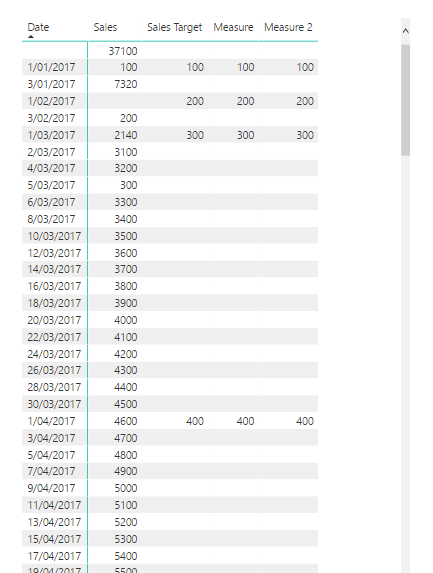
Sorry , it didn't worked out well for me..
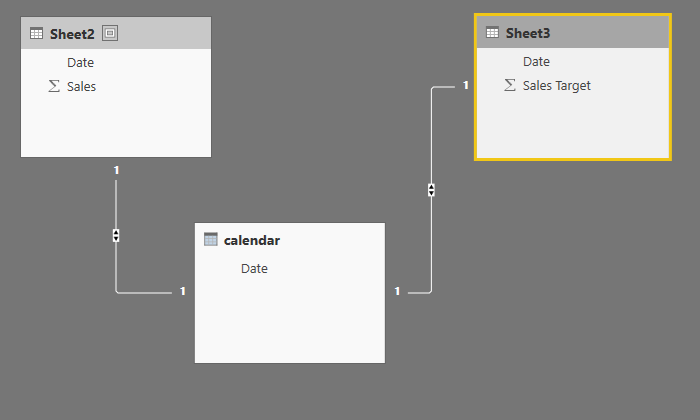
Please take a look at screenshots and let me know if I missed any thing..
I'm still unable to get Targets filling up for all the dates..
I've tried using bot the formulae..
Measure =
VAR d =MIN ( 'Calendar'[Date] )
RETURN
MAXX (TOPN ( 1, FILTER ( Sheet3, Sheet3[Date] <= d ), Sheet3[Date], DESC ),Sheet3[Sales Target])
Measure 2 =
VAR x = CALCULATE ( COUNTROWS ( Sheet3 ) + 0, FILTER ( Sheet3, Sheet3[Date] = MAX('calendar'[Date].[Date] )) )
VAR y = IF ( x = 0, CALCULATE ( MAX ( Sheet3[Date] ), FILTER ( Sheet3, Sheet3[Date] <= MAX('calendar'[Date].[Date] ))), MAX('calendar'[Date].[Date] ))
RETURN
CALCULATE ( MAX ( Sheet3[Sales Target] ), FILTER ( Sheet3, Sheet3[Date] <= y && Sheet3[Date] >= y ) )
Dashboard Chart
Dataset 1
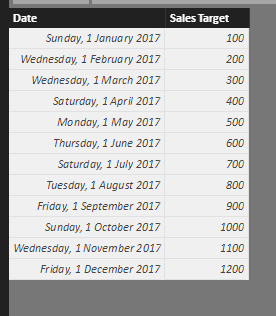
Dataset 2
Calendar Dataset
Link
You may use the following DAX.
Measure =
VAR d =
MAX ( Sheet2[Date] )
RETURN
MAXX (
TOPN ( 1, FILTER ( ALL ( Sheet3 ), Sheet3[Date] <= d ), Sheet3[Date], DESC ),
Sheet3[Sales Target]
)
Hey there @kkalyanrr. I'm guessing all this is happening because you're filtering from a separate date table. If not, then your slicer will not display the dates that don't exist in your dataset.
So, I guess you now have something like this:
Sales =
CALCULATE (
SUM ( Table[Sales] ),
FILTER (
Table,
Table[Date] >= 'Calendar'[Date]
&& Table[Date] <= 'Calendar'[Date]
)
)
What you could do, is this:
SalesNEW =
VAR x =
CALCULATE (
COUNTROWS ( Table ) + 0,
FILTER ( Table, Table[Date] = 'Calendar'[Date] )
)
VAR y =
IF (
x = 0,
CALCULATE (
MAX ( Table[Date] ),
FILTER ( Table, Table[Date] <= 'Calendar'[Date] )
),
'Calendar'[Date]
)
RETURN
CALCULATE (
SUM ( Table[Sales] ),
FILTER ( Table, Table[Date] <= y && Table[Date] >= y )
)
which basically checks if there exists a sale on this day, and if not it finds the first previous day with sales and and then calculates the sales on a same manner.
I don't really understand though why you'd like to display sales on a day where there weren't any, but what can I do 🙂
Hope that helps !
The Power BI Data Visualization World Championships is back! Get ahead of the game and start preparing now!
| User | Count |
|---|---|
| 41 | |
| 38 | |
| 36 | |
| 30 | |
| 28 |
| User | Count |
|---|---|
| 128 | |
| 88 | |
| 79 | |
| 67 | |
| 62 |