Get certified for free when you join Fabric Data Days 2026 and dive into Fabric, Power BI, SQL, AI, and other essential data skills.
Join nowTry your skills in the Power BI Dataviz World Championship! Round one ends June 26. Join now
Hello,
This is a repost - the earlier post had incorrectly picked up the url to the sample.
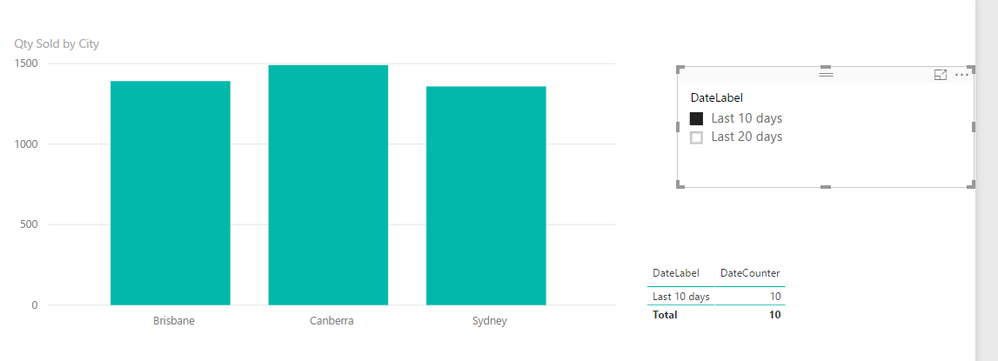
I was watching the tips and tricks video from Tech Ed (https://www.youtube.com/watch?v=LrSV7d28EAA) where the presenter has used a measure to create a dynamic date slicer. The measure is then used as a filter on any visuals where you want the slicer to filter the dates.
I have tried to replicate the date slicer on some sample data ( https://1drv.ms/u/s!AtIcMmSmmXe9gap5KwuKiewCVxUEvg ) and it doesn't work for me - so if anyone could give me a nudge in the right direction then it would be appreciated.
Cheers and thanks in advance,
Mark
Solved! Go to Solution.
Hi @67nmark,
You can change the Cross filter direction between the dates table and Sales table as Both, then the measure will be working.
Best Regards,
Qiuyun Yu
Hi @67nmark,
You can change the Cross filter direction between the dates table and Sales table as Both, then the measure will be working.
Best Regards,
Qiuyun Yu
Thanks very much. That's working great.
Don't miss out on Data Days, June 15 through August 7. Learn Fabric, Power BI, SQL, AI and more.
Check out the May 2026 Power BI update to learn about new features.
| User | Count |
|---|---|
| 24 | |
| 22 | |
| 21 | |
| 20 | |
| 14 |
| User | Count |
|---|---|
| 58 | |
| 52 | |
| 41 | |
| 33 | |
| 31 |