Get Fabric or SQL Certified for Free.
Get certified for free when you join Fabric Data Days 2026 and dive into Fabric, Power BI, SQL, AI, and other essential data skills.
Join now- Power BI forums
- Get Help with Power BI
- Desktop
- Service
- Report Server
- Power Query
- Mobile Apps
- Developer
- DAX Commands and Tips
- Custom Visuals Development Discussion
- Health and Life Sciences
- Power BI Spanish forums
- Translated Spanish Desktop
- Training and Consulting
- Instructor Led Training
- Dashboard in a Day for Women, by Women
- Galleries
- Data Stories Gallery
- Themes Gallery
- Contests Gallery
- QuickViz Gallery
- Quick Measures Gallery
- Visual Calculations Gallery
- Notebook Gallery
- Translytical Task Flow Gallery
- TMDL Gallery
- R Script Showcase
- Webinars and Video Gallery
- Ideas
- Custom Visuals Ideas (read-only)
- Issues
- Issues
- Events
- Upcoming Events
July 7 - July 17 | Round 2 of the Power BI Dataviz World Championships. Don't miss your chance! Learn more
- Power BI forums
- Forums
- Get Help with Power BI
- Desktop
- Re: division by zero
- Subscribe to RSS Feed
- Mark Topic as New
- Mark Topic as Read
- Float this Topic for Current User
- Bookmark
- Subscribe
- Printer Friendly Page

- Mark as New
- Bookmark
- Subscribe
- Mute
- Subscribe to RSS Feed
- Permalink
- Report Inappropriate Content
division by zero
Hello,
I have encountered problem, that is killing me. I need to use Direct Query mode, which does not support IFERROR function.
I have several measures, that sometimes return error.
For example I have two columns:
NetValue
QuantityKG
QuantityKG is sometimes 0.
I need to make a measure: NetValue / QuantityKG. If it is an error I can have 0 calculated.
The measure would not be visible in a visual, because of division by zero, which I cannot easily solve with IFERROR statement.
I tried filtering values but it wouldn't help.
Do you have any idea how can I overcome this issue?
Thanks
Solved! Go to Solution.


- Mark as New
- Bookmark
- Subscribe
- Mute
- Subscribe to RSS Feed
- Permalink
- Report Inappropriate Content
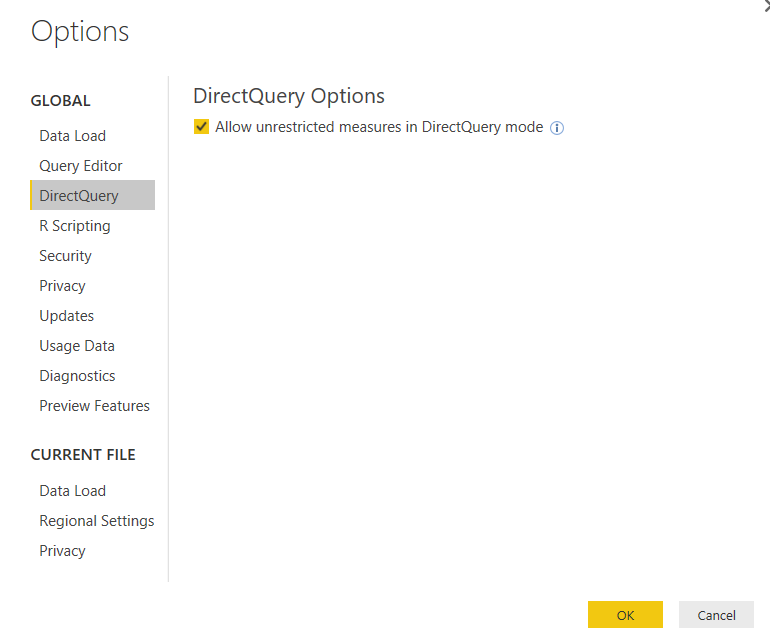
@KamilaOlek you can turn on feture to allow unrestricted measures in directquery which should then be able to use IFERROR function. You can go to File -> Options and settings -> DirectQuery.

- Mark as New
- Bookmark
- Subscribe
- Mute
- Subscribe to RSS Feed
- Permalink
- Report Inappropriate Content
What about just a simple IF statement?
=IF([QuantityKG] = 0,0,DIVIDE([NetValue],[QuantityKG])
You can also use DIVIDE function, probably a little cleaner:
=DIVIDE([NetValue],[QuantityKG],0)
DIVIDE will return the 3rd parameter as the value if a divide by zero occurs.
Follow on LinkedIn
@ me in replies or I'll lose your thread!!!
Instead of a Kudo, please vote for this idea
Become an expert!: Enterprise DNA
External Tools: MSHGQM
YouTube Channel!: Microsoft Hates Greg
Latest book!: DAX For Humans
DAX is easy, CALCULATE makes DAX hard...

- Mark as New
- Bookmark
- Subscribe
- Mute
- Subscribe to RSS Feed
- Permalink
- Report Inappropriate Content
You can now right click column in query and "Replace errors"... for anyone looking for a solution 10.2022

- Mark as New
- Bookmark
- Subscribe
- Mute
- Subscribe to RSS Feed
- Permalink
- Report Inappropriate Content
The division by zero is uniquely and reasonably determined as 1/0=0/0=z/0=0 in the natural extensions of fractions. We have to change our basic ideas for our space and world:
http://www.scirp.org/journal/alamt http://dx.doi.org/10.4236/alamt.2016.62007
http://www.ijapm.org/show-63-504-1.html
http://www.diogenes.bg/ijam/contents/2014-27-2/9/9.pdf
http://okmr.yamatoblog.net/division%20by%20zero/announcement%20326-%20the%20divi
Announcement 326: The division by zero z/0=0z/0=0 - its impact to human beings through education and research
- Mark as New
- Bookmark
- Subscribe
- Mute
- Subscribe to RSS Feed
- Permalink
- Report Inappropriate Content
The division by zero is uniquely and reasonably determined as 1/0=0/0=z/0=0 in the natural extensions of fractions. We have to change our basic ideas for our space and world:
http://www.scirp.org/journal/alamt http://dx.doi.org/10.4236/alamt.2016.62007
http://www.ijapm.org/show-63-504-1.html
http://www.diogenes.bg/ijam/contents/2014-27-2/9/9.pdf
http://okmr.yamatoblog.net/division%20by%20zero/announcement%20326-%20the%20divi
Announcement 326: The division by zero z/0=0z/0=0 - its impact to human beings through education and research
- Mark as New
- Bookmark
- Subscribe
- Mute
- Subscribe to RSS Feed
- Permalink
- Report Inappropriate Content
What about just a simple IF statement?
=IF([QuantityKG] = 0,0,DIVIDE([NetValue],[QuantityKG])
You can also use DIVIDE function, probably a little cleaner:
=DIVIDE([NetValue],[QuantityKG],0)
DIVIDE will return the 3rd parameter as the value if a divide by zero occurs.
Follow on LinkedIn
@ me in replies or I'll lose your thread!!!
Instead of a Kudo, please vote for this idea
Become an expert!: Enterprise DNA
External Tools: MSHGQM
YouTube Channel!: Microsoft Hates Greg
Latest book!: DAX For Humans
DAX is easy, CALCULATE makes DAX hard...


- Mark as New
- Bookmark
- Subscribe
- Mute
- Subscribe to RSS Feed
- Permalink
- Report Inappropriate Content
I like your suggestion how to handle division by zero. I created this measure but need to change it to only calculate when a specific value is met.
- Mark as New
- Bookmark
- Subscribe
- Mute
- Subscribe to RSS Feed
- Permalink
- Report Inappropriate Content
@Greg_Deckler Can I do this for a custom column ?
I tried it and got an error "Expression.Error: The name 'DIVIDE' wasn't recognized. Make sure it's spelled correctly."
- Mark as New
- Bookmark
- Subscribe
- Mute
- Subscribe to RSS Feed
- Permalink
- Report Inappropriate Content
@KamilaOlek you can turn on feture to allow unrestricted measures in directquery which should then be able to use IFERROR function. You can go to File -> Options and settings -> DirectQuery.
- Mark as New
- Bookmark
- Subscribe
- Mute
- Subscribe to RSS Feed
- Permalink
- Report Inappropriate Content
As easy as that! Thanks a lot.!
- Mark as New
- Bookmark
- Subscribe
- Mute
- Subscribe to RSS Feed
- Permalink
- Report Inappropriate Content
Hello,
I have encountered problem, that is killing me. I need to use Direct Query mode, which does not support IFERROR function.
I have several measures, that sometimes return error.
For example I have two columns:
NetValue
QuantityKG
QuantityKG is sometimes 0.
I need to make a measure: NetValue / QuantityKG. If it is an error I can have 0 calculated.
The measure would not be visible in a visual, because of division by zero, which I cannot easily solve with IFERROR statement.
I tried filtering values but it wouldn't help.
Do you have any idea how can I overcome this issue?
Thanks
- Mark as New
- Bookmark
- Subscribe
- Mute
- Subscribe to RSS Feed
- Permalink
- Report Inappropriate Content
See your other thread on this topic:
http://community.powerbi.com/t5/Desktop/division-by-zero/m-p/48702
Follow on LinkedIn
@ me in replies or I'll lose your thread!!!
Instead of a Kudo, please vote for this idea
Become an expert!: Enterprise DNA
External Tools: MSHGQM
YouTube Channel!: Microsoft Hates Greg
Latest book!: DAX For Humans
DAX is easy, CALCULATE makes DAX hard...

Helpful resources

FabCon & SQLCon – Barcelona 2026
Join us in Barcelona for FabCon and SQLCon, the Fabric, Power BI, SQL, and AI community event. Save €200 with code FABCMTY200.

Data Days 2026
Join Fabric Data Days 2026: 60 days of free live/on-demand sessions, challenges, study groups, and certification opportunities.

Power BI DataViz World Championships - June 2026
A new Power BI DataViz World Championship is coming this June! Don't miss out on submitting your entry.

| User | Count |
|---|---|
| 22 | |
| 22 | |
| 18 | |
| 17 | |
| 13 |


| User | Count |
|---|---|
| 61 | |
| 52 | |
| 47 | |
| 41 | |
| 38 |


