Don't miss your chance to take the Fabric Data Engineer (DP-600) exam for FREE! Find out how by watching the DP-600 session on-demand now through April 28th.
Learn moreJoin the FabCon + SQLCon recap series. Up next: Power BI, Real-Time Intelligence, IQ and AI, and Data Factory take center stage. All sessions are available on-demand after the live show. Register now
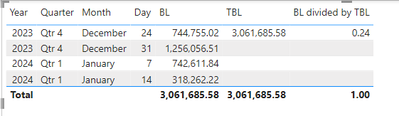
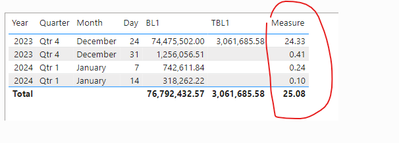
I am new to power bi,Actually i want to divide BL with TBL to get thier ratio,but it give me only one vlaue for the first row,I want the function that resuilt for all row.
Solved! Go to Solution.
Thanks @PowerBigginer
Hi, @zia1991
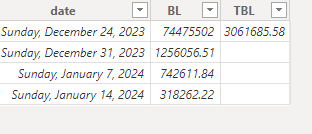
Based on the data provided by your picture, I guess your BL and TBL are both a metric, so I created the following sample data:
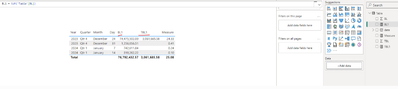
I created two measures and placed them in the table visual:
I use the following DAX to divide each row:
MEASURE =
VAR _seletedvalue =
CALCULATE ( [TBL1], ALL ( 'Table' ) )
RETURN
DIVIDE ( [BL1], _seletedvalue, 0 )
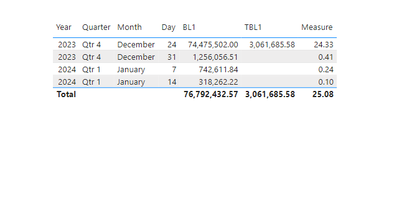
Here are the results:
I've provided the PBIX file used this time below.
How to Get Your Question Answered Quickly
If it does not help, please provide more details with your desired output and pbix file without privacy information (or some sample data) .
Best Regards
Jianpeng Li
If this post helps, then please consider Accept it as the solution to help the other members find it more quickly.
Thanks @PowerBigginer
Hi, @zia1991
Based on the data provided by your picture, I guess your BL and TBL are both a metric, so I created the following sample data:
I created two measures and placed them in the table visual:
I use the following DAX to divide each row:
MEASURE =
VAR _seletedvalue =
CALCULATE ( [TBL1], ALL ( 'Table' ) )
RETURN
DIVIDE ( [BL1], _seletedvalue, 0 )
Here are the results:
I've provided the PBIX file used this time below.
How to Get Your Question Answered Quickly
If it does not help, please provide more details with your desired output and pbix file without privacy information (or some sample data) .
Best Regards
Jianpeng Li
If this post helps, then please consider Accept it as the solution to help the other members find it more quickly.
But you don't have any values in TBL If you don't have values you can replace with 0
Try this = DIVIDE([BL],[TBL],0)
For more Power BI tips and Tricks https://powertipstricks.blogspot.com/ check out the blog
If it works Please Mark As A solution !
Check out the April 2026 Power BI update to learn about new features.
If you have recently started exploring Fabric, we'd love to hear how it's going. Your feedback can help with product improvements.
A new Power BI DataViz World Championship is coming this June! Don't miss out on submitting your entry.
| User | Count |
|---|---|
| 45 | |
| 38 | |
| 34 | |
| 21 | |
| 17 |
| User | Count |
|---|---|
| 66 | |
| 65 | |
| 31 | |
| 26 | |
| 26 |