Join us at FabCon Atlanta from March 16 - 20, 2026, for the ultimate Fabric, Power BI, AI and SQL community-led event. Save $200 with code FABCOMM.
Register now!The Power BI Data Visualization World Championships is back! Get ahead of the game and start preparing now! Learn more
I have the follwoing table below.. I would like to get a distinct count of Comp_inv. If i change the field in the filter to a count (distinct)
Hi, @mmowrey ;
Is your problem solved? If so, kindly mark the proper reply as a solution to help others having the similar issue and close the case. If not, let me know and I'll try to help you further.
Best Regards,
Community Support Team _ Yalan Wu
If this post helps, then please consider Accept it as the solution to help the other members find it more quickly.
Hi, @mmowrey ;
You could try it
dicount =
CALCULATE(DISTINCTCOUNT('Table'[COMPINV. _ID]),ALLEXCEPT('Table','Table'[SHIPMENT_ DATETIME]))
Or
dicount = DISTINCTCOUNT('Table'[COMPINV. _ID])
Or
dicount =
COUNTROWS(SUMMARIZE('Table',[COMPINV. _ID]))
In my data, those is correct. you could check the difference about you data. or share more infomation.
The final output is shown below:
Best Regards,
Community Support Team _ Yalan Wu
If this post helps, then please consider Accept it as the solution to help the other members find it more quickly.
Hello @mmowrey ,
Can you please try Creating measure as -
Measure = DistinctCount(Table[Compinv_id])
Please mark it as Answer if it solves your issue. Kudos are also appreciated.
Cheers,
Shishir
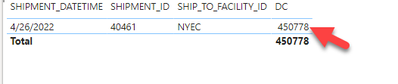
returns same large value instead of 16
The Power BI Data Visualization World Championships is back! Get ahead of the game and start preparing now!
| User | Count |
|---|---|
| 39 | |
| 38 | |
| 38 | |
| 28 | |
| 27 |
| User | Count |
|---|---|
| 124 | |
| 88 | |
| 73 | |
| 66 | |
| 65 |