Get certified for free when you join Fabric Data Days 2026 and dive into Fabric, Power BI, SQL, AI, and other essential data skills.
Join nowJuly 7 - July 17 | Round 2 of the Power BI Dataviz World Championships. Don't miss your chance! Learn more
I have the follwoing table below.. I would like to get a distinct count of Comp_inv. If i change the field in the filter to a count (distinct)
Hi, @mmowrey ;
Is your problem solved? If so, kindly mark the proper reply as a solution to help others having the similar issue and close the case. If not, let me know and I'll try to help you further.
Best Regards,
Community Support Team _ Yalan Wu
If this post helps, then please consider Accept it as the solution to help the other members find it more quickly.
Hi, @mmowrey ;
You could try it
dicount =
CALCULATE(DISTINCTCOUNT('Table'[COMPINV. _ID]),ALLEXCEPT('Table','Table'[SHIPMENT_ DATETIME]))
Or
dicount = DISTINCTCOUNT('Table'[COMPINV. _ID])
Or
dicount =
COUNTROWS(SUMMARIZE('Table',[COMPINV. _ID]))
In my data, those is correct. you could check the difference about you data. or share more infomation.
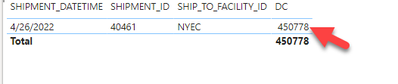
The final output is shown below:
Best Regards,
Community Support Team _ Yalan Wu
If this post helps, then please consider Accept it as the solution to help the other members find it more quickly.
Hello @mmowrey ,
Can you please try Creating measure as -
Measure = DistinctCount(Table[Compinv_id])
Please mark it as Answer if it solves your issue. Kudos are also appreciated.
Cheers,
Shishir
returns same large value instead of 16
Join us in Barcelona for FabCon and SQLCon, the Fabric, Power BI, SQL, and AI community event. Save €200 with code FABCMTY200.
Join Fabric Data Days 2026: 60 days of free live/on-demand sessions, challenges, study groups, and certification opportunities.
| User | Count |
|---|---|
| 23 | |
| 23 | |
| 17 | |
| 13 | |
| 13 |
| User | Count |
|---|---|
| 63 | |
| 41 | |
| 39 | |
| 38 | |
| 38 |