Join us at FabCon Atlanta from March 16 - 20, 2026, for the ultimate Fabric, Power BI, AI and SQL community-led event. Save $200 with code FABCOMM.
Register now!The Power BI Data Visualization World Championships is back! Get ahead of the game and start preparing now! Learn more
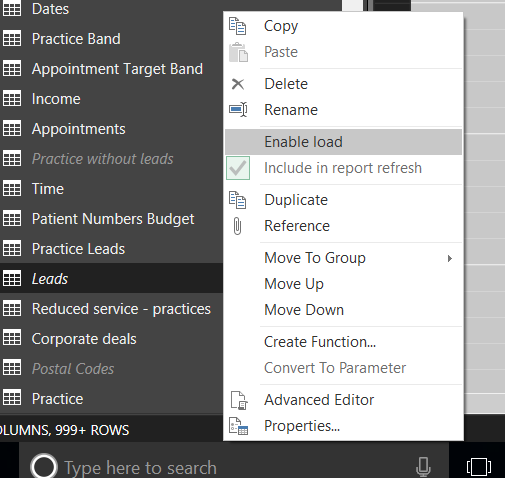
my leads table looks like its disabled and when i try to reenable it it give me an error at the bottom, when i refresh the model i can see leads are coming in into the data refresh but i am just wondering why enabled load is unchecked and why include in report refresh is greyed out?
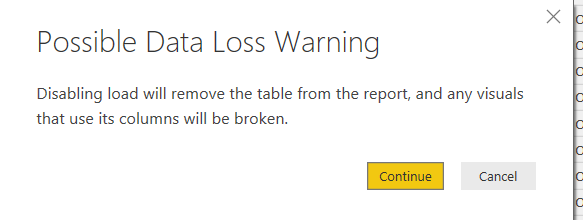
lwhen i try to renable the load because its unchecked here it gives me an error about data loss?
this is in italics which means to me it isnt re loading
es in power query looks like its been disabled, its using italics
Proud to be a Super User!
Hi @vanessafvg,
Based on my test, the include in report refresh option will be greyed out when enabled load is unchecked, and it will be available again when enabled load is checked(this is reasonable). However, I cannot reproduce the other issue. I only get the Possible Data Loss Warning when I try to disable the enable load option(not re-enable it). A little weird.
In addition, have you tried the solution provided by @prateekraina above? Does it work in your scenario? ![]()
Regards
no i didnt' want to create any issues as it seems to be working fine and ive left the client now so its out of my hands but thank sfor the tips.
Proud to be a Super User!
What happens when you click on Continue ?
@prateekraina nothing, no change
Proud to be a Super User!
Well in that case, have you tried deleting Leads table and loading/sourcing it once again from your data source. That might resolve the issue.
The Power BI Data Visualization World Championships is back! Get ahead of the game and start preparing now!
Check out the November 2025 Power BI update to learn about new features.
| User | Count |
|---|---|
| 66 | |
| 44 | |
| 40 | |
| 29 | |
| 19 |
| User | Count |
|---|---|
| 200 | |
| 126 | |
| 103 | |
| 70 | |
| 53 |