Don't miss your chance to take the Fabric Data Engineer (DP-700) exam on us!
Learn moreWe've captured the moments from FabCon & SQLCon that everyone is talking about, and we are bringing them to the community, live and on-demand. Starts on April 14th. Register now
I have created a DirectQuery connection with SQL Azure Database. I am using Power BI (free) for this.
I want to confirm whether any change in my database automatically refreshes the reports/dashboards?
Regards,
Sahil
Yes and no. Since you are using DirectQuery, you are querying the data live. So, there is no automatic refresh, each time you view the report/dashboard it is querying the database and coming back with the latest information.
According to this:
https://powerbi.microsoft.com/en-us/pricing/
Live connections are only supported with Pro license.
I am using Power BI pro and created a live connection with my database. After publishing the report, when I moved cursor on dataset it is showing "This dataset connects to a source with DirectQuery, which is always up to date. You don't need to schedule a refresh on this dataset".
But when i made a change in the database, it doesn't get reflected in the dashboard. What needs to be done to make the dashboard live.
Thanks in Advance.
Hi @sahilpruthi,
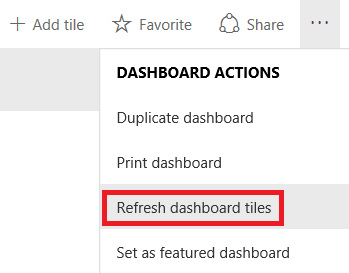
As you are connecting to Azure SQL database in DirectQuery mode, when you interact with a visualization, queries are sent from Power BI directly to the database. Updated data is then returned and visualizations are updated. If there is no user interaction in a visualization, like in a dashboard, data is refreshed automatically about every fifteen minutes. You can also click "Refresh dashboard tiles" to get updated data in no time.
Reference:
Databases in the cloud
Best Regards,
Qiuyun Yu
Thanks
Is there any service(or any other thing) that updates my dashboard instantly after I made an update in the database.
Hi @sahilpruthi,
What I mentioned above happens in Power BI Service. When you interact with visual, you can always see the latest data.
Best Regards,
Qiuyun Yu
If you have recently started exploring Fabric, we'd love to hear how it's going. Your feedback can help with product improvements.
A new Power BI DataViz World Championship is coming this June! Don't miss out on submitting your entry.
Share feedback directly with Fabric product managers, participate in targeted research studies and influence the Fabric roadmap.
| User | Count |
|---|---|
| 53 | |
| 36 | |
| 33 | |
| 19 | |
| 17 |
| User | Count |
|---|---|
| 73 | |
| 72 | |
| 38 | |
| 35 | |
| 26 |