cancel
Showing results for 
Search instead for 
Did you mean: 

Level up your Power BI skills this month - build one visual each week and tell better stories with data! Get started

Reply

decomposition tree

HI

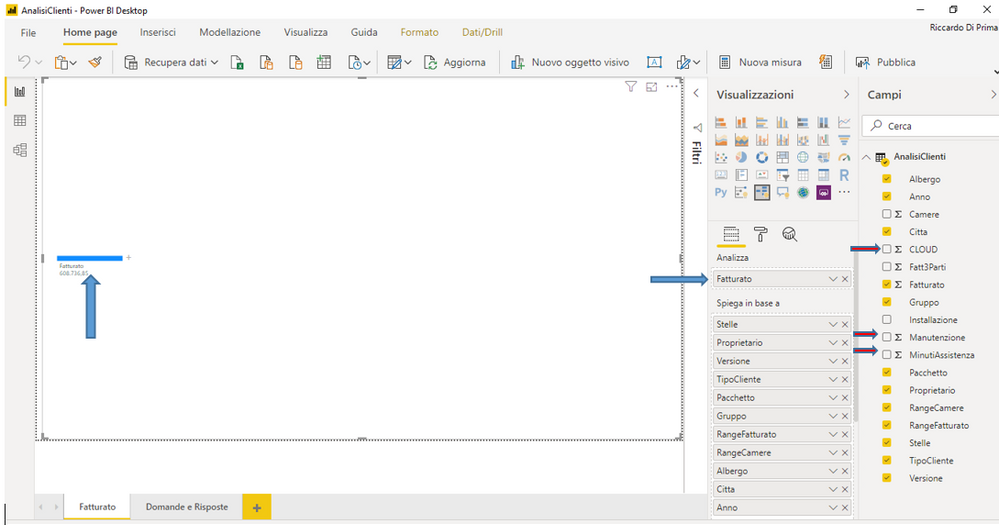
Can I enter two or more fields in Analyze and select which field to use on the page?

I would like to analyze the fields Invoiced or CLOUD or Maintenance ... selecting them from a list. How can you do that?

Grazie.  Thank you

Greetings

Riccardo


Cattura.PNG

5 REPLIES 5
v-chuncz-msft
Community Support
Community Support

@RiccardoBefore 


You may also try using bookmarks instead.

Community Support Team _ Sam Zha
If this post helps, then please consider Accept it as the solution to help the other members find it more quickly.

HI.

Thank you for the answer.

I tried to create the bookmarks, inserting a grid and creating the bookmark. Then I put on the same page a chart with data from the same dataset and created another bookmarks. I made the grid invisible in the first bookmark and the graph in the second.

I see the bookmarkes at the bottom but I always see the two controls visible.

Maybe I didn't understand how bookmarks work, even though I followed the information of the web page.

Do I need to set some flags? I'm working with the February version of Power BI Desktop.

Thanks.

Riccardo

Hi

The bookmarks is only applicable to a report with multiple pages and not to a single page that is edited by adding controls and creating the bookmark each time you add a control.

Is my statement true?

Thank you

Riccardo

amitchandak
Super User
Super User

Only one measure is supported as of now.

Refer:https://docs.microsoft.com/en-us/power-bi/visuals/power-bi-visualization-decomposition-tree

You can try a measure slicer to change values

https://community.powerbi.com/t5/Desktop/Slicer-MTD-QTD-YTD-to-filter-dates-using-the-slicer/td-p/50...

Share with Power BI Enthusiasts: Full Power BI Video (20 Hours) YouTube
Microsoft Fabric Series 60+ Videos YouTube
Microsoft Fabric Hindi End to End YouTube

Thanks for the reply.

Is it possible, via DAX and a filter, to select the field to be analyzed?


Riccardo

Helpful resources

Announcements
April Power BI Update Carousel

Power BI Monthly Update - April 2026

Check out the April 2026 Power BI update to learn about new features.

Fabric SQL PBI Data Days

Data Days 2026 coming soon!

Sign up to receive a private message when registration opens and key events begin.

New to Fabric survey Carousel

New to Fabric Survey

If you have recently started exploring Fabric, we'd love to hear how it's going. Your feedback can help with product improvements.

Power BI DataViz World Championships carousel

Power BI DataViz World Championships - June 2026

A new Power BI DataViz World Championship is coming this June! Don't miss out on submitting your entry.