Join us at FabCon Atlanta from March 16 - 20, 2026, for the ultimate Fabric, Power BI, AI and SQL community-led event. Save $200 with code FABCOMM.
Register now!Learn from the best! Meet the four finalists headed to the FINALS of the Power BI Dataviz World Championships! Register now
HI
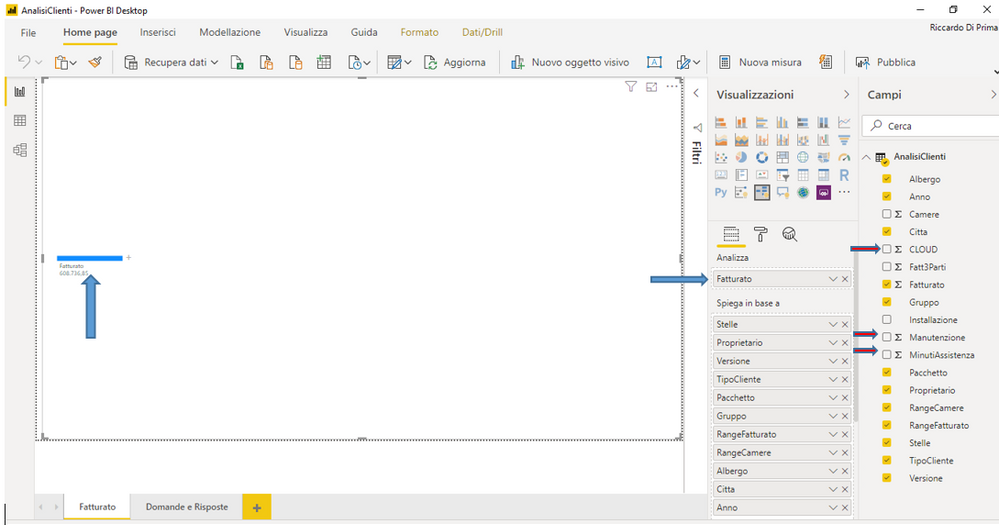
Can I enter two or more fields in Analyze and select which field to use on the page?
I would like to analyze the fields Invoiced or CLOUD or Maintenance ... selecting them from a list. How can you do that?
Grazie. Thank you
Greetings
Riccardo
You may also try using bookmarks instead.
HI.
Thank you for the answer.
I tried to create the bookmarks, inserting a grid and creating the bookmark. Then I put on the same page a chart with data from the same dataset and created another bookmarks. I made the grid invisible in the first bookmark and the graph in the second.
I see the bookmarkes at the bottom but I always see the two controls visible.
Maybe I didn't understand how bookmarks work, even though I followed the information of the web page.
Do I need to set some flags? I'm working with the February version of Power BI Desktop.
Thanks.
Riccardo
Hi
The bookmarks is only applicable to a report with multiple pages and not to a single page that is edited by adding controls and creating the bookmark each time you add a control.
Is my statement true?
Thank you
Riccardo
Only one measure is supported as of now.
Refer:https://docs.microsoft.com/en-us/power-bi/visuals/power-bi-visualization-decomposition-tree
You can try a measure slicer to change values
Thanks for the reply.
Is it possible, via DAX and a filter, to select the field to be analyzed?
Riccardo
Share feedback directly with Fabric product managers, participate in targeted research studies and influence the Fabric roadmap.
Check out the February 2026 Power BI update to learn about new features.
| User | Count |
|---|---|
| 66 | |
| 58 | |
| 45 | |
| 19 | |
| 15 |