
Learn from the best! Meet the four finalists headed to the FINALS of the Power BI Dataviz World Championships! Register now
Hello All, I am trying to write a measure that goes thus
Solved! Go to Solution.
Hi @odada11 ,
Are you making it a calculated column? Try this and amend table name etc to fit your need...😎
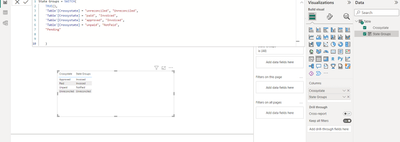
State Groups = SWITCH(
TRUE(),
'Table'[Crossystate] = "unreconciled", "Unreconciled",
'Table'[Crossystate] = "paid", "Invoiced",
'Table'[Crossystate] = "approved", "Invoiced",
'Table'[Crossystate] = "unpaid", "NotPaid",
"Pending"
)Many Thanks,
Taylor
LinkedIn: www.linkedin.com/in/taylordownes10 😊
Hi @odada11 ,
Try this...😎
New Calculated Column = SWITCH(
TRUE(),
[Crossystate]="Unreconciled", "Unreconciled",
[crossystate]="paid", "Invoiced",
[crossystate]="Approved", "Invoiced",
[crossystate]="unpaid", "Notpaid",
"Pending"
)
Many thanks,
Taylor
Thank you so much
i tried it and it returned this error
Hi @odada11 ,
Are you making it a calculated column? Try this and amend table name etc to fit your need...😎
State Groups = SWITCH(
TRUE(),
'Table'[Crossystate] = "unreconciled", "Unreconciled",
'Table'[Crossystate] = "paid", "Invoiced",
'Table'[Crossystate] = "approved", "Invoiced",
'Table'[Crossystate] = "unpaid", "NotPaid",
"Pending"
)Many Thanks,
Taylor
LinkedIn: www.linkedin.com/in/taylordownes10 😊
Thank you so much for your help, is there a way i can make all the "invoiced" appear as one in a drop down filter rather than have several Invoiced.
Really grateful for your help
A new Power BI DataViz World Championship is coming this June! Don't miss out on submitting your entry.
Share feedback directly with Fabric product managers, participate in targeted research studies and influence the Fabric roadmap.
| User | Count |
|---|---|
| 45 | |
| 34 | |
| 27 | |
| 15 | |
| 15 |
| User | Count |
|---|---|
| 58 | |
| 55 | |
| 38 | |
| 21 | |
| 20 |