


cancel
Showing results for 
Search instead for 
Did you mean: 

Join the FabCon + SQLCon recap series. Up next: Power BI, Real-Time Intelligence, IQ and AI, and Data Factory take center stage. All sessions are available on-demand after the live show. Register now

Reply
Stuk
Helper I
Helper I

dax formula problem

Hello ! i would like to create a column which give me the number of the week of the last appointement i have already tried Capture.PNG or Capture1.PNG
but it's not working does anyone can help me?

5 REPLIES 5
Sean
Community Champion
Community Champion

@Stuk

When you say its not working - are you getting an error message OR not the result you want?


Also you may try ISBLANK ( Table[Column] ) instead of ISEMPTY ( Table )

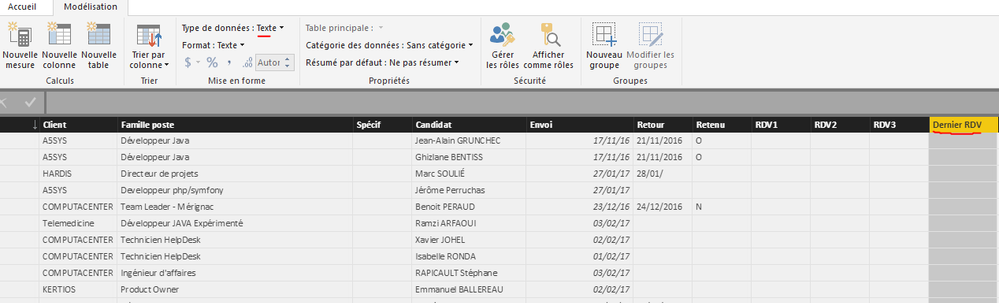
Thanks but i tell me " can't convert "" which is Text type into Date type"Capture.PNG
the problem probably don't come from the formula

Sean
Community Champion
Community Champion

@Stuk

WEEKNUM works on dates!

Does the [Dernier RDV] column contain dates?

If it does select the Column and convert it to DATA TYPE: Date


Data Type - Date.png


This should resolve it!

I can't convert it into Date ( actual Data type : Text) BUT in request editor the data type is DateCapture.PNGCapture1.PNG

Sean
Community Champion
Community Champion

Did you try converting it? (click OK if you get a pop up warning forget what it says something discouraging you to convert...)


If it's really Data Type: Date in the Query Editor it should convert with no errors in the Modeling tab!

Helpful resources

Announcements
April Power BI Update Carousel

Power BI Monthly Update - April 2026

Check out the April 2026 Power BI update to learn about new features.

New to Fabric survey Carousel

New to Fabric Survey

If you have recently started exploring Fabric, we'd love to hear how it's going. Your feedback can help with product improvements.

Power BI DataViz World Championships carousel

Power BI DataViz World Championships - June 2026

A new Power BI DataViz World Championship is coming this June! Don't miss out on submitting your entry.

FabCon and SQLCon Highlights Carousel

FabCon &SQLCon Highlights

Experience the highlights from FabCon & SQLCon, available live and on-demand starting April 14th.