


cancel
Showing results for 
Search instead for 
Did you mean: 

July 7 - July 17 | Round 2 of the Power BI Dataviz World Championships. Don't miss your chance! Learn more

Reply
Stuk
Helper I
Helper I

dax formula problem

Hello ! i would like to create a column which give me the number of the week of the last appointement i have already tried Capture.PNG or Capture1.PNG
but it's not working does anyone can help me?

5 REPLIES 5
Sean
Community Champion
Community Champion

@Stuk

When you say its not working - are you getting an error message OR not the result you want?


Also you may try ISBLANK ( Table[Column] ) instead of ISEMPTY ( Table )

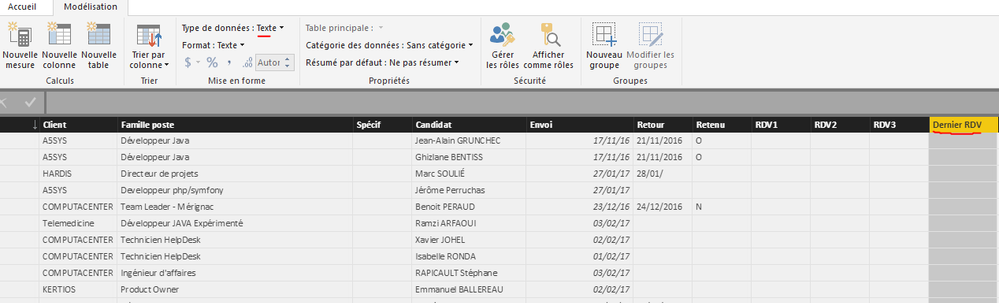
Thanks but i tell me " can't convert "" which is Text type into Date type"Capture.PNG
the problem probably don't come from the formula

Sean
Community Champion
Community Champion

@Stuk

WEEKNUM works on dates!

Does the [Dernier RDV] column contain dates?

If it does select the Column and convert it to DATA TYPE: Date


Data Type - Date.png


This should resolve it!

I can't convert it into Date ( actual Data type : Text) BUT in request editor the data type is DateCapture.PNGCapture1.PNG

Sean
Community Champion
Community Champion

Did you try converting it? (click OK if you get a pop up warning forget what it says something discouraging you to convert...)


If it's really Data Type: Date in the Query Editor it should convert with no errors in the Modeling tab!

Helpful resources

Announcements
FabCon and SQLCon Barcelona 2026

FabCon & SQLCon – Barcelona 2026

Join us in Barcelona for FabCon and SQLCon, the Fabric, Power BI, SQL, and AI community event. Save €200 with code FABCMTY200.

60 days of Data Days Carousel

Data Days 2026

Join Fabric Data Days 2026: 60 days of free live/on-demand sessions, challenges, study groups, and certification opportunities.

Power BI DataViz World Championships carousel

Power BI DataViz World Championships - June 2026

A new Power BI DataViz World Championship is coming this June! Don't miss out on submitting your entry.