cancel
Showing results for 
Search instead for 
Did you mean: 

The Power BI Data Visualization World Championships is back! Get ahead of the game and start preparing now! Learn more

Reply
Bakhtawar
Post Patron
Post Patron

dax example

i want examples of these points .. 


  • Any DAX function always refers to a complete column/field or a table. It will never refer to individual values. If you want to use the functions on separate values within a column, you need to apply filters in a DAX formula.
  • DAX functions provide the flexibility to create a formula that is applied on a row-by-row basis. The calculations or formulas get applied as per the context of the values in each row.

any example please?


2 ACCEPTED SOLUTIONS
Greg_Deckler
Community Champion
Community Champion

So, an example of the first one, to get to an individual value of a cell you could do something like this:


Measure = MAXX(FILTER('Table',[Column] = "Something"),[Value])


This would filter the table "Table" to only the rows where "Column" equals the value "Something" and then return the maximum value in the Value column from that subset. Note, there are literally tens of thousands if not hundreds of thousands of examples that could be provided for this because it is how DAX works. It is a core concept and I include it in my book in the first chapter "Thinking DAX".


Correct, this would be a calculated column like:

New Column = [Column1] + [Column2]


Each row would take the value in Column1 and Column2 for that row and add them together into the new column, "New Column".


Or, in a measure, you can use ADDCOLUMNS and it's the same sort of thing.


Follow on LinkedIn
@ me in replies or I'll lose your thread!!!
Instead of a Kudo, please vote for this idea
Become an expert!: Enterprise DNA
External Tools: MSHGQM
YouTube Channel!: Microsoft Hates Greg
Latest book!:
DAX For Humans

DAX is easy, CALCULATE makes DAX hard...

View solution in original post

Hi @Bakhtawar ,


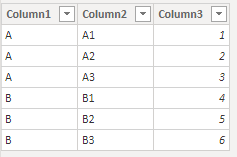
Here is the test data.

2-1.PNG

Then I created a measure:

Measure = 
SUM('Table'[Column3])

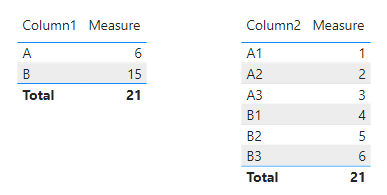
Now you could do see the different results with column1 and column2.

3-1.PNG

The measure will show different result depends on your context.


Community Support Team _ Eads
If this post helps, then please consider Accept it as the solution to help the other members find it.

View solution in original post

3 REPLIES 3
Greg_Deckler
Community Champion
Community Champion

So, an example of the first one, to get to an individual value of a cell you could do something like this:


Measure = MAXX(FILTER('Table',[Column] = "Something"),[Value])


This would filter the table "Table" to only the rows where "Column" equals the value "Something" and then return the maximum value in the Value column from that subset. Note, there are literally tens of thousands if not hundreds of thousands of examples that could be provided for this because it is how DAX works. It is a core concept and I include it in my book in the first chapter "Thinking DAX".


Correct, this would be a calculated column like:

New Column = [Column1] + [Column2]


Each row would take the value in Column1 and Column2 for that row and add them together into the new column, "New Column".


Or, in a measure, you can use ADDCOLUMNS and it's the same sort of thing.


Follow on LinkedIn
@ me in replies or I'll lose your thread!!!
Instead of a Kudo, please vote for this idea
Become an expert!: Enterprise DNA
External Tools: MSHGQM
YouTube Channel!: Microsoft Hates Greg
Latest book!:
DAX For Humans

DAX is easy, CALCULATE makes DAX hard...

and second one ?

Hi @Bakhtawar ,


Here is the test data.

2-1.PNG

Then I created a measure:

Measure = 
SUM('Table'[Column3])

Now you could do see the different results with column1 and column2.

3-1.PNG

The measure will show different result depends on your context.


Community Support Team _ Eads
If this post helps, then please consider Accept it as the solution to help the other members find it.

Helpful resources

Announcements
Power BI DataViz World Championships

Power BI Dataviz World Championships

The Power BI Data Visualization World Championships is back! Get ahead of the game and start preparing now!

December 2025 Power BI Update Carousel

Power BI Monthly Update - December 2025

Check out the December 2025 Power BI Holiday Recap!

FabCon Atlanta 2026 carousel

FabCon Atlanta 2026

Join us at FabCon Atlanta, March 16-20, for the ultimate Fabric, Power BI, AI and SQL community-led event. Save $200 with code FABCOMM.