Don't miss your chance to take the Fabric Data Engineer (DP-600) exam for FREE! Find out how by watching the DP-600 session on-demand now through April 28th.
Learn moreJoin the FabCon + SQLCon recap series. Up next: Power BI, Real-Time Intelligence, IQ and AI, and Data Factory take center stage. All sessions are available on-demand after the live show. Register now
i want examples of these points ..
any example please?
Solved! Go to Solution.
So, an example of the first one, to get to an individual value of a cell you could do something like this:
Measure = MAXX(FILTER('Table',[Column] = "Something"),[Value])
This would filter the table "Table" to only the rows where "Column" equals the value "Something" and then return the maximum value in the Value column from that subset. Note, there are literally tens of thousands if not hundreds of thousands of examples that could be provided for this because it is how DAX works. It is a core concept and I include it in my book in the first chapter "Thinking DAX".
Correct, this would be a calculated column like:
New Column = [Column1] + [Column2]
Each row would take the value in Column1 and Column2 for that row and add them together into the new column, "New Column".
Or, in a measure, you can use ADDCOLUMNS and it's the same sort of thing.
Hi @Bakhtawar ,
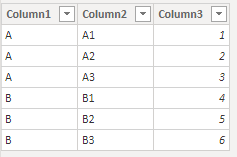
Here is the test data.
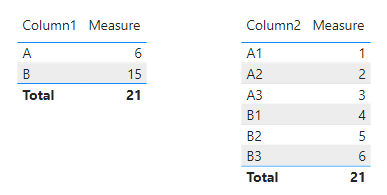
Then I created a measure:
Measure =
SUM('Table'[Column3])
Now you could do see the different results with column1 and column2.
The measure will show different result depends on your context.
So, an example of the first one, to get to an individual value of a cell you could do something like this:
Measure = MAXX(FILTER('Table',[Column] = "Something"),[Value])
This would filter the table "Table" to only the rows where "Column" equals the value "Something" and then return the maximum value in the Value column from that subset. Note, there are literally tens of thousands if not hundreds of thousands of examples that could be provided for this because it is how DAX works. It is a core concept and I include it in my book in the first chapter "Thinking DAX".
Correct, this would be a calculated column like:
New Column = [Column1] + [Column2]
Each row would take the value in Column1 and Column2 for that row and add them together into the new column, "New Column".
Or, in a measure, you can use ADDCOLUMNS and it's the same sort of thing.
and second one ?
Hi @Bakhtawar ,
Here is the test data.
Then I created a measure:
Measure =
SUM('Table'[Column3])
Now you could do see the different results with column1 and column2.
The measure will show different result depends on your context.
Check out the April 2026 Power BI update to learn about new features.
If you have recently started exploring Fabric, we'd love to hear how it's going. Your feedback can help with product improvements.
A new Power BI DataViz World Championship is coming this June! Don't miss out on submitting your entry.
| User | Count |
|---|---|
| 41 | |
| 37 | |
| 34 | |
| 21 | |
| 16 |
| User | Count |
|---|---|
| 65 | |
| 59 | |
| 31 | |
| 25 | |
| 25 |