cancel
Showing results for 
Search instead for 
Did you mean: 

July 28 - August 9 | Final Round of the Power BI Dataviz World Championships. This is your chance. Learn more

Reply
sapirmarko
Helper I
Helper I

datediff between two separate columns and two diffrent record

Hi everyone!


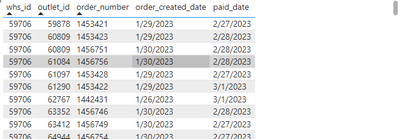
I have this table:

sapirmarko_0-1688554613475.png


I want to create a measure that for each whs_id && outlet_id calculates the day difference between the current order to the previous order

for example:

whs_id = 59706 

outlet_id = 60809

the day difference between order 1453423 paid_date - 2/28/2023

to order 1456751 order_created_date - 1/30/2023 is -29 days, so the measure should give me "-29"


1 ACCEPTED SOLUTION
Anonymous
Not applicable

Hi @sapirmarko ,


I suggest you to create a measure by below code.

Diff =
VAR _ADDRANK =
    ADDCOLUMNS (
        'Table',
        "Rank",
            RANKX (
                FILTER (
                    'Table',
                    'Table'[whs_id] = EARLIER ( [whs_id] )
                        && 'Table'[outlet_id] = EARLIER ( [outlet_id] )
                ),
                'Table'[order_ceated_date],
                ,
                DESC,
                DENSE
            )
    )
VAR _ADDDIFF =
    SUMMARIZE (
        _ADDRANK,
        [whs_id],
        [outlet_id],
        "Diff",
            VAR _CURRENT =
                MAXX (
                    FILTER (
                        _ADDRANK,
                        [whs_id] = EARLIER ( [whs_id] )
                            && [outlet_id] = EARLIER ( [outlet_id] )
                            && [Rank] = 1
                    ),
                    [order_ceated_date]
                )
            VAR _PREVIOUS =
                MAXX (
                    FILTER (
                        _ADDRANK,
                        [whs_id] = EARLIER ( [whs_id] )
                            && [outlet_id] = EARLIER ( [outlet_id] )
                            && [Rank] = 2
                    ),
                    [paid_date]
                )
            RETURN
                DATEDIFF ( _PREVIOUS, _CURRENT, DAY )
    )
RETURN
    SUMX ( _ADDDIFF, [Diff] )

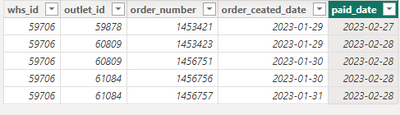
My Sample:

vrzhoumsft_0-1688712200282.png

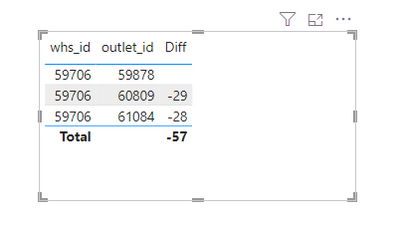
Result is as below.

vrzhoumsft_1-1688712212428.png


Best Regards,
Rico Zhou


If this post helps, then please consider Accept it as the solution to help the other members find it more quickly.


View solution in original post

2 REPLIES 2
Anonymous
Not applicable

Hi @sapirmarko ,


I suggest you to create a measure by below code.

Diff =
VAR _ADDRANK =
    ADDCOLUMNS (
        'Table',
        "Rank",
            RANKX (
                FILTER (
                    'Table',
                    'Table'[whs_id] = EARLIER ( [whs_id] )
                        && 'Table'[outlet_id] = EARLIER ( [outlet_id] )
                ),
                'Table'[order_ceated_date],
                ,
                DESC,
                DENSE
            )
    )
VAR _ADDDIFF =
    SUMMARIZE (
        _ADDRANK,
        [whs_id],
        [outlet_id],
        "Diff",
            VAR _CURRENT =
                MAXX (
                    FILTER (
                        _ADDRANK,
                        [whs_id] = EARLIER ( [whs_id] )
                            && [outlet_id] = EARLIER ( [outlet_id] )
                            && [Rank] = 1
                    ),
                    [order_ceated_date]
                )
            VAR _PREVIOUS =
                MAXX (
                    FILTER (
                        _ADDRANK,
                        [whs_id] = EARLIER ( [whs_id] )
                            && [outlet_id] = EARLIER ( [outlet_id] )
                            && [Rank] = 2
                    ),
                    [paid_date]
                )
            RETURN
                DATEDIFF ( _PREVIOUS, _CURRENT, DAY )
    )
RETURN
    SUMX ( _ADDDIFF, [Diff] )

My Sample:

vrzhoumsft_0-1688712200282.png

Result is as below.

vrzhoumsft_1-1688712212428.png


Best Regards,
Rico Zhou


If this post helps, then please consider Accept it as the solution to help the other members find it more quickly.


thanks!!

Helpful resources

Announcements
Fabric Community Sticker Design Challenge Barcelona Carousel

Fabric Community Sticker Challenge - Barcelona 2026

If you love stickers, then you will definitely want to check out our community sticker challenge, Barcelona edition!

July Power BI Update Carousel

Power BI Monthly Update - July 2026

Check out the July 2026 Power BI update to learn about new features.

Power BI DataViz World Championships carousel

Power BI DataViz World Championships - June 2026

A new Power BI DataViz World Championship is coming this June! Don't miss out on submitting your entry.

Top Solution Authors