cancel
Showing results for 
Search instead for 
Did you mean: 

July 7 - July 17 | Round 2 of the Power BI Dataviz World Championships. Don't miss your chance! Learn more

Reply
alevandenes
Helper IV
Helper IV

date difference in same column (multiple dates)

Hi all,


I want to calculate the Mean time between failures for some machines (average number of days between one failure and the next one for each machine)


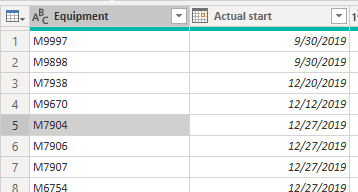
I have one column with all the machine numbers and one column with the notification dates.

DATEDIFF doesnt work because i am comparing data in the same column and not in different ones.

Anyone has a suggestion on how to solve this? I thought about pivoting/unpivoting but i cant seem to get it right.


alevandenes_0-1599732774245.png


I found in this forum a solution, but it applies only in cases i have two dates

Date Difference = CALCULATE(DATEDIFF(MIN(Table1[Max Date]), MAX(Table1[Max Date]), DAY), ALLEXCEPT(Table1, Table1[Name]))


Ideas?


Thank you in advance,
Alessandra

1 ACCEPTED SOLUTION
Greg_Deckler
Community Champion
Community Champion

@alevandenes - I have an article on MTBF - See my article on Mean Time Between Failure (MTBF) which uses EARLIER: http://community.powerbi.com/t5/Community-Blog/Mean-Time-Between-Failure-MTBF-and-Power-BI/ba-p/3395....
The basic pattern is:
Column = 
  VAR __Current = [Value]
  VAR __PreviousDate = MAXX(FILTER('Table','Table'[Date] < EARLIER('Table'[Date])),[Date])

  VAR __Previous = MAXX(FILTER('Table',[Date]=__PreviousDate),[Value])
RETURN
  __Current - __Previous


Follow on LinkedIn
@ me in replies or I'll lose your thread!!!
Instead of a Kudo, please vote for this idea
Become an expert!: Enterprise DNA
External Tools: MSHGQM
YouTube Channel!: Microsoft Hates Greg
Latest book!:
DAX For Humans

DAX is easy, CALCULATE makes DAX hard...

View solution in original post

4 REPLIES 4
Greg_Deckler
Community Champion
Community Champion

@alevandenes - I have an article on MTBF - See my article on Mean Time Between Failure (MTBF) which uses EARLIER: http://community.powerbi.com/t5/Community-Blog/Mean-Time-Between-Failure-MTBF-and-Power-BI/ba-p/3395....
The basic pattern is:
Column = 
  VAR __Current = [Value]
  VAR __PreviousDate = MAXX(FILTER('Table','Table'[Date] < EARLIER('Table'[Date])),[Date])

  VAR __Previous = MAXX(FILTER('Table',[Date]=__PreviousDate),[Value])
RETURN
  __Current - __Previous


Follow on LinkedIn
@ me in replies or I'll lose your thread!!!
Instead of a Kudo, please vote for this idea
Become an expert!: Enterprise DNA
External Tools: MSHGQM
YouTube Channel!: Microsoft Hates Greg
Latest book!:
DAX For Humans

DAX is easy, CALCULATE makes DAX hard...

Hi @Greg_Deckler 

I was wondering if you had a solution also to exclude non-working hours from the calculation of Repair Hours?

Your article helped incredibly.


Kind regards,

Alessandra

Wow thank you very much!! The article is great

amitchandak
Super User
Super User

@alevandenes , I think You need to try like

last Actual start date = maxx(filter(Table, [Equipment] = earlier([Equipment]) && [Actual start date] <earlier([Actual start date])),[Actual start date])

Share with Power BI Enthusiasts: Full Power BI Video (20 Hours) YouTube
Microsoft Fabric Series 60+ Videos YouTube
Microsoft Fabric Hindi End to End YouTube

Helpful resources

Announcements
FabCon and SQLCon Barcelona 2026

FabCon & SQLCon – Barcelona 2026

Join us in Barcelona for FabCon and SQLCon, the Fabric, Power BI, SQL, and AI community event. Save €200 with code FABCMTY200.

60 days of Data Days Carousel

Data Days 2026

Join Fabric Data Days 2026: 60 days of free live/on-demand sessions, challenges, study groups, and certification opportunities.

Power BI DataViz World Championships carousel

Power BI DataViz World Championships - June 2026

A new Power BI DataViz World Championship is coming this June! Don't miss out on submitting your entry.