cancel
Showing results for 
Search instead for 
Did you mean: 

July 7 - July 17 | Round 2 of the Power BI Dataviz World Championships. Don't miss your chance! Learn more

Reply
tylerbauer
Helper II
Helper II

custom link

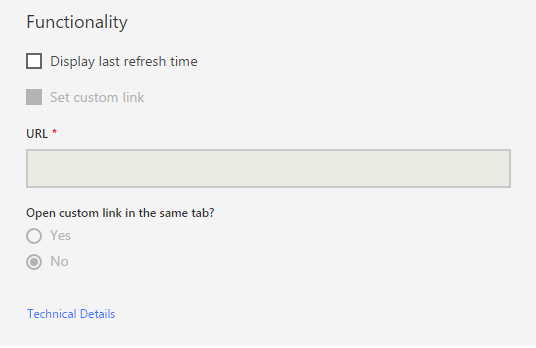
I am having problems adding a custom link. I watched the video showing how to do that but I think it is an older version of Power BI  -https://powerbi.microsoft.com/en-us/documentation/powerbi-service-edit-a-tile-in-a-dashboard/#hyperl...  How do I add a custom URL link to a tile in the current Power BI? Screenshot is attachedError.PNG

1 ACCEPTED SOLUTION

I discovered the problem. You are not allowed to create custom links when you pin a visual (the whole report). You can only create custom links for individual visuals. Perhaps, Microsoft will change this with later versions 🙂 

View solution in original post

5 REPLIES 5
Greg_Deckler
Community Champion
Community Champion

Hm, not sure why that "Set custom link" checkbox is greyed out. I wonder if that is a Pro feature for some bizarre reason? I don't have any problem setting that on my tiles.


Follow on LinkedIn
@ me in replies or I'll lose your thread!!!
Instead of a Kudo, please vote for this idea
Become an expert!: Enterprise DNA
External Tools: MSHGQM
YouTube Channel!: Microsoft Hates Greg
Latest book!:
DAX For Humans

DAX is easy, CALCULATE makes DAX hard...

I discovered the problem. You are not allowed to create custom links when you pin a visual (the whole report). You can only create custom links for individual visuals. Perhaps, Microsoft will change this with later versions 🙂 

Hi @tylerbauer,


Great to hear the problem got discovered! Could you accept your last reply as solution to help others who has similar issue easily find the answer and close this thread?Smiley Happy


In addition, here is the idea for supporting Individual Custom Links for Pinned Live Pages on Power BI Ideas. You can vote it up and add your comments there to make this feature coming sooner.


Regards

Anonymous
Not applicable

Is there any solution to this problem? or it is still a problem?

Maybe this is the case. Do you have the pro version?

Helpful resources

Announcements
FabCon and SQLCon Barcelona 2026

FabCon & SQLCon – Barcelona 2026

Join us in Barcelona for FabCon and SQLCon, the Fabric, Power BI, SQL, and AI community event. Save €200 with code FABCMTY200.

60 days of Data Days Carousel

Data Days 2026

Join Data Days 2026: 60 days of free live/on-demand sessions, challenges, study groups, and certification opportunities.

Power BI DataViz World Championships carousel

Power BI DataViz World Championships - June 2026

A new Power BI DataViz World Championship is coming this June! Don't miss out on submitting your entry.

Top Solution Authors