cancel
Showing results for 
Search instead for 
Did you mean: 

The Power BI Data Visualization World Championships is back! Get ahead of the game and start preparing now! Learn more

Reply
tylerbauer
Helper II
Helper II

custom link

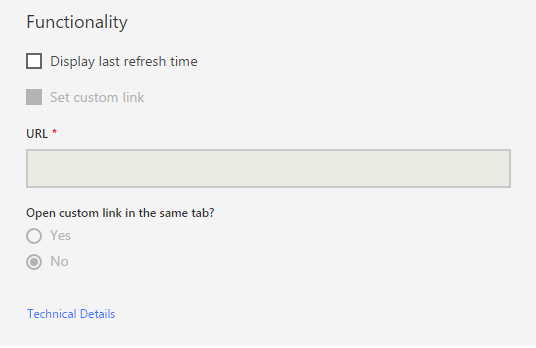
I am having problems adding a custom link. I watched the video showing how to do that but I think it is an older version of Power BI  -https://powerbi.microsoft.com/en-us/documentation/powerbi-service-edit-a-tile-in-a-dashboard/#hyperl...  How do I add a custom URL link to a tile in the current Power BI? Screenshot is attachedError.PNG

1 ACCEPTED SOLUTION

I discovered the problem. You are not allowed to create custom links when you pin a visual (the whole report). You can only create custom links for individual visuals. Perhaps, Microsoft will change this with later versions 🙂 

View solution in original post

5 REPLIES 5
Greg_Deckler
Community Champion
Community Champion

Hm, not sure why that "Set custom link" checkbox is greyed out. I wonder if that is a Pro feature for some bizarre reason? I don't have any problem setting that on my tiles.


Follow on LinkedIn
@ me in replies or I'll lose your thread!!!
Instead of a Kudo, please vote for this idea
Become an expert!: Enterprise DNA
External Tools: MSHGQM
YouTube Channel!: Microsoft Hates Greg
Latest book!:
DAX For Humans

DAX is easy, CALCULATE makes DAX hard...

I discovered the problem. You are not allowed to create custom links when you pin a visual (the whole report). You can only create custom links for individual visuals. Perhaps, Microsoft will change this with later versions 🙂 

Hi @tylerbauer,


Great to hear the problem got discovered! Could you accept your last reply as solution to help others who has similar issue easily find the answer and close this thread?Smiley Happy


In addition, here is the idea for supporting Individual Custom Links for Pinned Live Pages on Power BI Ideas. You can vote it up and add your comments there to make this feature coming sooner.


Regards

Anonymous
Not applicable

Is there any solution to this problem? or it is still a problem?

Maybe this is the case. Do you have the pro version?

Helpful resources

Announcements
Power BI DataViz World Championships

Power BI Dataviz World Championships

The Power BI Data Visualization World Championships is back! Get ahead of the game and start preparing now!

December 2025 Power BI Update Carousel

Power BI Monthly Update - December 2025

Check out the December 2025 Power BI Holiday Recap!

FabCon Atlanta 2026 carousel

FabCon Atlanta 2026

Join us at FabCon Atlanta, March 16-20, for the ultimate Fabric, Power BI, AI and SQL community-led event. Save $200 with code FABCOMM.

Top Solution Authors