This time we’re going bigger than ever. Fabric, Power BI, SQL, AI and more. We're covering it all. You won't want to miss it.
Learn moreLevel up your Power BI skills this month - build one visual each week and tell better stories with data! Get started
Hi
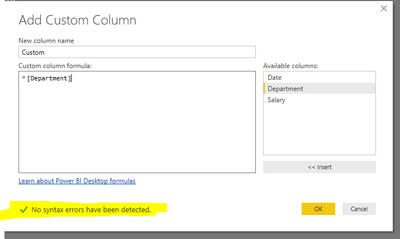
Working with different custom column formulas , OK button is not enabling in my system.
.
Thanks
Hi @Anonymous,
Have you resolved your issue? If you have, please mark right reply as answer. Thanks for understanding.
Best Regards,
Angelia
Hi @Anonymous,
Please try "=[Content]" to create a custom column, and check if it works fine.
Excel.Workbook() function, returns a table representing sheets in the given excel workbook. I am not clear your purpose of using it. It returns a error message: The formula is incomplete. Only there is no syntax errors, the "OK" is enabling.
Could you please share more details for further analysis?
Best Regards,
Angelia
Strange, similar issue was reported here.
What version are you using (File - Help - About)?
Mine is Version: 2.46.4732.461 64-bit (May 2017), but there is a newer version already.
Ah, the same reporter... why didn't you continue with your previous topic, as it is the same issue?
Or maybe you tried to, byt raised a new topic by mistake.
Check out the April 2026 Power BI update to learn about new features.
Sign up to receive a private message when registration opens and key events begin.
If you have recently started exploring Fabric, we'd love to hear how it's going. Your feedback can help with product improvements.
| User | Count |
|---|---|
| 36 | |
| 33 | |
| 26 | |
| 24 | |
| 17 |
| User | Count |
|---|---|
| 67 | |
| 49 | |
| 32 | |
| 27 | |
| 22 |