Get certified for free when you join Fabric Data Days 2026 and dive into Fabric, Power BI, SQL, AI, and other essential data skills.
Join nowTry your skills in the Power BI Dataviz World Championship! Round one ends June 26. Join now
Hi
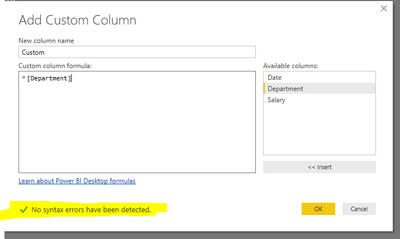
Working with different custom column formulas , OK button is not enabling in my system.
.
Thanks
Hi @Anonymous,
Have you resolved your issue? If you have, please mark right reply as answer. Thanks for understanding.
Best Regards,
Angelia
Hi @Anonymous,
Please try "=[Content]" to create a custom column, and check if it works fine.
Excel.Workbook() function, returns a table representing sheets in the given excel workbook. I am not clear your purpose of using it. It returns a error message: The formula is incomplete. Only there is no syntax errors, the "OK" is enabling.
Could you please share more details for further analysis?
Best Regards,
Angelia
Strange, similar issue was reported here.
What version are you using (File - Help - About)?
Mine is Version: 2.46.4732.461 64-bit (May 2017), but there is a newer version already.
Ah, the same reporter... why didn't you continue with your previous topic, as it is the same issue?
Or maybe you tried to, byt raised a new topic by mistake.
Don't miss out on Data Days, June 15 through August 7. Learn Fabric, Power BI, SQL, AI and more.
Check out the May 2026 Power BI update to learn about new features.
| User | Count |
|---|---|
| 22 | |
| 21 | |
| 21 | |
| 20 | |
| 13 |
| User | Count |
|---|---|
| 59 | |
| 53 | |
| 41 | |
| 31 | |
| 26 |