cancel
Showing results for 
Search instead for 
Did you mean: 

Vote for your favorite vizzies from the Power BI Dataviz World Championship submissions. Vote now!

Reply
karimkz
Advocate I
Advocate I

create table from existing table

Hi all. 

I'm getting used to DAX expressionswith columns, but not with tables. 

I want to create new table for waterfall chart. 

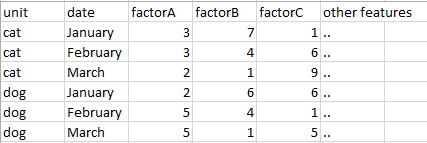
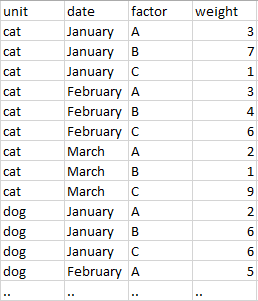
Here is the part of big table I have (1) and my target table (2). 

1.PNG          -->              2.PNG


Could you guys help me find the best way to do this?

Appreciate.

1 ACCEPTED SOLUTION
Vvelarde
Community Champion
Community Champion

@karimkz


hi. is possible that exists better solutions but i present one


TableNew2 =
UNION (
    SELECTCOLUMNS (
        Table1,
        "UNIT", Table1[UNIT],
        "DATE", Table1[DATE],
        "FACTOR", "A",
        "WEIGHT", Table1[FACTOR A]
    ),
    SELECTCOLUMNS (
        Table1,
        "UNIT", Table1[UNIT],
        "DATE", Table1[DATE],
        "FACTOR", "B",
        "WEIGHT", Table1[FACTOR B]
    ),
    SELECTCOLUMNS (
        Table1,
        "UNIT", Table1[UNIT],
        "DATE", Table1[DATE],
        "FACTOR", "A",
        "WEIGHT", Table1[FACTOR C]
    )
)

Or 


TableNew =
UNION (
    SUMMARIZECOLUMNS ( Table1[UNIT], Table1[DATE], Table1[FACTOR A], "FACTOR", "A" ),
    SUMMARIZECOLUMNS ( Table1[UNIT], Table1[DATE], Table1[FACTOR B], "FACTOR", "B" ),
    SUMMARIZECOLUMNS ( Table1[UNIT], Table1[DATE], Table1[FACTOR C], "FACTOR", "C" )
)


Lima - Peru

View solution in original post

4 REPLIES 4
MarcelBeug
Community Champion
Community Champion

It can easily be done via the Query Editor, using Unpivot as illustrated in this video.

Specializing in Power Query Formula Language (M)

Actually, my columns are calculated columns, so Edit Query doesn't work here. 

Any ideas?

Vvelarde
Community Champion
Community Champion

@karimkz


hi. is possible that exists better solutions but i present one


TableNew2 =
UNION (
    SELECTCOLUMNS (
        Table1,
        "UNIT", Table1[UNIT],
        "DATE", Table1[DATE],
        "FACTOR", "A",
        "WEIGHT", Table1[FACTOR A]
    ),
    SELECTCOLUMNS (
        Table1,
        "UNIT", Table1[UNIT],
        "DATE", Table1[DATE],
        "FACTOR", "B",
        "WEIGHT", Table1[FACTOR B]
    ),
    SELECTCOLUMNS (
        Table1,
        "UNIT", Table1[UNIT],
        "DATE", Table1[DATE],
        "FACTOR", "A",
        "WEIGHT", Table1[FACTOR C]
    )
)

Or 


TableNew =
UNION (
    SUMMARIZECOLUMNS ( Table1[UNIT], Table1[DATE], Table1[FACTOR A], "FACTOR", "A" ),
    SUMMARIZECOLUMNS ( Table1[UNIT], Table1[DATE], Table1[FACTOR B], "FACTOR", "B" ),
    SUMMARIZECOLUMNS ( Table1[UNIT], Table1[DATE], Table1[FACTOR C], "FACTOR", "C" )
)


Lima - Peru

Thanks, you're awesome.


Helpful resources

Announcements
Power BI DataViz World Championships

Power BI Dataviz World Championships

Vote for your favorite vizzies from the Power BI World Championship submissions!

Sticker Challenge 2026 Carousel

Join our Community Sticker Challenge 2026

If you love stickers, then you will definitely want to check out our Community Sticker Challenge!

January Power BI Update Carousel

Power BI Monthly Update - January 2026

Check out the January 2026 Power BI update to learn about new features.

FabCon Atlanta 2026 carousel

FabCon Atlanta 2026

Join us at FabCon Atlanta, March 16-20, for the ultimate Fabric, Power BI, AI and SQL community-led event. Save $200 with code FABCOMM.