cancel
Showing results for 
Search instead for 
Did you mean: 

July 7 - July 17 | Round 2 of the Power BI Dataviz World Championships. Don't miss your chance! Learn more

Reply
karimkz
Advocate I
Advocate I

create table from existing table

Hi all. 

I'm getting used to DAX expressionswith columns, but not with tables. 

I want to create new table for waterfall chart. 

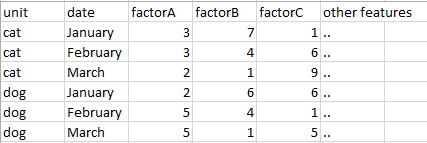
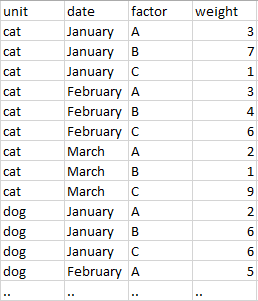
Here is the part of big table I have (1) and my target table (2). 

1.PNG          -->              2.PNG


Could you guys help me find the best way to do this?

Appreciate.

1 ACCEPTED SOLUTION
Vvelarde
Community Champion
Community Champion

@karimkz


hi. is possible that exists better solutions but i present one


TableNew2 =
UNION (
    SELECTCOLUMNS (
        Table1,
        "UNIT", Table1[UNIT],
        "DATE", Table1[DATE],
        "FACTOR", "A",
        "WEIGHT", Table1[FACTOR A]
    ),
    SELECTCOLUMNS (
        Table1,
        "UNIT", Table1[UNIT],
        "DATE", Table1[DATE],
        "FACTOR", "B",
        "WEIGHT", Table1[FACTOR B]
    ),
    SELECTCOLUMNS (
        Table1,
        "UNIT", Table1[UNIT],
        "DATE", Table1[DATE],
        "FACTOR", "A",
        "WEIGHT", Table1[FACTOR C]
    )
)

Or 


TableNew =
UNION (
    SUMMARIZECOLUMNS ( Table1[UNIT], Table1[DATE], Table1[FACTOR A], "FACTOR", "A" ),
    SUMMARIZECOLUMNS ( Table1[UNIT], Table1[DATE], Table1[FACTOR B], "FACTOR", "B" ),
    SUMMARIZECOLUMNS ( Table1[UNIT], Table1[DATE], Table1[FACTOR C], "FACTOR", "C" )
)


Lima - Peru

View solution in original post

4 REPLIES 4
MarcelBeug
Community Champion
Community Champion

It can easily be done via the Query Editor, using Unpivot as illustrated in this video.

Specializing in Power Query Formula Language (M)

Actually, my columns are calculated columns, so Edit Query doesn't work here. 

Any ideas?

Vvelarde
Community Champion
Community Champion

@karimkz


hi. is possible that exists better solutions but i present one


TableNew2 =
UNION (
    SELECTCOLUMNS (
        Table1,
        "UNIT", Table1[UNIT],
        "DATE", Table1[DATE],
        "FACTOR", "A",
        "WEIGHT", Table1[FACTOR A]
    ),
    SELECTCOLUMNS (
        Table1,
        "UNIT", Table1[UNIT],
        "DATE", Table1[DATE],
        "FACTOR", "B",
        "WEIGHT", Table1[FACTOR B]
    ),
    SELECTCOLUMNS (
        Table1,
        "UNIT", Table1[UNIT],
        "DATE", Table1[DATE],
        "FACTOR", "A",
        "WEIGHT", Table1[FACTOR C]
    )
)

Or 


TableNew =
UNION (
    SUMMARIZECOLUMNS ( Table1[UNIT], Table1[DATE], Table1[FACTOR A], "FACTOR", "A" ),
    SUMMARIZECOLUMNS ( Table1[UNIT], Table1[DATE], Table1[FACTOR B], "FACTOR", "B" ),
    SUMMARIZECOLUMNS ( Table1[UNIT], Table1[DATE], Table1[FACTOR C], "FACTOR", "C" )
)


Lima - Peru

Thanks, you're awesome.


Helpful resources

Announcements
FabCon and SQLCon Barcelona 2026

FabCon & SQLCon – Barcelona 2026

Join us in Barcelona for FabCon and SQLCon, the Fabric, Power BI, SQL, and AI community event. Save €200 with code FABCMTY200.

60 days of Data Days Carousel

Data Days 2026

Join Data Days 2026: 60 days of free live/on-demand sessions, challenges, study groups, and certification opportunities.

Power BI DataViz World Championships carousel

Power BI DataViz World Championships - June 2026

A new Power BI DataViz World Championship is coming this June! Don't miss out on submitting your entry.

Top Solution Authors