Get certified for free when you join Fabric Data Days 2026 and dive into Fabric, Power BI, SQL, AI, and other essential data skills.
Join nowJuly 28 - August 9 | Final Round of the Power BI Dataviz World Championships. This is your chance. Learn more
Hello,
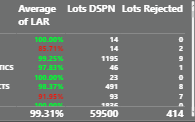
I have this table and I would like to create a slicer for an average of LAR . So if the average LAR is "greater than 96%" and "less than 96%"
Thank you.
Solved! Go to Solution.
Hi @gio1082 ,
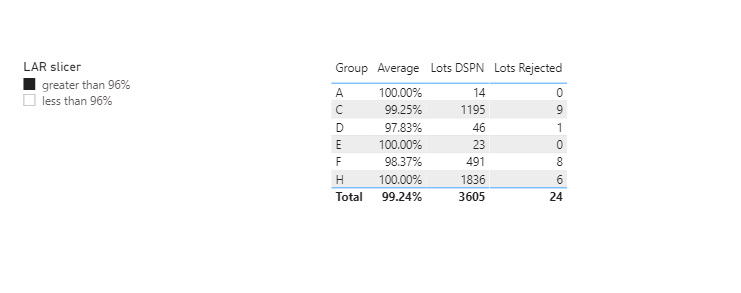
Based on your desricption, I have defined the [Average of LAR] as a measure in my sample file like this:
Average = AVERAGE('Table'[Average of LAR])Modified the previous measure:
Measure =
IF (
NOT ( ISFILTERED ( 'Slicer table'[LAR slicer] ) ),
1,
IF (
SELECTEDVALUE ( 'Slicer table'[LAR slicer] ) = "greater than 96%",
IF ( [Average] > 0.96, 1 ),
IF (
SELECTEDVALUE ( 'Slicer table'[LAR slicer] ) = "less than 96%",
IF ( [Average] < 0.96, 1 )
)
)
)Refer the sample file: Create a slicer.pbix
Best Regards,
Yingjie Li
If this post helps then please consider Accept it as the solution to help the other members find it more quickly.
Hi @gio1082 ,
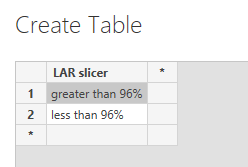
1. Create this table manually first:
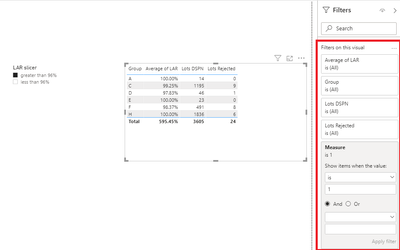
2. Create a measure like this, put it in the visual table and set its vallue as 1:
Measure =
IF (
SELECTEDVALUE ( 'Slicer table'[LAR slicer] ) = "greater than 96%",
IF ( SELECTEDVALUE ( 'Table'[Average of LAR] ) > 0.96, 1 ),
IF (
SELECTEDVALUE ( 'Slicer table'[LAR slicer] ) = "less than 96%",
IF ( SELECTEDVALUE ( 'Table'[Average of LAR] ) < 0.96, 1 )
)
)Attached sample file that hopes to help you: create a slicer.pbix
Best Regards,
Yingjie Li
If this post helps then please consider Accept it as the solution to help the other members find it more quickly.
Hi,
Sorry, for late response, this definitely what want but it not working for me. I think is because the average of LAR is metric.
So I have some products and a supplier who is responsible for that product. So Average LAR is a metric of the LAR to get the average for the supplier base on the products
thanks
Hi @gio1082 ,
Based on your desricption, I have defined the [Average of LAR] as a measure in my sample file like this:
Average = AVERAGE('Table'[Average of LAR])Modified the previous measure:
Measure =
IF (
NOT ( ISFILTERED ( 'Slicer table'[LAR slicer] ) ),
1,
IF (
SELECTEDVALUE ( 'Slicer table'[LAR slicer] ) = "greater than 96%",
IF ( [Average] > 0.96, 1 ),
IF (
SELECTEDVALUE ( 'Slicer table'[LAR slicer] ) = "less than 96%",
IF ( [Average] < 0.96, 1 )
)
)
)Refer the sample file: Create a slicer.pbix
Best Regards,
Yingjie Li
If this post helps then please consider Accept it as the solution to help the other members find it more quickly.
@gio1082 - Complex selector - https://community.powerbi.com/t5/Quick-Measures-Gallery/The-Complex-Selector/m-p/1116633#M534
Join us in Barcelona for FabCon and SQLCon, the Fabric, Power BI, SQL, and AI community event. Save €200 with code FABCMTY200.
If you love stickers, then you will definitely want to check out our community sticker challenge, Barcelona edition!
Check out the July 2026 Power BI update to learn about new features.
| User | Count |
|---|---|
| 30 | |
| 28 | |
| 23 | |
| 21 | |
| 19 |
| User | Count |
|---|---|
| 44 | |
| 32 | |
| 18 | |
| 17 | |
| 17 |