Join us in Barcelona for FabCon and SQLCon, September 28 - October 1, 2026.
This is best Fabric, Power BI, SQL and AI community event. How do we know? The last event sold out! Save €200 with code FABCMTY200.
Register now- Power BI forums
- Get Help with Power BI
- Desktop
- Service
- Report Server
- Power Query
- Mobile Apps
- Developer
- DAX Commands and Tips
- Custom Visuals Development Discussion
- Health and Life Sciences
- Power BI Spanish forums
- Translated Spanish Desktop
- Training and Consulting
- Instructor Led Training
- Dashboard in a Day for Women, by Women
- Galleries
- Data Stories Gallery
- Themes Gallery
- Contests Gallery
- QuickViz Gallery
- Quick Measures Gallery
- Visual Calculations Gallery
- Fabric Apps Gallery
- Notebook Gallery
- Translytical Task Flow Gallery
- TMDL Gallery
- R Script Showcase
- Webinars and Video Gallery
- Ideas
- Custom Visuals Ideas (read-only)
- Issues
- Issues
- Events
- Upcoming Events
The Fabric community is now in read-only for platform upgrade. Learn more
- Power BI forums
- Forums
- Get Help with Power BI
- Desktop
- Re: create new Column
- Subscribe to RSS Feed
- Mark Topic as New
- Mark Topic as Read
- Float this Topic for Current User
- Bookmark
- Subscribe
- Printer Friendly Page


- Mark as New
- Bookmark
- Subscribe
- Mute
- Subscribe to RSS Feed
- Permalink
create new Column
Hi Team
Please help me i need new Column Gate entery Basis if gatey entery multipule i need single amount Freight amount Like my output.
| Gate entry | Freight Amount |
| CDA1031293 | 12850 |
| CDA1031293 | 12850 |
| CDA1031298 | 12000 |
| CDA1031298 | 12000 |
| CDA1031298 | 12000 |
| CDA1031298 | 12000 |
| CDA1031298 | 12000 |
| CDA1031331 | 12000 |
| CDA1031331 | 12000 |
| CDA1031411 | 12100 |
| CDA1031411 | 12100 |
| CDA1031424 | 12100 |
| CDA1031424 | 12100 |
| CDA1031424 | 12100 |
| CDA1031424 | 12100 |
| CDA1031482 | 12800 |
| CDA1031482 | 12800 |
| CDA1031482 | 12800 |
| CDA1031482 | 12800 |
| CDA1031482 | 12800 |
| CDA1031482 | 12800 |
| CDA1031482 | 12800 |
| CDA1031482 | 12800 |
| CDA1031482 | 12800 |
| CDA1031482 | 12800 |
| CDA1031493 | 12200 |
My Out put Like This
| Gate entry | Freight Amount | Create Column (Need this Result) |
| CDA1031293 | 12850 | 12850 |
| CDA1031293 | 12850 | 0 |
| CDA1031298 | 12000 | 1200 |
| CDA1031298 | 12000 | 0 |
| CDA1031298 | 12000 | 0 |
| CDA1031298 | 12000 | 0 |
| CDA1031298 | 12000 | 0 |
| CDA1031331 | 12000 | 12000 |
| CDA1031331 | 12000 | 0 |
| CDA1031411 | 12100 | 12100 |
| CDA1031411 | 12100 | 0 |
| CDA1031424 | 12100 | 12100 |
| CDA1031424 | 12100 | 0 |
| CDA1031424 | 12100 | 0 |
| CDA1031424 | 12100 | 0 |
| CDA1031482 | 12800 | 12800 |
| CDA1031482 | 12800 | 0 |
| CDA1031482 | 12800 | 0 |
| CDA1031482 | 12800 | 0 |
| CDA1031482 | 12800 | 0 |
| CDA1031482 | 12800 | 0 |
| CDA1031482 | 12800 | 0 |
| CDA1031482 | 12800 | 0 |
| CDA1031482 | 12800 | 0 |
| CDA1031482 | 12800 | 0 |
| CDA1031493 | 12200 | 12200 |
Solved! Go to Solution.


- Mark as New
- Bookmark
- Subscribe
- Mute
- Subscribe to RSS Feed
- Permalink
Based on your description, I created data to reproduce your scenario. The pbix file is attached in the end.
IN DAX
https://1drv.ms/u/s!AiUZ0Ws7G26Rixu4oV5LW2VcErUY?e=4oFKH2

- Mark as New
- Bookmark
- Subscribe
- Mute
- Subscribe to RSS Feed
- Permalink
Hi @shri0025 ,
Please try below steps:
1. add an index column in Power Query pane
2. create a new column with below dax formula
Column =
VAR cur_entry = [Gate entry]
VAR cur_index = [Index]
VAR tmp =
    FILTER ( 'Table', [Gate entry] = cur_entry )
VAR _a =
    MINX ( tmp, [Index] )
RETURN
    IF ( cur_index = _a, [Freight Amount], 0 )
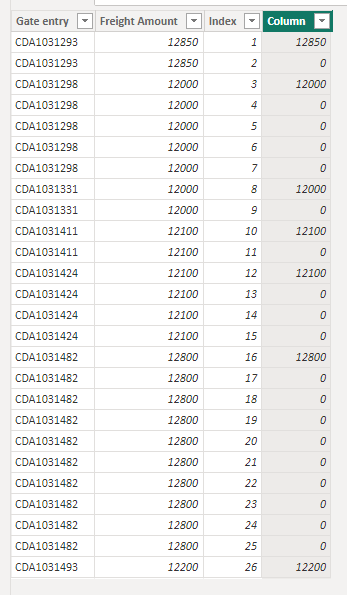
Please refer the attached .pbix file.
Best regards,
Community Support Team_Binbin Yu
If this post helps, then please consider Accept it as the solution to help the other members find it more quickly.
- Mark as New
- Bookmark
- Subscribe
- Mute
- Subscribe to RSS Feed
- Permalink
Hi @shri0025 ,
Please try below steps:
1. add an index column in Power Query pane
2. create a new column with below dax formula
Column =
VAR cur_entry = [Gate entry]
VAR cur_index = [Index]
VAR tmp =
    FILTER ( 'Table', [Gate entry] = cur_entry )
VAR _a =
    MINX ( tmp, [Index] )
RETURN
    IF ( cur_index = _a, [Freight Amount], 0 )
Please refer the attached .pbix file.
Best regards,
Community Support Team_Binbin Yu
If this post helps, then please consider Accept it as the solution to help the other members find it more quickly.
- Mark as New
- Bookmark
- Subscribe
- Mute
- Subscribe to RSS Feed
- Permalink
Based on your description, I created data to reproduce your scenario. The pbix file is attached in the end.
IN DAX
https://1drv.ms/u/s!AiUZ0Ws7G26Rixu4oV5LW2VcErUY?e=4oFKH2
- Mark as New
- Bookmark
- Subscribe
- Mute
- Subscribe to RSS Feed
- Permalink
Hi
Thanks Ahmedx Your Solution is Perfect but i need in column Dax not in Query Because My data set is Many Column Column 1 to Column 45 so I dont use Query only used Column in Dax .
- Mark as New
- Bookmark
- Subscribe
- Mute
- Subscribe to RSS Feed
- Permalink
Hi
Can you see me My out put column If Multipule Gate entery then Freight AMount single and 0
| Gate entry | Freight Amount | Create Column (Need this Result) |
| CDA1031293 | 12850 | 12850 |
| CDA1031293 | 12850 | 0 |
| CDA1031298 | 12000 | 1200 |
| CDA1031298 | 12000 | 0 |
| CDA1031298 | 12000 | 0 |
| CDA1031298 | 12000 | 0 |
| CDA1031298 | 12000 | 0 |
| CDA1031331 | 12000 | 12000 |
| CDA1031331 | 12000 | 0 |
| CDA1031411 | 12100 | 12100 |
| CDA1031411 | 12100 | 0 |
| CDA1031424 | 12100 | 12100 |
| CDA1031424 | 12100 | 0 |
| CDA1031424 | 12100 | 0 |
| CDA1031424 | 12100 | 0 |
| CDA1031482 | 12800 | 12800 |
| CDA1031482 | 12800 | 0 |
| CDA1031482 | 12800 | 0 |
| CDA1031482 | 12800 | 0 |
| CDA1031482 | 12800 | 0 |
| CDA1031482 | 12800 | 0 |
| CDA1031482 | 12800 | 0 |
| CDA1031482 | 12800 | 0 |
| CDA1031482 | 12800 | 0 |
| CDA1031482 | 12800 | 0 |
| CDA1031493 | 12200 | 12200 |
- Mark as New
- Bookmark
- Subscribe
- Mute
- Subscribe to RSS Feed
- Permalink
pls try this
let
    Source = Table.FromRows(Json.Document(Binary.Decompress(Binary.FromText("i45WcnZxNDQwNjSyNFbSUTI0sjA1UIrVISxsARY2MKCbsLGxIQnCJoYQYUPihI1MaCdsYQQJweEtDE0nRiDhWAA=", BinaryEncoding.Base64), Compression.Deflate)), let _t = ((type nullable text) meta [Serialized.Text = true]) in type table [#"Gate entry" = _t, #"Freight Amount" = _t]),
    #"Changed Type" = Table.TransformColumnTypes(Source,{{"Gate entry", type text}, {"Freight Amount", Int64.Type}}),
    #"Grouped Rows" = Table.Group(#"Changed Type", {"Gate entry"}, {{"Count",
 each  Table.AddIndexColumn(_ , "indx",1,1)}}),
    #"Removed Other Columns" = Table.SelectColumns(#"Grouped Rows",{"Count"}),
    #"Expanded Count" = Table.ExpandTableColumn(#"Removed Other Columns", "Count", {"Gate entry", "Freight Amount", "indx"}, {"Gate entry", "Freight Amount", "indx"}),
    #"Added Custom" = Table.AddColumn(#"Expanded Count", "Result", each if[indx] =1 then [Freight Amount] else 0),
    #"Removed Columns" = Table.RemoveColumns(#"Added Custom",{"indx"})
in
    #"Removed Columns"

- Mark as New
- Bookmark
- Subscribe
- Mute
- Subscribe to RSS Feed
- Permalink
@shri0025 Try to create a calculated column using this DAX:
Create Column =
VAR GateEntry = YourTableName[Gate Entry]
VAR FreightAmount = YourTableName[Freight Amount]
VAR GateEntryCount = CALCULATE(COUNTROWS(YourTableName), ALLEXCEPT(YourTableName, YourTableName[Gate Entry]))
RETURN
IF(GateEntryCount = 1, FreightAmount, 0)
If you find this insightful, please provide a Kudo and accept this as a solution.
- Mark as New
- Bookmark
- Subscribe
- Mute
- Subscribe to RSS Feed
- Permalink
Hi Devesh
Thanks for reply it is not working
Helpful resources

FabCon & SQLCon – Barcelona 2026
Join us in Barcelona for FabCon and SQLCon, the Fabric, Power BI, SQL, and AI community event. Save €200 with code FABCMTY200.

Power BI DataViz World Championships - June 2026
A new Power BI DataViz World Championship is coming this June! Don't miss out on submitting your entry.

| User | Count |
|---|---|
| 23 | |
| 22 | |
| 14 | |
| 14 | |
| 13 |


| User | Count |
|---|---|
| 47 | |
| 39 | |
| 24 | |
| 20 | |
| 20 |


