cancel
Showing results for 
Search instead for 
Did you mean: 

The Power BI Data Visualization World Championships is back! It's time to submit your entry. Live now!

Reply
jfmejiav1
Frequent Visitor

create a conditional flag

Hello,


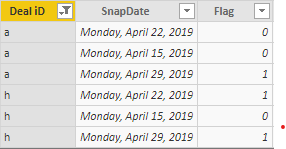
Currently y have a table with snapshot of deals the date of the snapshot and if in that date the deal had a flag or not. ( see below)


Annotation 2019-04-23 105708.png


I want to create a column that puts the first date when the deal had a flag. So for example deal h first had the flag on the 22, then i only want a date on a new column for the 22th of April not for the 22 and 29.


how can i do this?


thank you 

1 ACCEPTED SOLUTION
AlB
Community Champion
Community Champion

Hi @jfmejiav1,

Try this for your new calculated column, where Table1 is the table you show:

NewCol =
CALCULATE (
    MIN ( Table1[SnapDate] ),
    Table1[Flag] = 1,
    ALLEXCEPT ( Table1, Table1[Deal iD] )
)

or this (I'm not quite sure which one you need):

NewCol =
VAR _Date =
    CALCULATE (
        MIN ( Table1[SnapDate] ),
        Table1[Flag] = 1,
        ALLEXCEPT ( Table1, Table1[Deal iD] )
    )
RETURN
    IF ( Table1[SnapDate] = _Date, _Date )


View solution in original post

1 REPLY 1
AlB
Community Champion
Community Champion

Hi @jfmejiav1,

Try this for your new calculated column, where Table1 is the table you show:

NewCol =
CALCULATE (
    MIN ( Table1[SnapDate] ),
    Table1[Flag] = 1,
    ALLEXCEPT ( Table1, Table1[Deal iD] )
)

or this (I'm not quite sure which one you need):

NewCol =
VAR _Date =
    CALCULATE (
        MIN ( Table1[SnapDate] ),
        Table1[Flag] = 1,
        ALLEXCEPT ( Table1, Table1[Deal iD] )
    )
RETURN
    IF ( Table1[SnapDate] = _Date, _Date )


Helpful resources

Announcements
FabCon Atlanta 2026 carousel

FabCon Atlanta 2026

Join us at FabCon Atlanta, March 16-20, for the ultimate Fabric, Power BI, AI and SQL community-led event. Save $200 with code FABCOMM.