cancel
Showing results for 
Search instead for 
Did you mean: 

Level up your Power BI skills this month - build one visual each week and tell better stories with data! Get started

Reply
Vitor_sp_bo
Helper I
Helper I

count on date

Guys, good morning! All right ?

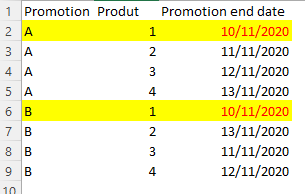
I need help with a formula that counts how many times a product has been on sale, 1 product can be in more than one promotion, but if the promotion date has the same end (1 product in two different promotions with the same end date I I only count it 1 time), so in the example of the image I would only count the product "1" once, even though it is in two different promotions, what matters is whether the end date is the same or not. Any doubts I make myself available, thank you

Vitor_sp_bo_1-1637238702036.png


1 ACCEPTED SOLUTION
selimovd
Super User
Super User

Hey @Vitor_sp_bo ,


you can just summarize the columns by product and promotion end date and then count the rows with a COUNTX.
Like this products with the same end date will only count once. The following measure should do that:

Amount Promotions =
COUNTX (
    SUMMARIZE (
        myPromotions,
        myPromotions[Product],
        myPromotions[Promotion end date]
    ),
    1
)


And it also shows the result you want:

selimovd_0-1637239696817.png


If you need any help please let me know.
If I answered your question I would be happy if you could mark my post as a solution ✔️ and give it a thumbs up 👍
 
Best regards
Denis
 

View solution in original post

5 REPLIES 5
v-angzheng-msft
Community Support
Community Support

Hi, @Vitor_sp_bo 


The data in the two screenshots above does not match the first one and the data in the screenshot above seems to be incomplete.

Could you please consdier sharing more details about it and posting expected result so it is clear on what needs to be implemented?  And It would be great if there is a sample file without any sesentive information here.

It makes it easier to give you a solution.


Best Regards,
Community Support Team _ Zeon Zheng


If this post helps, then please consider Accept it as the solution to help the other members find it more quickly.

selimovd
Super User
Super User

Hey @Vitor_sp_bo ,


you can just summarize the columns by product and promotion end date and then count the rows with a COUNTX.
Like this products with the same end date will only count once. The following measure should do that:

Amount Promotions =
COUNTX (
    SUMMARIZE (
        myPromotions,
        myPromotions[Product],
        myPromotions[Promotion end date]
    ),
    1
)


And it also shows the result you want:

selimovd_0-1637239696817.png


If you need any help please let me know.
If I answered your question I would be happy if you could mark my post as a solution ✔️ and give it a thumbs up 👍
 
Best regards
Denis
 

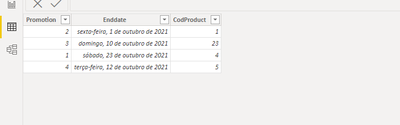
Here it ended up going wrong, I believe it may be related to the fact that my "Product" is in another table, I have a product table linked to the promotion table

Hey @Vitor_sp_bo ,


can you give an example how your data looks?

And when you reply please link my username with an @ symbol. Otherwise I will not be notified that you replied.


Best regards

Denis

@selimovd Table Product:

Vitor_sp_bo_0-1637326432700.png


Table Promotion:

Vitor_sp_bo_1-1637326463983.png


Relation:

produxt 1 --- * promotion

Helpful resources

Announcements
April Power BI Update Carousel

Power BI Monthly Update - April 2026

Check out the April 2026 Power BI update to learn about new features.

Fabric SQL PBI Data Days

Data Days 2026 coming soon!

Sign up to receive a private message when registration opens and key events begin.

New to Fabric survey Carousel

New to Fabric Survey

If you have recently started exploring Fabric, we'd love to hear how it's going. Your feedback can help with product improvements.

Power BI DataViz World Championships carousel

Power BI DataViz World Championships - June 2026

A new Power BI DataViz World Championship is coming this June! Don't miss out on submitting your entry.