Join us at FabCon Atlanta from March 16 - 20, 2026, for the ultimate Fabric, Power BI, AI and SQL community-led event. Save $200 with code FABCOMM.
Register now!The Power BI Data Visualization World Championships is back! Get ahead of the game and start preparing now! Learn more
Hi,
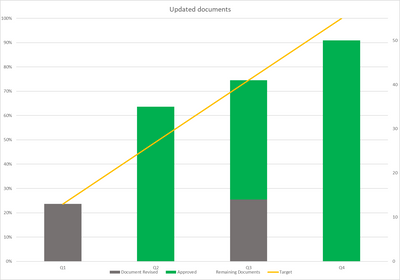
I'm trying to recreate an Excel Table in Power Bi - never thought it would seem so complex to create something so simple - maybe its just because I am a novice. Anyway, trying to get Three different stages for documents monitored over four quarters of the year - with trendline for target. Simple right? Not for me - here is the chart in Excel and the data - please tell me what I am doing wrong - I get the chart created etc but maybe my data points in the imported Excel are wrong? no idea. Thank you in advance!
| Q1 | Q2 | Q3 | Q4 | |
| Document Revised | 13 | 0 | 14 | 0 |
| Approved | 0 | 35 | 27 | 50 |
| Remaining Documents | 42 | 20 | 14 | 5 |
| Target | 13 | 27 | 41 | 55 |
@Rosie64, Yes, it is doable.
You may need a measure for Target,
Target = CALCULATE(
SUM('Table'[Value]),
'Table'[Type] = "Target"
)
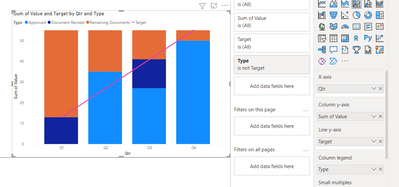
Add the category to the column legend property and exclude Target at the visual level filter, add value column to column y-axis and the target measure to Line y-axis
The Power BI Data Visualization World Championships is back! Get ahead of the game and start preparing now!
| User | Count |
|---|---|
| 38 | |
| 37 | |
| 33 | |
| 32 | |
| 29 |
| User | Count |
|---|---|
| 132 | |
| 88 | |
| 82 | |
| 68 | |
| 64 |