Join us in Barcelona for FabCon and SQLCon, September 28 - October 1, 2026.
This is best Fabric, Power BI, SQL and AI community event. How do we know? The last event sold out! Save €200 with code FABCMTY200.
Register now- Power BI forums
- Get Help with Power BI
- Desktop
- Service
- Report Server
- Power Query
- Mobile Apps
- Developer
- DAX Commands and Tips
- Custom Visuals Development Discussion
- Health and Life Sciences
- Power BI Spanish forums
- Translated Spanish Desktop
- Training and Consulting
- Instructor Led Training
- Dashboard in a Day for Women, by Women
- Galleries
- Data Stories Gallery
- Themes Gallery
- Contests Gallery
- QuickViz Gallery
- Quick Measures Gallery
- Visual Calculations Gallery
- Fabric Apps Gallery
- Notebook Gallery
- Translytical Task Flow Gallery
- TMDL Gallery
- R Script Showcase
- Webinars and Video Gallery
- Ideas
- Custom Visuals Ideas (read-only)
- Issues
- Issues
- Events
- Upcoming Events
The Fabric community is upgrading! Read all of the details including the timeline and what you can expect. Learn more
- Power BI forums
- Forums
- Get Help with Power BI
- Desktop
- Re: convert Timestamp
- Subscribe to RSS Feed
- Mark Topic as New
- Mark Topic as Read
- Float this Topic for Current User
- Bookmark
- Subscribe
- Printer Friendly Page


- Mark as New
- Bookmark
- Subscribe
- Mute
- Subscribe to RSS Feed
- Permalink
- Report Inappropriate Content
convert Timestamp
Hi,
I have in my file a colomn with TimeStamps like this.

as you see the date is a mix of 8 digits, 9 digits or 10 digits.
I want try to make colomn`s Date & Time Colomnn
How can i make separate coloms with Date and Time from this?
Solved! Go to Solution.


- Mark as New
- Bookmark
- Subscribe
- Mute
- Subscribe to RSS Feed
- Permalink
- Report Inappropriate Content
@Frixel Try the following:
Date Column =
    VAR __Date = SUBSTITUTE(LEFT([Column1],SEARCH(" ",[Column1],,0)),"(","")
    VAR __FirstHyphen = SEARCH("-",__Date,,0)
    VAR __SecondHyphen = SEARCH("-",__Date,__FirstHyphen+1,0)
    VAR __Day = LEFT(__Date,SEARCH("-",__Date,,0)-1)
    VAR __Month = MID([Column1],__FirstHyphen+2,__SecondHyphen - __FirstHyphen - 1)
    VAR __Year = RIGHT(__Date,LEN(__Date) - __SecondHyphen)
    VAR __NewDate = __Month & "-" & __Day & "-" & __Year
RETURN
    __NewDate
PBIX is attached below sig. Table (17a)
Follow on LinkedIn
@ me in replies or I'll lose your thread!!!
Instead of a Kudo, please vote for this idea
Become an expert!: Enterprise DNA
External Tools: MSHGQM
YouTube Channel!: Microsoft Hates Greg
Latest book!: DAX For Humans
DAX is easy, CALCULATE makes DAX hard...

- Mark as New
- Bookmark
- Subscribe
- Mute
- Subscribe to RSS Feed
- Permalink
- Report Inappropriate Content
@Frixel IMHO, it's a lightweight to cope with in Power Query as there's a specific date type called datetime to hold such data. Pls try M code below,
let
    Source = Table.FromRows(Json.Document(Binary.Decompress(Binary.FromText("i45W0jDTNbLUNTIwMlAwsLAyMLIyMdFUitUBShjqmkPFza2MgVKWQPFYAA==", BinaryEncoding.Base64), Compression.Deflate)), let _t = ((type nullable text) meta [Serialized.Text = true]) in type table [Column1 = _t]),
    Trans = Table.TransformColumns(Source, {{"Column1", each Text.Remove(_, {"(", ")"})}}),
    #"Changed Type" = Table.TransformColumnTypes(Trans,{{"Column1", type datetime}}),
    Split = Table.TransformColumns(#"Changed Type", {"Column1", each [Date = DateTime.Date(_), Time = DateTime.Time(_)]}),
    #"Expanded Column1" = Table.ExpandRecordColumn(Split, "Column1", {"Date", "Time"}, {"Date", "Time"})
in
#"Expanded Column1"| Thanks to the great efforts by MS engineers to simplify syntax of DAX! Most beginners are SUCCESSFULLY MISLED to think that they could easily master DAX; but it turns out that the intricacy of the most frequently used RANKX() is still way beyond their comprehension! |
DAX is simple, but NOT EASY! |


- Mark as New
- Bookmark
- Subscribe
- Mute
- Subscribe to RSS Feed
- Permalink
- Report Inappropriate Content
@Frixel , do you have all date-time in dd-MM format .becasue in that case you need just remove ( and ) and you can get date with this setting
- Mark as New
- Bookmark
- Subscribe
- Mute
- Subscribe to RSS Feed
- Permalink
- Report Inappropriate Content
@Frixel Replace the ( ) with blank (nothing) and then split on space? Do you want Power Query or DAX?
In DAX, use SUBSTITUTE to remove the ( ) and use something like this to extract Date and Time:
Date Column =
  LEFT([Timestamp],SEARCH(" ",[Timestamp],,0))

Time Column =
  RIGHT([Timestamp],LEN([Timestamp]) - SEARCH(" ",[Timestamp],,0))
Follow on LinkedIn
@ me in replies or I'll lose your thread!!!
Instead of a Kudo, please vote for this idea
Become an expert!: Enterprise DNA
External Tools: MSHGQM
YouTube Channel!: Microsoft Hates Greg
Latest book!: DAX For Humans
DAX is easy, CALCULATE makes DAX hard...
- Mark as New
- Bookmark
- Subscribe
- Mute
- Subscribe to RSS Feed
- Permalink
- Report Inappropriate Content
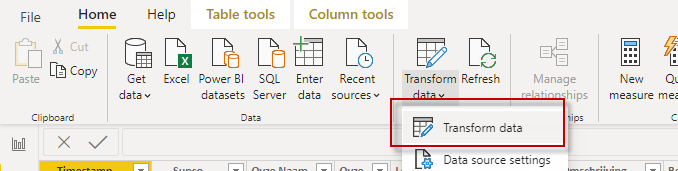
- Mark as New
- Bookmark
- Subscribe
- Mute
- Subscribe to RSS Feed
- Permalink
- Report Inappropriate Content
@Frixel In Power Query, do this:
let
    Source = Table.FromRows(Json.Document(Binary.Decompress(Binary.FromText("i45W0jDTNbLUNTIwMlAwsLAyMLIyMdFUitUBShjqmkPFza2MgVKWQPFYAA==", BinaryEncoding.Base64), Compression.Deflate)), let _t = ((type nullable text) meta [Serialized.Text = true]) in type table [Column1 = _t]),
    #"Changed Type" = Table.TransformColumnTypes(Source,{{"Column1", type text}}),
    #"Replaced Value" = Table.ReplaceValue(#"Changed Type","(","",Replacer.ReplaceText,{"Column1"}),
    #"Replaced Value1" = Table.ReplaceValue(#"Replaced Value",")","",Replacer.ReplaceText,{"Column1"}),
    #"Split Column by Delimiter" = Table.SplitColumn(#"Replaced Value1", "Column1", Splitter.SplitTextByDelimiter(" ", QuoteStyle.Csv), {"Column1.1", "Column1.2"}),
    #"Changed Type1" = Table.TransformColumnTypes(#"Split Column by Delimiter",{{"Column1.1", type date}, {"Column1.2", type time}})
in
    #"Changed Type1"
Follow on LinkedIn
@ me in replies or I'll lose your thread!!!
Instead of a Kudo, please vote for this idea
Become an expert!: Enterprise DNA
External Tools: MSHGQM
YouTube Channel!: Microsoft Hates Greg
Latest book!: DAX For Humans
DAX is easy, CALCULATE makes DAX hard...
- Mark as New
- Bookmark
- Subscribe
- Mute
- Subscribe to RSS Feed
- Permalink
- Report Inappropriate Content
@Frixel No, that is Power Query.
Follow on LinkedIn
@ me in replies or I'll lose your thread!!!
Instead of a Kudo, please vote for this idea
Become an expert!: Enterprise DNA
External Tools: MSHGQM
YouTube Channel!: Microsoft Hates Greg
Latest book!: DAX For Humans
DAX is easy, CALCULATE makes DAX hard...
- Mark as New
- Bookmark
- Subscribe
- Mute
- Subscribe to RSS Feed
- Permalink
- Report Inappropriate Content
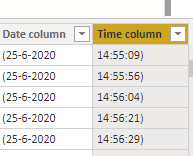
- Mark as New
- Bookmark
- Subscribe
- Mute
- Subscribe to RSS Feed
- Permalink
- Report Inappropriate Content
@Frixel OK, if you are doing it via DAX, then it would be:
Date Column =
  SUBSTITUTE(LEFT([Timestamp],SEARCH(" ",[Timestamp],,0)),"(","")

Time Column =
  SUBSTITUTE(RIGHT([Timestamp],LEN([Timestamp]) - SEARCH(" ",[Timestamp],,0)),")","")
Follow on LinkedIn
@ me in replies or I'll lose your thread!!!
Instead of a Kudo, please vote for this idea
Become an expert!: Enterprise DNA
External Tools: MSHGQM
YouTube Channel!: Microsoft Hates Greg
Latest book!: DAX For Humans
DAX is easy, CALCULATE makes DAX hard...
- Mark as New
- Bookmark
- Subscribe
- Mute
- Subscribe to RSS Feed
- Permalink
- Report Inappropriate Content
Great, it conferts now the time and date.
But...
The problem is now is that the date is reversed, if you know what i mean.
1st row 1st colomn = 1 July 2020 etc

- Mark as New
- Bookmark
- Subscribe
- Mute
- Subscribe to RSS Feed
- Permalink
- Report Inappropriate Content
@Frixel Try the following:
Date Column =
    VAR __Date = SUBSTITUTE(LEFT([Column1],SEARCH(" ",[Column1],,0)),"(","")
    VAR __FirstHyphen = SEARCH("-",__Date,,0)
    VAR __SecondHyphen = SEARCH("-",__Date,__FirstHyphen+1,0)
    VAR __Day = LEFT(__Date,SEARCH("-",__Date,,0)-1)
    VAR __Month = MID([Column1],__FirstHyphen+2,__SecondHyphen - __FirstHyphen - 1)
    VAR __Year = RIGHT(__Date,LEN(__Date) - __SecondHyphen)
    VAR __NewDate = __Month & "-" & __Day & "-" & __Year
RETURN
    __NewDate
PBIX is attached below sig. Table (17a)
Follow on LinkedIn
@ me in replies or I'll lose your thread!!!
Instead of a Kudo, please vote for this idea
Become an expert!: Enterprise DNA
External Tools: MSHGQM
YouTube Channel!: Microsoft Hates Greg
Latest book!: DAX For Humans
DAX is easy, CALCULATE makes DAX hard...
- Mark as New
- Bookmark
- Subscribe
- Mute
- Subscribe to RSS Feed
- Permalink
- Report Inappropriate Content
@Greg_Deckler Thanks,
It seems now i have the right Date format.
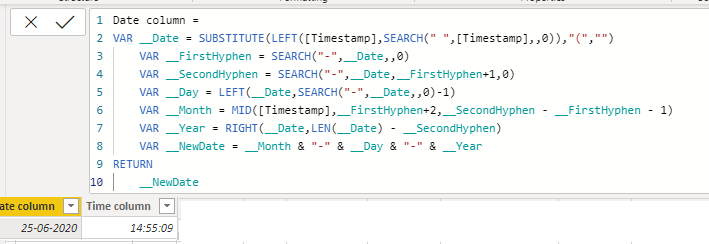
Can i now also move the Colomns date and Time on a other place?
I can`t find a option to move colomns to an other place
- Mark as New
- Bookmark
- Subscribe
- Mute
- Subscribe to RSS Feed
- Permalink
- Report Inappropriate Content
@Frixel I'm not sure what you mean by that. DAX calculated columns are always tacked onto the end of a table.
Follow on LinkedIn
@ me in replies or I'll lose your thread!!!
Instead of a Kudo, please vote for this idea
Become an expert!: Enterprise DNA
External Tools: MSHGQM
YouTube Channel!: Microsoft Hates Greg
Latest book!: DAX For Humans
DAX is easy, CALCULATE makes DAX hard...
- Mark as New
- Bookmark
- Subscribe
- Mute
- Subscribe to RSS Feed
- Permalink
- Report Inappropriate Content
@Frixel Try:
Date Column =
    VAR __Date = SUBSTITUTE(LEFT([Column1],SEARCH(" ",[Column1],,0)),"(","")
    VAR __FirstHyphen = SEARCH("-",__Date,,0)
    VAR __SecondHyphen = SEARCH("-",__Date,__FirstHyphen+1,0)
    VAR __Day = LEFT(__Date,SEARCH("-",__Date,,0)-1)
    VAR __Month = MID([Column1],__FirstHyphen+2,__SecondHyphen - __FirstHyphen - 1)
    VAR __Year = RIGHT(__Date,LEN(__Date) - __SecondHyphen)
    VAR __NewDate = __Month & "-" & __Day & "-" & __Year
RETURN
    __NewDate
PBIX is attached below sig. Table (17a)
Follow on LinkedIn
@ me in replies or I'll lose your thread!!!
Instead of a Kudo, please vote for this idea
Become an expert!: Enterprise DNA
External Tools: MSHGQM
YouTube Channel!: Microsoft Hates Greg
Latest book!: DAX For Humans
DAX is easy, CALCULATE makes DAX hard...

Helpful resources

FabCon & SQLCon – Barcelona 2026
Join us in Barcelona for FabCon and SQLCon, the Fabric, Power BI, SQL, and AI community event. Save €200 with code FABCMTY200.

Power BI DataViz World Championships - June 2026
A new Power BI DataViz World Championship is coming this June! Don't miss out on submitting your entry.

| User | Count |
|---|---|
| 24 | |
| 22 | |
| 20 | |
| 18 | |
| 14 |


| User | Count |
|---|---|
| 31 | |
| 26 | |
| 23 | |
| 20 | |
| 20 |


