cancel
Showing results for 
Search instead for 
Did you mean: 

Try your skills in the Power BI Dataviz World Championship! Round one ends June 26. Join now

Reply
viitama
Frequent Visitor

conditional join

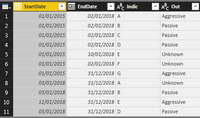
Hi, I'm new to PowerBi and trying to figure out how to join conditionally. I have been able to use merge queries wizard for simple joins, but now I have bit more complex. Here is my two tables and I would like to get Example1 Out column to Example2 table by matching Example2.Date to Example1.StartDate and Example1.EndDate (it should be between those) and Indic. Not sure where I do this, but I would appreciate if answer would incluede some info, where I input my DAX code.


image.pngimage.png


1 ACCEPTED SOLUTION
v-chuncz-msft
Community Support
Community Support

@viitama,


You may refer to the following DAX that adds a calculated column.

Column =
MAXX (
    FILTER (
        Example1,
        Example1[Indic] = Example2[Indic]
            && Example1[StartDate] <= Example2[Date]
            && Example1[EndDate] >= Example2[Date]
    ),
    Example1[Out]
)
Community Support Team _ Sam Zha
If this post helps, then please consider Accept it as the solution to help the other members find it more quickly.

View solution in original post

3 REPLIES 3
itcloud_Learn
Frequent Visitor

Hey Did you got the solution what you were asking i am having the same scernerio. if you got the solution please let me know that would be help ful, i am als having complex join scernerio

v-chuncz-msft
Community Support
Community Support

@viitama,


You may refer to the following DAX that adds a calculated column.

Column =
MAXX (
    FILTER (
        Example1,
        Example1[Indic] = Example2[Indic]
            && Example1[StartDate] <= Example2[Date]
            && Example1[EndDate] >= Example2[Date]
    ),
    Example1[Out]
)
Community Support Team _ Sam Zha
If this post helps, then please consider Accept it as the solution to help the other members find it more quickly.

this is way better that joins, thanks. Will work on new columns more.

Helpful resources

Announcements
Fabric Data Days is here Carousel

Fabric Data Days 2026

Don't miss out on Data Days, June 15 through August 7. Learn Fabric, Power BI, SQL, AI and more.

May Power BI Update Carousel

Power BI Monthly Update - May 2026

Check out the May 2026 Power BI update to learn about new features.

Power BI DataViz World Championships carousel

Power BI DataViz World Championships - June 2026

A new Power BI DataViz World Championship is coming this June! Don't miss out on submitting your entry.