This time we’re going bigger than ever. Fabric, Power BI, SQL, AI and more. We're covering it all. You won't want to miss it.
Learn moreDid you hear? There's a new SQL AI Developer certification (DP-800). Start preparing now and be one of the first to get certified. Register now
Hi community,
I have the following requirements:
- Period (numeric, not as date) as filter selection
- periods greater than selected period should be blue coloured
- periods less than selected period should be grey coloured
Well, I have a measure called #SelectedPeriod (e.g. 202003) and period-column #MyPeriodField
Now, I'm trying to tell PBI something like this:
IF #MyPeriodField is less than #SelectedPeriod than "#01B8AA" else "#333333"
The problem is I can't create a measure because I'm unable to use column-values or rather non-aggregated values in measures
AND
calculated colums are fixed and can't be used in conditional formatting.
So, do you have an idea how I could get PBI to format my table by selected period?
| 201801 | 201802 | 201803 | 201804 | 201805 | 201806 | 201807 |
| 54 | 456 | 45 | 546 | 456 | 86 | 456 |
| 42 | 12 | 454 | 21 | 454 | 121 | 6 |
Solved! Go to Solution.
Hi inf1948,
To achieve what you described you must follow these steps:
Measure =
VAR _period = SELECTEDVALUE('Period'[Period])
VAR _tableperiod = SELECTEDVALUE('Table'[Period])
RETURN IF(_period > _tableperiod,0,1)_period - dictionary, tableperiod - table with data
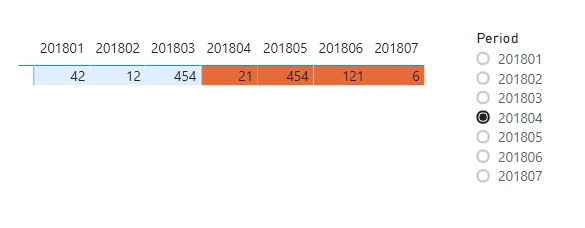
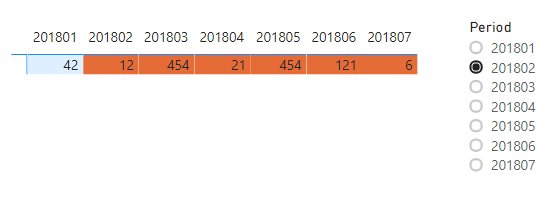
The result (I used background color, but you can also use this for font color):
_______________
If I helped, please accept the solution and give kudos! 😀
Hi inf1948,
To achieve what you described you must follow these steps:
Measure =
VAR _period = SELECTEDVALUE('Period'[Period])
VAR _tableperiod = SELECTEDVALUE('Table'[Period])
RETURN IF(_period > _tableperiod,0,1)_period - dictionary, tableperiod - table with data
The result (I used background color, but you can also use this for font color):
_______________
If I helped, please accept the solution and give kudos! 😀
awesome, thank you!
Create a measure and then use that in the conditional format of a font under advance control choose the field and use this measure
Color Date = if(FIRSTNONBLANK('Date'[datekey],blank()) <="201803","black","blue")
Color Date = if(FIRSTNONBLANK('Date'[date],TODAY()) <today(),"lightgreen","red")
Color sales = if(AVERAGE(Sales[Sales Amount])<170,"green","red")
Color Year = if(FIRSTNONBLANK('Date'[Year],2014) <=2016,"lightgreen",if(FIRSTNONBLANK('Date'[Year],2014)>2018,"red","yellow"))
Check steps
https://docs.microsoft.com/en-us/power-bi/desktop-conditional-table-formatting#color-by-color-values
Check out the April 2026 Power BI update to learn about new features.
Sign up to receive a private message when registration opens and key events begin.
If you have recently started exploring Fabric, we'd love to hear how it's going. Your feedback can help with product improvements.
| User | Count |
|---|---|
| 34 | |
| 31 | |
| 30 | |
| 21 | |
| 16 |
| User | Count |
|---|---|
| 61 | |
| 50 | |
| 30 | |
| 23 | |
| 23 |