Share feedback directly with Fabric product managers, participate in targeted research studies and influence the Fabric roadmap.
Sign up nowGet Fabric certified for FREE! Don't miss your chance! Learn more
Hi community,
I have the following requirements:
- Period (numeric, not as date) as filter selection
- periods greater than selected period should be blue coloured
- periods less than selected period should be grey coloured
Well, I have a measure called #SelectedPeriod (e.g. 202003) and period-column #MyPeriodField
Now, I'm trying to tell PBI something like this:
IF #MyPeriodField is less than #SelectedPeriod than "#01B8AA" else "#333333"
The problem is I can't create a measure because I'm unable to use column-values or rather non-aggregated values in measures
AND
calculated colums are fixed and can't be used in conditional formatting.
So, do you have an idea how I could get PBI to format my table by selected period?
| 201801 | 201802 | 201803 | 201804 | 201805 | 201806 | 201807 |
| 54 | 456 | 45 | 546 | 456 | 86 | 456 |
| 42 | 12 | 454 | 21 | 454 | 121 | 6 |
Solved! Go to Solution.
Hi inf1948,
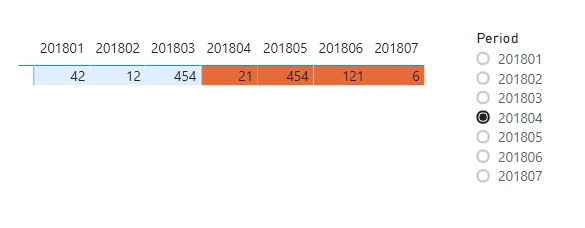
To achieve what you described you must follow these steps:
Measure =
VAR _period = SELECTEDVALUE('Period'[Period])
VAR _tableperiod = SELECTEDVALUE('Table'[Period])
RETURN IF(_period > _tableperiod,0,1)_period - dictionary, tableperiod - table with data
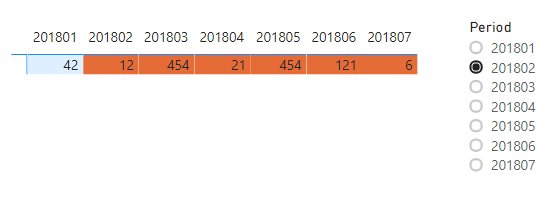
The result (I used background color, but you can also use this for font color):
_______________
If I helped, please accept the solution and give kudos! 😀
Hi inf1948,
To achieve what you described you must follow these steps:
Measure =
VAR _period = SELECTEDVALUE('Period'[Period])
VAR _tableperiod = SELECTEDVALUE('Table'[Period])
RETURN IF(_period > _tableperiod,0,1)_period - dictionary, tableperiod - table with data
The result (I used background color, but you can also use this for font color):
_______________
If I helped, please accept the solution and give kudos! 😀
awesome, thank you!
Create a measure and then use that in the conditional format of a font under advance control choose the field and use this measure
Color Date = if(FIRSTNONBLANK('Date'[datekey],blank()) <="201803","black","blue")
Color Date = if(FIRSTNONBLANK('Date'[date],TODAY()) <today(),"lightgreen","red")
Color sales = if(AVERAGE(Sales[Sales Amount])<170,"green","red")
Color Year = if(FIRSTNONBLANK('Date'[Year],2014) <=2016,"lightgreen",if(FIRSTNONBLANK('Date'[Year],2014)>2018,"red","yellow"))
Check steps
https://docs.microsoft.com/en-us/power-bi/desktop-conditional-table-formatting#color-by-color-values
Share feedback directly with Fabric product managers, participate in targeted research studies and influence the Fabric roadmap.
If you love stickers, then you will definitely want to check out our Community Sticker Challenge!
Check out the January 2026 Power BI update to learn about new features.
| User | Count |
|---|---|
| 63 | |
| 62 | |
| 42 | |
| 20 | |
| 18 |