Don't miss your chance to take the Fabric Data Engineer (DP-700) exam on us!
Learn moreWe've captured the moments from FabCon & SQLCon that everyone is talking about, and we are bringing them to the community, live and on-demand. Starts on April 14th. Register now
Hi Dears,
I have the following case and looking for your expertise. Suppose I have the following table I need to compare how much days resources has booked against the forecast
Period Name Number of hours
Aug X 8
Aug X 8
Aug X 8
Aug Y 7
Aug Y 5
Sept
. .
So X booked 3 days, and Y booked 1.6 days.
Now my forecast is as follow
Aug X 5days
Aug Y 4 days
Sept X 3 days
. .
How can I represent that graphically? I am looking to show each resource how much he booked against the forecast. As well as to show the total number of days because by all resources against the total forecast. Many thanks in advance
hi,@abukapsoun
After my research, you can do these as below:
Step1:
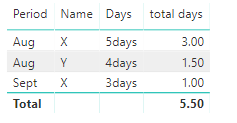
use this formula to create a table as below:
Table = FILTER(GENERATE(SUMMARIZE(Table1,Table1[Period],Table1[Name],"total days",CALCULATE(SUM(Table1[Number of hours]))/8),Table2),Table1[Period]=Table2[Period1]&&Table1[Name]=Table2[Name1])
Step2;
drag the fields into table
Here is pbix, please try it.
https://www.dropbox.com/s/srap6ny87r45mla/compare%20values.pbix?dl=0
Regards,
Lin
Thank you very much @v-lili6-msft that looks exactly what I am looking for.
Now I will try to mirror your proposal on my file.. I hope it works 🙂
hi, @abukapsoun
Could you please tell me if your problem has been solved? If it is, could you please mark the helpful replies as Answered?
Best Regards,
Lin
If you have recently started exploring Fabric, we'd love to hear how it's going. Your feedback can help with product improvements.
A new Power BI DataViz World Championship is coming this June! Don't miss out on submitting your entry.
Share feedback directly with Fabric product managers, participate in targeted research studies and influence the Fabric roadmap.
| User | Count |
|---|---|
| 55 | |
| 34 | |
| 32 | |
| 19 | |
| 17 |
| User | Count |
|---|---|
| 75 | |
| 72 | |
| 38 | |
| 35 | |
| 25 |