Learn from the best! Meet the four finalists headed to the FINALS of the Power BI Dataviz World Championships! Register now
Hi,
Is it possible to change the order in a stacked column combochart?
for example:
Is it possible for example that the combochart (THis Year Sales, Last Year Sales and Gross Margin Last Year % by month) on the link above to change the order stacked column chart so that the stacked column chart starts with "Last Year Sales" and on top "This year Sales"??
Solved! Go to Solution.
Hi @TonyG,
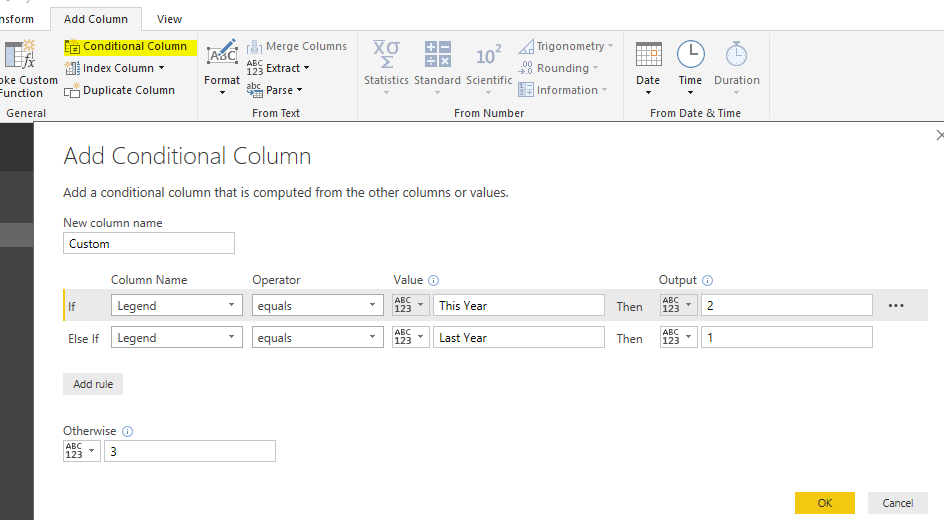
You should create a conditional column in Query Editor mode first.
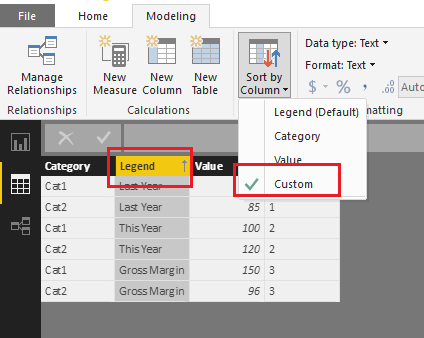
In data view tab, change the "sort by column" selection from default to the new conditional column.
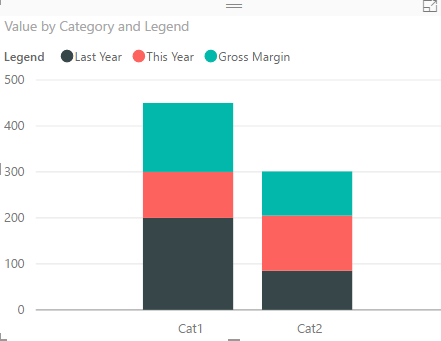
But in chart visual, it is not able to change the legend order based on need, it is in Ascending Order by default.
Best regards,
Yuliana Gu
Hi @TonyG,
You should create a conditional column in Query Editor mode first.
In data view tab, change the "sort by column" selection from default to the new conditional column.
But in chart visual, it is not able to change the legend order based on need, it is in Ascending Order by default.
Best regards,
Yuliana Gu
Hi,
There is few possibilities:
1) Create calculated column/measure wich return text (e.g. 1.Last year and 2.This year) then it will put 1 below and 2 above.
2) Create index column/measure for dates and use function "Sort by column", there choose index column.
If you have 2 columns with revenue for this and last year then just change their order in neded field (column values).
| User | Count |
|---|---|
| 55 | |
| 37 | |
| 23 | |
| 17 | |
| 17 |
| User | Count |
|---|---|
| 69 | |
| 58 | |
| 39 | |
| 21 | |
| 21 |