Join us at FabCon Atlanta from March 16 - 20, 2026, for the ultimate Fabric, Power BI, AI and SQL community-led event. Save $200 with code FABCOMM.
Register now!The Power BI Data Visualization World Championships is back! Get ahead of the game and start preparing now! Learn more
Hi I like to combine two tables of data into one bar chart.
this this the first data table:
| Forecast data | Amount | Expecteddate | DateofForecast | Product | |||
| 80 | 1-6-2016 | 27-4-2016 | Red | ||||
| 90 | 1-6-2016 | 4-5-2016 | Red | ||||
| 95 | 1-6-2016 | 11-5-2016 | Red | ||||
| 98 | 1-6-2016 | 18-5-2016 | Red | ||||
| 100 | 1-6-2016 | 25-5-2016 | Red | ||||
| 90 | 5-6-2016 | 1-5-2016 | Green | ||||
| 95 | 5-6-2016 | 8-5-2016 | Green | ||||
| 100 | 5-6-2016 | 15-5-2016 | Green | ||||
| 108 | 5-6-2016 | 22-5-2016 | Green | ||||
| 110 | 5-6-2016 | 29-5-2016 | Green |
This is the second datatable.
| Amount | Expecteddate | DateofForecast | Product | ||||
| actuals data | 101 | 1-6-2016 | 1-6-2016 | Red | |||
| 112 | 5-6-2016 | 5-6-2016 | Green |
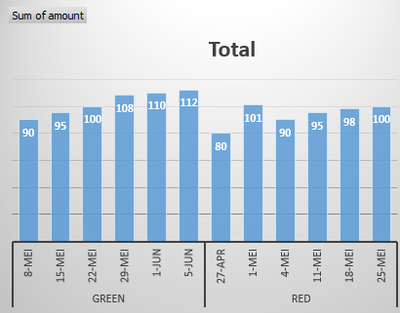
The bar chart could look like this
The bars should be clustered by expecteddate and product
The last bar of the product (= actuals) may be different color.
I like to have this analysis over a month period for example.
Any ideaS how to do this?
JohnD2
Solved! Go to Solution.
Hi sridevi,
In your scenario, you should combine the two tables into a single one first.
uniontable = UNION(ADDCOLUMNS(Actual,"Actuals","actual forecast"),ADDCOLUMNS(Forcecast,"Actuals","Forcecast forecast"))
To distinguish the bar color between actual value and forcecast value, you can add anextra legend in the chart.
If you have any question, please feel free to ask.
Best regards,
Yuliana Gu
Hi sridevi,
In your scenario, you should combine the two tables into a single one first.
uniontable = UNION(ADDCOLUMNS(Actual,"Actuals","actual forecast"),ADDCOLUMNS(Forcecast,"Actuals","Forcecast forecast"))
To distinguish the bar color between actual value and forcecast value, you can add anextra legend in the chart.
If you have any question, please feel free to ask.
Best regards,
Yuliana Gu
Hi John,
Please see attached file here for your solution.
You have to append your Actuals Table onto the Forecast Table and You can load this query into the PowerBI and Create Bar Chart visual with data labels on to visualize your output.
Thanks & Regards,
Bhavesh
Check out the November 2025 Power BI update to learn about new features.
Advance your Data & AI career with 50 days of live learning, contests, hands-on challenges, study groups & certifications and more!
| User | Count |
|---|---|
| 57 | |
| 43 | |
| 40 | |
| 21 | |
| 17 |
| User | Count |
|---|---|
| 171 | |
| 104 | |
| 90 | |
| 44 | |
| 44 |