Join us in Barcelona for FabCon and SQLCon, September 28 - October 1, 2026.
This is best Fabric, Power BI, SQL and AI community event. How do we know? The last event sold out! Save €200 with code FABCMTY200.
Register now- Power BI forums
- Get Help with Power BI
- Desktop
- Service
- Report Server
- Power Query
- Mobile Apps
- Developer
- DAX Commands and Tips
- Custom Visuals Development Discussion
- Health and Life Sciences
- Power BI Spanish forums
- Translated Spanish Desktop
- Training and Consulting
- Instructor Led Training
- Dashboard in a Day for Women, by Women
- Galleries
- Data Stories Gallery
- Themes Gallery
- Contests Gallery
- QuickViz Gallery
- Quick Measures Gallery
- Visual Calculations Gallery
- Fabric Apps Gallery
- Notebook Gallery
- Translytical Task Flow Gallery
- TMDL Gallery
- R Script Showcase
- Webinars and Video Gallery
- Ideas
- Custom Visuals Ideas (read-only)
- Issues
- Issues
- Events
- Upcoming Events
July 28 - August 9 | Final Round of the Power BI Dataviz World Championships. This is your chance. Learn more
- Power BI forums
- Forums
- Get Help with Power BI
- Desktop
- Re: column formatting issues
- Subscribe to RSS Feed
- Mark Topic as New
- Mark Topic as Read
- Float this Topic for Current User
- Bookmark
- Subscribe
- Printer Friendly Page

- Mark as New
- Bookmark
- Subscribe
- Mute
- Subscribe to RSS Feed
- Permalink
- Report Inappropriate Content
column formatting issues
I am having an issue where rather than showing the ID multiple times i want to show ID once but the Type region and price to all appear on the same line rather than seperate please see example data
Solved! Go to Solution.


- Mark as New
- Bookmark
- Subscribe
- Mute
- Subscribe to RSS Feed
- Permalink
- Report Inappropriate Content
hi @Anonymous
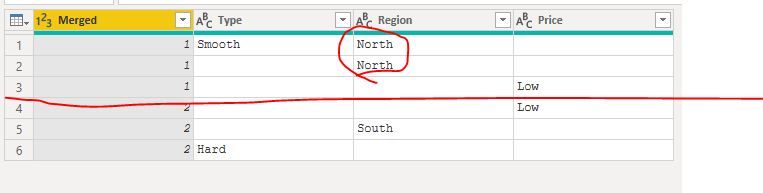
For this error, it means you have more than one value in same Megerd ID for Type or Region or Price.
It like this:
So please adjust the Pivot function as below:
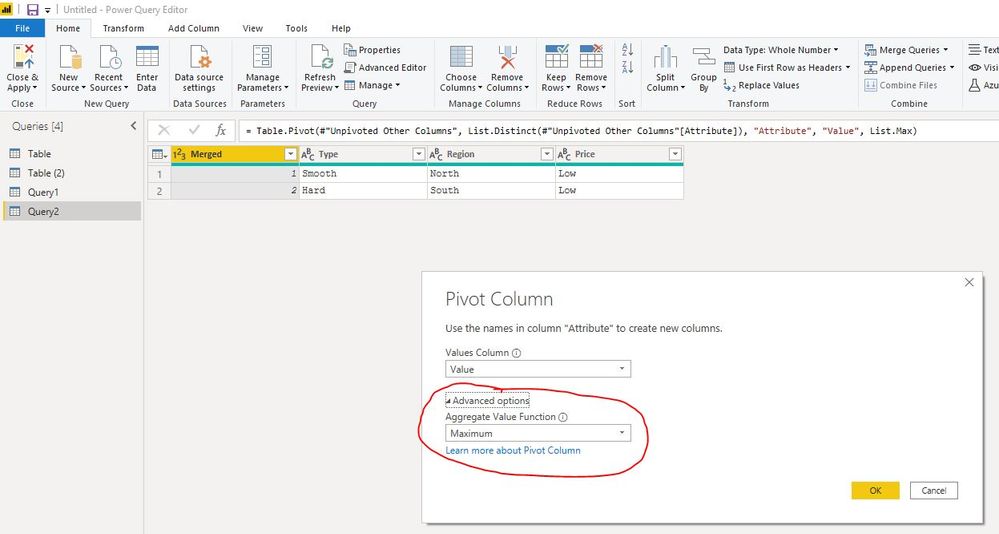
here is M code, you could try it.
let
    Source = Table.FromRows(Json.Document(Binary.Decompress(Binary.FromText("i45WMlTSUQrOzc8vyQAy/PKLwLSCUqwOREoBpygI++SXg8WM8IgF55ci6QaJeiQWpcA1xMYCAA==", BinaryEncoding.Base64), Compression.Deflate)), let _t = ((type nullable text) meta [Serialized.Text = true]) in type table [Merged = _t, Type = _t, Region = _t, Price = _t]),
    #"Changed Type" = Table.TransformColumnTypes(Source,{{"Merged", Int64.Type}, {"Type", type text}, {"Region", type text}, {"Price", type text}}),
    #"Replaced Value" = Table.ReplaceValue(#"Changed Type"," ",null,Replacer.ReplaceValue,{"Type", "Region", "Price"}),
    #"Unpivoted Other Columns" = Table.UnpivotOtherColumns(#"Replaced Value", {"Merged"}, "Attribute", "Value"),
    #"Pivoted Column" = Table.Pivot(#"Unpivoted Other Columns", List.Distinct(#"Unpivoted Other Columns"[Attribute]), "Attribute", "Value", List.Max)
in
    #"Pivoted Column"
Regards,
Lin
If this post helps, then please consider Accept it as the solution to help the other members find it more quickly.


- Mark as New
- Bookmark
- Subscribe
- Mute
- Subscribe to RSS Feed
- Permalink
- Report Inappropriate Content
Hi @Anonymous
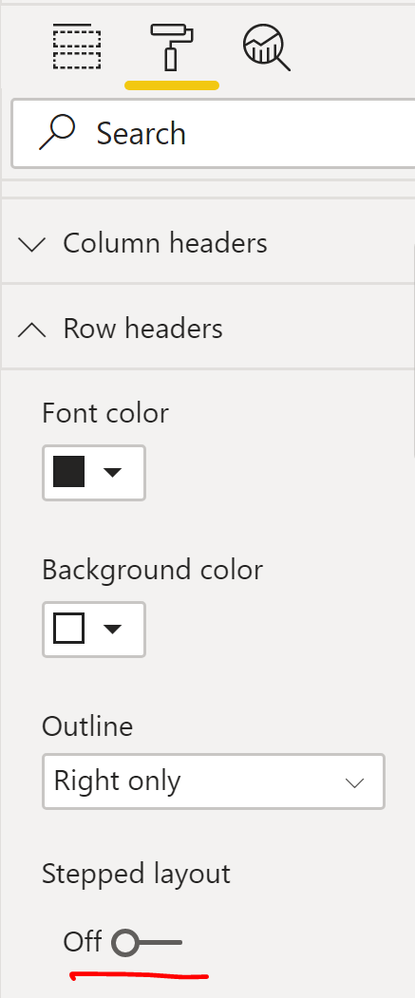
If you are referring matrix visual layout?
Then you can switch off the stepped layout.
Mariusz
If this post helps, then please consider Accepting it as the solution.
Please feel free to connect with me.
- Mark as New
- Bookmark
- Subscribe
- Mute
- Subscribe to RSS Feed
- Permalink
- Report Inappropriate Content
@Mariusz sorry bad explanation i need to do this in Power Bi in M Query. As these columns need to be filters, i have tried pivotting the data then unpivotting but i get an error as says there can't be multiples
- Mark as New
- Bookmark
- Subscribe
- Mute
- Subscribe to RSS Feed
- Permalink
- Report Inappropriate Content
Hi @Anonymous
Can you paste the sample from Excel into the body of this post?
Mariusz
If this post helps, then please consider Accepting it as the solution.
Please feel free to connect with me.
- Mark as New
- Bookmark
- Subscribe
- Mute
- Subscribe to RSS Feed
- Permalink
- Report Inappropriate Content
- Mark as New
- Bookmark
- Subscribe
- Mute
- Subscribe to RSS Feed
- Permalink
- Report Inappropriate Content
Hi @Anonymous
Try this
let
    Source = Table.FromRows(Json.Document(Binary.Decompress(Binary.FromText("i45WMlTSUQrOzc8vyQAyFMA4VgciDOL55RdBZZBFQdgnvxwsZoRHLDi/FEk3SNQjsSgFYVEsAA==", BinaryEncoding.Base64), Compression.Deflate)), let _t = ((type nullable text) meta [Serialized.Text = true]) in type table [Merged = _t, Type = _t, Region = _t, Price = _t]),
    #"Changed Type" = Table.TransformColumnTypes(Source,{{"Merged", Int64.Type}, {"Type", type text}, {"Region", type text}, {"Price", type text}}),
    #"Replaced Value" = Table.ReplaceValue(#"Changed Type"," ",null,Replacer.ReplaceValue,{"Type", "Region", "Price"}),
    #"Unpivoted Other Columns" = Table.UnpivotOtherColumns(#"Replaced Value", {"Merged"}, "Attribute", "Value"),
    #"Pivoted Column" = Table.Pivot(#"Unpivoted Other Columns", List.Distinct(#"Unpivoted Other Columns"[Attribute]), "Attribute", "Value")
in
    #"Pivoted Column"
or see the attached
Mariusz
If this post helps, then please consider Accepting it as the solution.
Please feel free to connect with me.
- Mark as New
- Bookmark
- Subscribe
- Mute
- Subscribe to RSS Feed
- Permalink
- Report Inappropriate Content
@Mariusz thank you for this but i am getting the following erro;
Expression.Error: There were too many elements in the enumeration to complete the operation.
Details:
[List]
This is down to duplicates but i need these to be in there, thats the main part i am having issue with
- Mark as New
- Bookmark
- Subscribe
- Mute
- Subscribe to RSS Feed
- Permalink
- Report Inappropriate Content
hi @Anonymous
For this error, it means you have more than one value in same Megerd ID for Type or Region or Price.
It like this:
So please adjust the Pivot function as below:
here is M code, you could try it.
let
    Source = Table.FromRows(Json.Document(Binary.Decompress(Binary.FromText("i45WMlTSUQrOzc8vyQAy/PKLwLSCUqwOREoBpygI++SXg8WM8IgF55ci6QaJeiQWpcA1xMYCAA==", BinaryEncoding.Base64), Compression.Deflate)), let _t = ((type nullable text) meta [Serialized.Text = true]) in type table [Merged = _t, Type = _t, Region = _t, Price = _t]),
    #"Changed Type" = Table.TransformColumnTypes(Source,{{"Merged", Int64.Type}, {"Type", type text}, {"Region", type text}, {"Price", type text}}),
    #"Replaced Value" = Table.ReplaceValue(#"Changed Type"," ",null,Replacer.ReplaceValue,{"Type", "Region", "Price"}),
    #"Unpivoted Other Columns" = Table.UnpivotOtherColumns(#"Replaced Value", {"Merged"}, "Attribute", "Value"),
    #"Pivoted Column" = Table.Pivot(#"Unpivoted Other Columns", List.Distinct(#"Unpivoted Other Columns"[Attribute]), "Attribute", "Value", List.Max)
in
    #"Pivoted Column"
Regards,
Lin
If this post helps, then please consider Accept it as the solution to help the other members find it more quickly.
- Mark as New
- Bookmark
- Subscribe
- Mute
- Subscribe to RSS Feed
- Permalink
- Report Inappropriate Content
Hi @Anonymous
Can you provide the data sample that includes duplicates?
Mariusz
If this post helps, then please consider Accepting it as the solution.
Please feel free to connect with me.
Helpful resources

FabCon & SQLCon – Barcelona 2026
Join us in Barcelona for FabCon and SQLCon, the Fabric, Power BI, SQL, and AI community event. Save €200 with code FABCMTY200.

Fabric Community Sticker Challenge - Barcelona 2026
If you love stickers, then you will definitely want to check out our community sticker challenge, Barcelona edition!

Power BI Monthly Update - July 2026
Check out the July 2026 Power BI update to learn about new features.

Power BI DataViz World Championships - June 2026
A new Power BI DataViz World Championship is coming this June! Don't miss out on submitting your entry.

| User | Count |
|---|---|
| 25 | |
| 23 | |
| 19 | |
| 18 | |
| 14 |


| User | Count |
|---|---|
| 24 | |
| 20 | |
| 20 | |
| 19 | |
| 18 |


