Get Fabric or SQL Certified for Free.
Get certified for free when you join Fabric Data Days 2026 and dive into Fabric, Power BI, SQL, AI, and other essential data skills.
Join now- Power BI forums
- Get Help with Power BI
- Desktop
- Service
- Report Server
- Power Query
- Mobile Apps
- Developer
- DAX Commands and Tips
- Custom Visuals Development Discussion
- Health and Life Sciences
- Power BI Spanish forums
- Translated Spanish Desktop
- Training and Consulting
- Instructor Led Training
- Dashboard in a Day for Women, by Women
- Galleries
- Data Stories Gallery
- Themes Gallery
- Contests Gallery
- QuickViz Gallery
- Quick Measures Gallery
- Visual Calculations Gallery
- Fabric Apps Gallery
- Notebook Gallery
- Translytical Task Flow Gallery
- TMDL Gallery
- R Script Showcase
- Webinars and Video Gallery
- Ideas
- Custom Visuals Ideas (read-only)
- Issues
- Issues
- Events
- Upcoming Events
July 28 - August 9 | Final Round of the Power BI Dataviz World Championships. This is your chance. Learn more
- Power BI forums
- Forums
- Get Help with Power BI
- Desktop
- circular dependency --help please
- Subscribe to RSS Feed
- Mark Topic as New
- Mark Topic as Read
- Float this Topic for Current User
- Bookmark
- Subscribe
- Printer Friendly Page

- Mark as New
- Bookmark
- Subscribe
- Mute
- Subscribe to RSS Feed
- Permalink
- Report Inappropriate Content
circular dependency --help please
hi
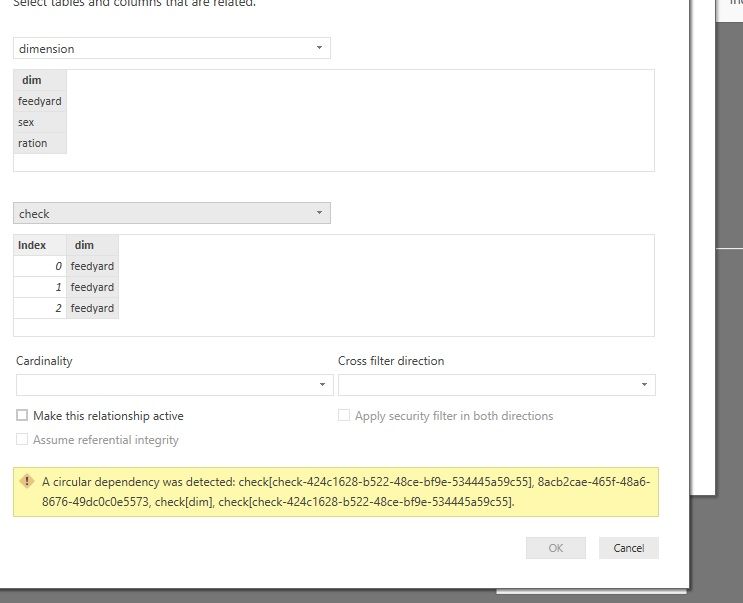
i am just trying to relate tables using bridge table . where i am facing the circlaur dependency .
dim:
feedyard
sex
ration
data table :
feedyard sex ration index
alex bike 1200 0
alex car 6000 1
alex house 2000 2
created the bridge table :
Solved! Go to Solution.


- Mark as New
- Bookmark
- Subscribe
- Mute
- Subscribe to RSS Feed
- Permalink
- Report Inappropriate Content
Hi @Anonymous
1. copy "dimension" and paste, then i get "dimension2" table,
in this table with only one column, "remove rows"->remove duplicates
2. copy "data" and paste, then i get "data2" table,
in this table, click on the [index] column and select "Remove other columns", then Removed Duplicates
3.in "dimension2" table, add a custome column
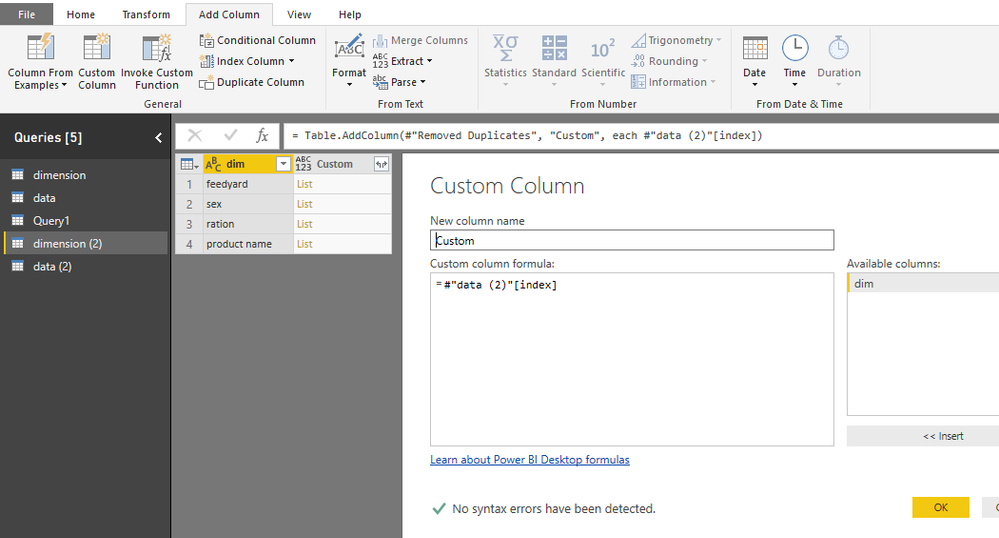
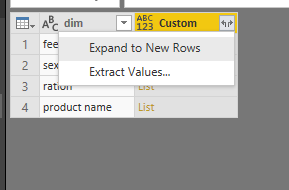
Then expand this column
Best Regards
Maggie
- Mark as New
- Bookmark
- Subscribe
- Mute
- Subscribe to RSS Feed
- Permalink
- Report Inappropriate Content
Hi @Anonymous
You use 'dimension'[dim] to create the bridge table, then create the relationship between 'dimension' and "check" table, so it occurs an error for circular dependency.
More introduction about avoiding circular dependency please read this article.
As a workaround, you could create this bridge table in Edit Queries.
Create a blank query, then paste the following code in Advanced editor
let
    Source1 = dimension,
    #"Removed Duplicates" = Table.Distinct(Source1),
    Source2 = data,
    #"Removed Other Columns" = Table.SelectColumns(Source2,{"index"}),
    #"Removed Duplicates2" = Table.Distinct(#"Removed Other Columns"),
    addcolumn=Table.AddColumn(#"Removed Duplicates", "index", each #"Removed Duplicates2"),
    #"Expanded index" = Table.ExpandTableColumn(addcolumn, "index", {"index"}, {"index.index"})
in
    #"Expanded index"
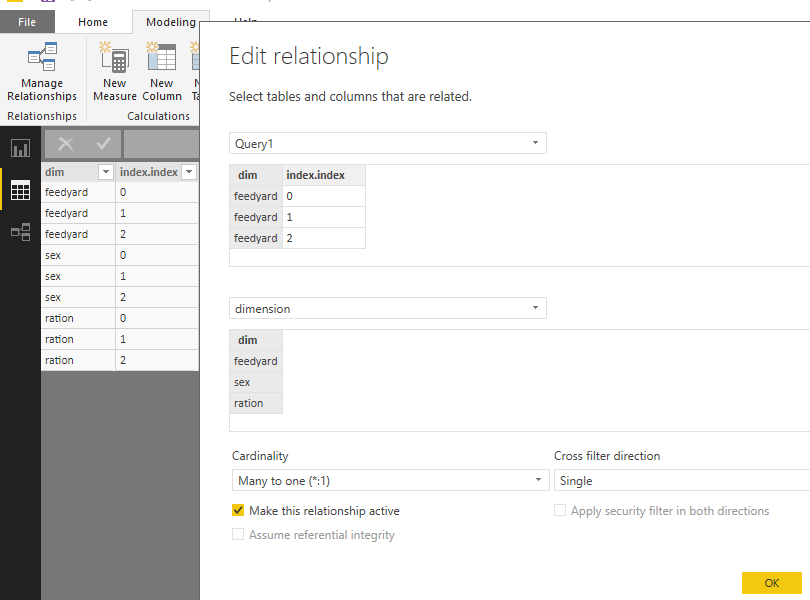
Or you can edit the table steps by steps with the UI
1.Query1:
copy and paste the 'dim' table->Removed Duplicates
2.Query2:
copy and paste the 'data' table->click on the [index] column and select "Remove other columns"->Removed Duplicates
3.in Query1:
Add column from Query2 , then expand the column
Best Regards
Maggie
- Mark as New
- Bookmark
- Subscribe
- Mute
- Subscribe to RSS Feed
- Permalink
- Report Inappropriate Content
will this table gets refreshed will scheduled in prod?. I mean if the values (attributes)gets added to the dimension ( productname say) will this data be also reflects to the bridge table automatically without manual intervension?
one more question : if i paste the query using query editor will this query creates other two tales and then join ?. Will this step refreshes the data in bridge table based on data change other two tables ?
- Mark as New
- Bookmark
- Subscribe
- Mute
- Subscribe to RSS Feed
- Permalink
- Report Inappropriate Content
Hi @Anonymous
1. when you add values in "dimension" or "data" table and refresh the dataset by clicking "Refresh All", it can automatically refresh in the "Query1".
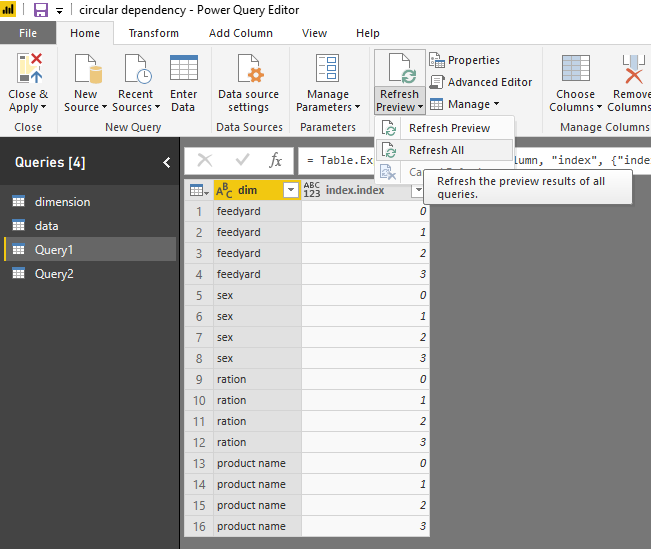
2.
my first method is:
create a blank query-"Query1"
open the Advanced editor, paste my code, this will create a table which you want.
this new table "Query1" has joined "dimension" or "data" table together.
Yes, when "dimension" or "data" table refresh, table "Query1" will refresh automatically as shown above.
If you don't want table "Query1" to refresh upon the "dimension" or "data" table refresh,
you could uncheck "include in report refresh", then "close &&apply" , go to the "Data view",
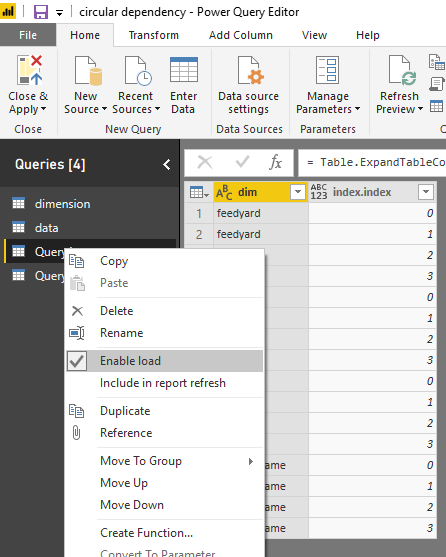
then when the "dimension" or "data" table refresh, table "Query1" won't refresh but remain the previous values. (in Data view and Report view)
If you use "Query1" and "Query2" together to create the bridge table, you need to uncheck "include in report refresh" for both "Query1" and "Query2" .
Best Regards
Maggie
- Mark as New
- Bookmark
- Subscribe
- Mute
- Subscribe to RSS Feed
- Permalink
- Report Inappropriate Content
- Mark as New
- Bookmark
- Subscribe
- Mute
- Subscribe to RSS Feed
- Permalink
- Report Inappropriate Content
Hi @Anonymous
1. copy "dimension" and paste, then i get "dimension2" table,
in this table with only one column, "remove rows"->remove duplicates
2. copy "data" and paste, then i get "data2" table,
in this table, click on the [index] column and select "Remove other columns", then Removed Duplicates
3.in "dimension2" table, add a custome column
Then expand this column
Best Regards
Maggie
- Mark as New
- Bookmark
- Subscribe
- Mute
- Subscribe to RSS Feed
- Permalink
- Report Inappropriate Content
3.in Query1:
Add column from Query2 , then expand the column .
can you send me screenshot how you did this from query editor . I am not able to add column from another table .can you help here ?
- Mark as New
- Bookmark
- Subscribe
- Mute
- Subscribe to RSS Feed
- Permalink
- Report Inappropriate Content
hi @v-juanli-msft if you used custom calculation tab for adding column .if yes can you share code please?
- Mark as New
- Bookmark
- Subscribe
- Mute
- Subscribe to RSS Feed
- Permalink
- Report Inappropriate Content
What does your overall table structure look like? Do you have many bi-directional relationships? Bi-directional 1 to many relationships are often the easy way to fall prey to this issue. The other cause could be if you have created a loop within your actual structure, whereby you might have to make a relationship inactive and make use of USERELATIONSHIP in dax if there is a special case.
- Mark as New
- Bookmark
- Subscribe
- Mute
- Subscribe to RSS Feed
- Permalink
- Report Inappropriate Content
HI @Anonymous
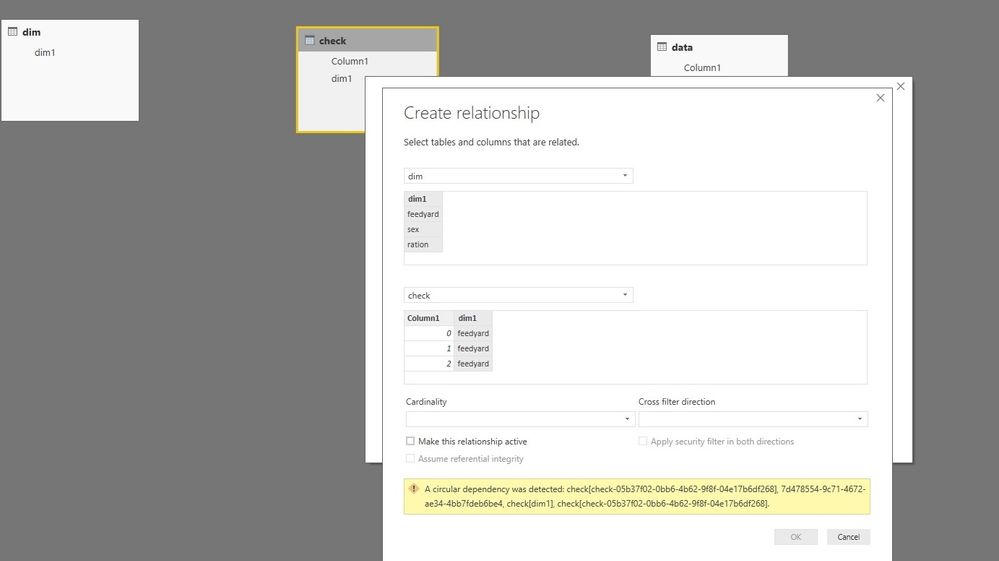
i dont have any tables other than 3 .Ataching the screenshot . Do you mean that table which i am creating by the use of cross join is causing the issue ?
- Mark as New
- Bookmark
- Subscribe
- Mute
- Subscribe to RSS Feed
- Permalink
- Report Inappropriate Content
I notice the Cardinality and Filter direction are blank. Those options shouldn't be blank, and it shouldn't even let you select blank. Something is very broken here.
Are you able to select cardinality?
- Mark as New
- Bookmark
- Subscribe
- Mute
- Subscribe to RSS Feed
- Permalink
- Report Inappropriate Content
hi @Anonymous : I am able to select them but "ok" button is not active state .can you try this sample data from your end once and let me know if any issues at my end.
- Mark as New
- Bookmark
- Subscribe
- Mute
- Subscribe to RSS Feed
- Permalink
- Report Inappropriate Content
It just occured to me what is wrong. Your building your bridging table in DAX, then trying to join that table into one of its parent tables. Thats creating the circular dependancy.
Instead, build this table inside the Edit Query section. Do this by right clicking on your query for the table you desire, click on "Reference", remove the columns you don't need and select "Remove Duplicates" in the next step. You should be able to create your join after you close and apply (you will first need to remove your Dax created table)
Helpful resources

FabCon & SQLCon – Barcelona 2026
Join us in Barcelona for FabCon and SQLCon, the Fabric, Power BI, SQL, and AI community event. Save €200 with code FABCMTY200.

Fabric Community Sticker Challenge - Barcelona 2026
If you love stickers, then you will definitely want to check out our community sticker challenge, Barcelona edition!

Power BI Monthly Update - July 2026
Check out the July 2026 Power BI update to learn about new features.

Power BI DataViz World Championships - June 2026
A new Power BI DataViz World Championship is coming this June! Don't miss out on submitting your entry.

| User | Count |
|---|---|
| 26 | |
| 24 | |
| 23 | |
| 19 | |
| 17 |


| User | Count |
|---|---|
| 30 | |
| 28 | |
| 21 | |
| 19 | |
| 17 |


