
cancel
Showing results for 
Search instead for 
Did you mean: 

July 7 - July 17 | Round 2 of the Power BI Dataviz World Championships. Don't miss your chance! Learn more

Reply
Sham_24
Frequent Visitor

changing sql server connection for Direct Query

I am new to Power BI. I am trying to change my SQL server data source connection to different SQL server data source connection in Direct Query mode. It is asking me to change it to import mode to do this. How can I change the sql server connection in direct query mode?

1 ACCEPTED SOLUTION
Anonymous
Not applicable

Hi, @Sham_24 

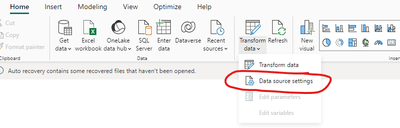
To change a SQL Server data source in DirectQuery mode without switching to import mode, in the Data Source Settings window, locate the current SQL Server data source, and then select Change Feed.

vyohuamsft_0-1713322659445.png

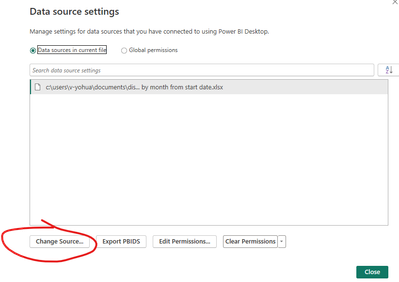
Enter the details of the new SQL Server you want to connect to, including the server name and database. Confirm the changes and close the Data Source Settings window.

vyohuamsft_1-1713322698134.png


How to Get Your Question Answered Quickly 

Best Regards

Yongkang Hua

If this post helps, then please consider Accept it as the solution to help the other members find it more quickly.

View solution in original post

4 REPLIES 4
Sham_24
Frequent Visitor

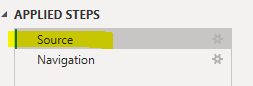
Thanks Yongkang Hua for your reply. I followed your steps. But when I go to Tranform Data and go to the Applied Steps-> Source. I see error below.

Sham_24_1-1713362016315.png


Sham_24_0-1713361942730.png


Anonymous
Not applicable

Hi, @Sham_24 

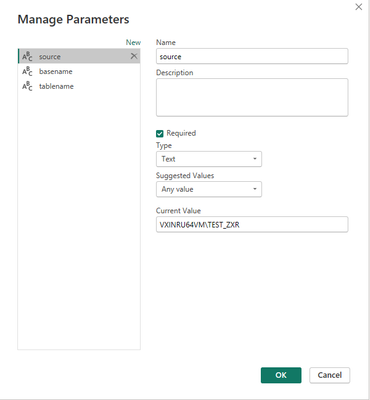
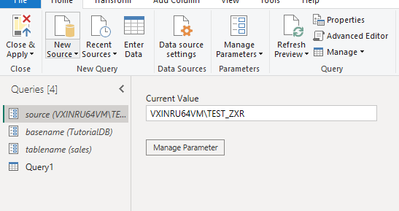
You can create three parameters in Power Query, representing the SQL Server data source, database, and data table, and then modify them in the Advance editor, as shown below:

Create three Parameters

vyohuamsft_0-1713424062629.png

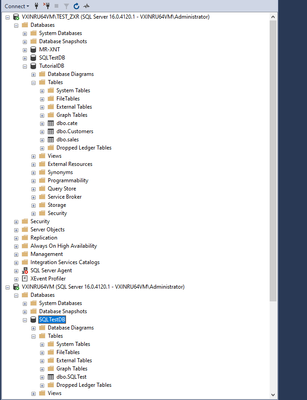
This is my sql server

vyohuamsft_1-1713424125852.png

vyohuamsft_5-1713425143326.png


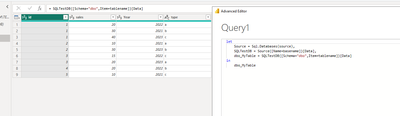
I'm in the M language in the Advanced Editor and my table data in sql server

vyohuamsft_3-1713424791323.png

let
    Source = Sql.Databases(source),
    SQLTestDB = Source{[Name=basename]}[Data],
    dbo_MyTable = SQLTestDB{[Schema="dbo",Item=tablename]}[Data]
in
    dbo_MyTable


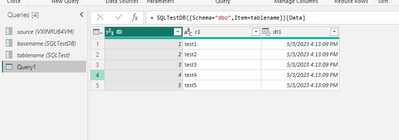
Next, I'm going to make changes to the data source from VXINRU64VMTEST_ZXR to VXINRU64VM data source, and make changes to the database and data tables, you need to do it in the parameters.

vyohuamsft_4-1713425095125.png


How to Get Your Question Answered Quickly 

Best Regards

Yongkang Hua

If this post helps, then please consider Accept it as the solution to help the other members find it more quickly.

Anonymous
Not applicable

Hi, @Sham_24 

To change a SQL Server data source in DirectQuery mode without switching to import mode, in the Data Source Settings window, locate the current SQL Server data source, and then select Change Feed.

vyohuamsft_0-1713322659445.png

Enter the details of the new SQL Server you want to connect to, including the server name and database. Confirm the changes and close the Data Source Settings window.

vyohuamsft_1-1713322698134.png


How to Get Your Question Answered Quickly 

Best Regards

Yongkang Hua

If this post helps, then please consider Accept it as the solution to help the other members find it more quickly.

Thanks YongKang Hua. It worked beautifully. 

Helpful resources

Announcements
FabCon and SQLCon Barcelona 2026

FabCon & SQLCon – Barcelona 2026

Join us in Barcelona for FabCon and SQLCon, the Fabric, Power BI, SQL, and AI community event. Save €200 with code FABCMTY200.

60 days of Data Days Carousel

Data Days 2026

Join Fabric Data Days 2026: 60 days of free live/on-demand sessions, challenges, study groups, and certification opportunities.

Power BI DataViz World Championships carousel

Power BI DataViz World Championships - June 2026

A new Power BI DataViz World Championship is coming this June! Don't miss out on submitting your entry.