Join us at FabCon Atlanta from March 16 - 20, 2026, for the ultimate Fabric, Power BI, AI and SQL community-led event. Save $200 with code FABCOMM.
Register now!Get Fabric certified for FREE! Don't miss your chance! Learn more
Hi,
I have a full and working report built on a live web url connection like
https://service/api/company/databoards/10=2019-01-01T00:00:00.000Z&11=2019-01-31T00:00:00.000Z
and I would like to extend the date range without having to rebuild the report as it contains various measures and DAX calculations.
Is there a way to extend the original url date range without having to re-do thew work?
Many thanks,
Solved! Go to Solution.
Hi @Anonymous
You should probably refer to change the source using parameter.
But I can’t access the link you indicated, I use below url for your reference.
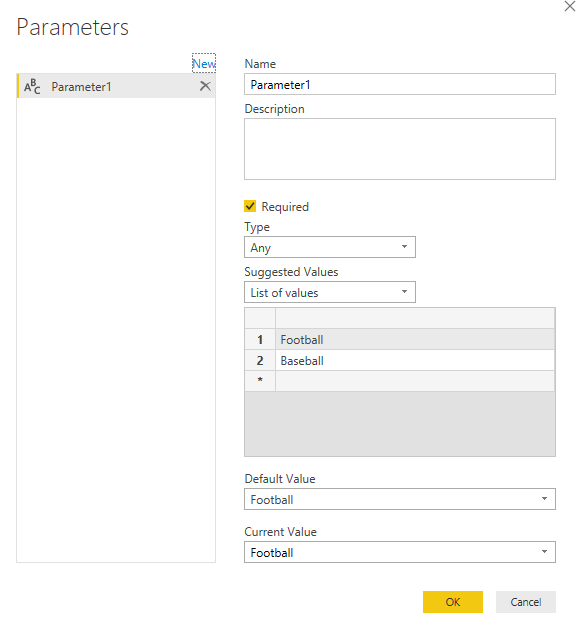
I’ve created the new parameter:
And then replace the url link with parameter:
Everytime we change the parameter, the link will be changed accordingly.
Best regards,
Dina Ye
Hi @Anonymous
You should probably refer to change the source using parameter.
But I can’t access the link you indicated, I use below url for your reference.
I’ve created the new parameter:
And then replace the url link with parameter:
Everytime we change the parameter, the link will be changed accordingly.
Best regards,
Dina Ye
Share feedback directly with Fabric product managers, participate in targeted research studies and influence the Fabric roadmap.
Check out the January 2026 Power BI update to learn about new features.
| User | Count |
|---|---|
| 69 | |
| 59 | |
| 47 | |
| 20 | |
| 15 |
| User | Count |
|---|---|
| 106 | |
| 102 | |
| 38 | |
| 27 | |
| 27 |