FabCon is coming to Atlanta
Join us at FabCon Atlanta from March 16 - 20, 2026, for the ultimate Fabric, Power BI, AI and SQL community-led event. Save $200 with code FABCOMM.
Register now!- Power BI forums
- Get Help with Power BI
- Desktop
- Service
- Report Server
- Power Query
- Mobile Apps
- Developer
- DAX Commands and Tips
- Custom Visuals Development Discussion
- Health and Life Sciences
- Power BI Spanish forums
- Translated Spanish Desktop
- Training and Consulting
- Instructor Led Training
- Dashboard in a Day for Women, by Women
- Galleries
- Data Stories Gallery
- Themes Gallery
- Contests Gallery
- QuickViz Gallery
- Quick Measures Gallery
- Visual Calculations Gallery
- Notebook Gallery
- Translytical Task Flow Gallery
- TMDL Gallery
- R Script Showcase
- Webinars and Video Gallery
- Ideas
- Custom Visuals Ideas (read-only)
- Issues
- Issues
- Events
- Upcoming Events
The Power BI Data Visualization World Championships is back! Get ahead of the game and start preparing now! Learn more
- Power BI forums
- Forums
- Get Help with Power BI
- Desktop
- Re: can power query do this?
- Subscribe to RSS Feed
- Mark Topic as New
- Mark Topic as Read
- Float this Topic for Current User
- Bookmark
- Subscribe
- Printer Friendly Page

- Mark as New
- Bookmark
- Subscribe
- Mute
- Subscribe to RSS Feed
- Permalink
- Report Inappropriate Content
can power query do this?
Hi,
I'm not even sure if this is something I should be trying to pull off in the query editor, but I figured I'd throw it out there and see.
I have a list of contributions, along with the fundraisers who were involved in securing those contributions. I want to divide each contribution evenly among the number of fundraisers associated with it and create a new row for each split of the contribution for each fundraiser.
From this to this...

Any thoughts?
Sample data here.
Thanks!
Nick
Solved! Go to Solution.


- Mark as New
- Bookmark
- Subscribe
- Mute
- Subscribe to RSS Feed
- Permalink
- Report Inappropriate Content
Hi @Anonymous,
Here's what I did:
let
    Source = Excel.Workbook(File.Contents("C:\Users\rlosurdo\Desktop\DAX & PQ Training\Training Solutions\data.xlsx"), null, true),
    data_Sheet = Source{[Item="data",Kind="Sheet"]}[Data],
    #"Promoted Headers" = Table.PromoteHeaders(data_Sheet, [PromoteAllScalars=true]),
    #"Changed Type" = Table.TransformColumnTypes(#"Promoted Headers",{{"Donor ID", Int64.Type}}),
    #"Unpivoted Columns" = Table.UnpivotOtherColumns(#"Changed Type", {"Donor ID", "Contribution ID", "Contribution Amt"}, "Attribute", "Value"),
    #"Renamed Columns" = Table.RenameColumns(#"Unpivoted Columns",{{"Value", "Fundraiser"}}),
    #"Added Contribution Amount" = Table.AddColumn(#"Renamed Columns", "Contribution Amount", each [Contribution Amt] / (let group = [Contribution ID] in List.Count(Table.SelectRows(#"Renamed Columns", each [Contribution ID] = group) [Contribution ID]) )),
    #"Removed Columns" = Table.RemoveColumns(#"Added Contribution Amount",{"Attribute", "Contribution Amt"}),
    #"Reordered Columns" = Table.ReorderColumns(#"Removed Columns",{"Donor ID", "Contribution ID", "Contribution Amount", "Fundraiser"})
in
    #"Reordered Columns"
You will have to change your Source; let me know if you have any questions...
Hope this helps,
Bekah
- Mark as New
- Bookmark
- Subscribe
- Mute
- Subscribe to RSS Feed
- Permalink
- Report Inappropriate Content
See the attached pbix, but the steps are:
- Unpivot columns
- Filter out blanks in the new value columns
- Group the rows by Contribution ID, Aggregating by All Row, Count Row, and the Average of Contribution Amount
- Divide Contribution Amouut by Count of people for a new column
- Remove misc Columns
- Expand out
- Rename columns and set data types
let
    Source = Table.FromRows(Json.Document(Binary.Decompress(Binary.FromText("i45WMjYzNVLSUTIEYQMgANJO+UlA0qe0ILMkEchwTE8E0yAUqxOtZGFuaglkg3QZQXUgK0EoNLW0MAWyjUFGm0IUeuVn5MFtQFJqZmlqAWSbgJQaQ5T6AY0szkhEaEJSDnQ0SDnIdKjBQflFlZgOAam1NLMwB7LNYB5EUu1Tmgw2PzE5uzgfZEVwRmZRJpLdsbEA", BinaryEncoding.Base64), Compression.Deflate)), let _t = ((type text) meta [Serialized.Text = true]) in type table [#"Donor ID" = _t, #"Contribution ID" = _t, #"Contribution Amt" = _t, #"Fundraiser 1" = _t, #"Fundraiser 2" = _t, #"Fundraiser 3" = _t, #"Fundraiser 4" = _t, #"Fundraiser 5" = _t]),
    #"Changed Type" = Table.TransformColumnTypes(Source,{{"Donor ID", Int64.Type}, {"Contribution ID", Int64.Type}, {"Contribution Amt", Int64.Type}, {"Fundraiser 1", type text}, {"Fundraiser 2", type text}, {"Fundraiser 3", type text}, {"Fundraiser 4", type text}, {"Fundraiser 5", type text}}),
    #"Unpivoted Other Columns" = Table.UnpivotOtherColumns(#"Changed Type", {"Donor ID", "Contribution ID", "Contribution Amt"}, "Attribute", "Value"),
    #"Filtered Rows" = Table.SelectRows(#"Unpivoted Other Columns", each ([Value] <> "")),
    #"Reordered Columns" = Table.ReorderColumns(#"Filtered Rows",{"Contribution ID", "Donor ID", "Contribution Amt", "Attribute", "Value"}),
    #"Grouped Rows" = Table.Group(#"Reordered Columns", {"Contribution ID"}, {{"All Data", each _, type table [Contribution ID=number, Donor ID=number, Contribution Amt=number, Attribute=text, Value=text]}, {"Count of People", each Table.RowCount(_), type number}, {"Cont Amount", each List.Average([Contribution Amt]), type number}}),
    #"Inserted Division" = Table.AddColumn(#"Grouped Rows", "Fund Raiseer Share", each [Cont Amount] / [Count of People], type number),
    #"Removed Columns" = Table.RemoveColumns(#"Inserted Division",{"Count of People", "Cont Amount"}),
    #"Expanded All Data" = Table.ExpandTableColumn(#"Removed Columns", "All Data", {"Donor ID", "Contribution Amt", "Attribute", "Value"}, {"Donor ID", "Contribution Amt", "Attribute", "Value"}),
    #"Renamed Columns" = Table.RenameColumns(#"Expanded All Data",{{"Value", "FundRaiser"}}),
    #"Removed Columns1" = Table.RemoveColumns(#"Renamed Columns",{"Attribute", "Contribution Amt"})
in
    #"Removed Columns1"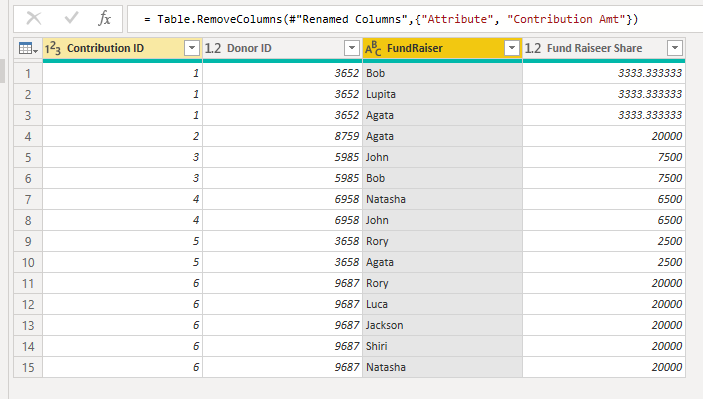
Shouldnt be a need to have the total amounts, as you would want to utilize DAX for that type of thing
File:
- Mark as New
- Bookmark
- Subscribe
- Mute
- Subscribe to RSS Feed
- Permalink
- Report Inappropriate Content
See the attached pbix, but the steps are:
- Unpivot columns
- Filter out blanks in the new value columns
- Group the rows by Contribution ID, Aggregating by All Row, Count Row, and the Average of Contribution Amount
- Divide Contribution Amouut by Count of people for a new column
- Remove misc Columns
- Expand out
- Rename columns and set data types
let
    Source = Table.FromRows(Json.Document(Binary.Decompress(Binary.FromText("i45WMjYzNVLSUTIEYQMgANJO+UlA0qe0ILMkEchwTE8E0yAUqxOtZGFuaglkg3QZQXUgK0EoNLW0MAWyjUFGm0IUeuVn5MFtQFJqZmlqAWSbgJQaQ5T6AY0szkhEaEJSDnQ0SDnIdKjBQflFlZgOAam1NLMwB7LNYB5EUu1Tmgw2PzE5uzgfZEVwRmZRJpLdsbEA", BinaryEncoding.Base64), Compression.Deflate)), let _t = ((type text) meta [Serialized.Text = true]) in type table [#"Donor ID" = _t, #"Contribution ID" = _t, #"Contribution Amt" = _t, #"Fundraiser 1" = _t, #"Fundraiser 2" = _t, #"Fundraiser 3" = _t, #"Fundraiser 4" = _t, #"Fundraiser 5" = _t]),
    #"Changed Type" = Table.TransformColumnTypes(Source,{{"Donor ID", Int64.Type}, {"Contribution ID", Int64.Type}, {"Contribution Amt", Int64.Type}, {"Fundraiser 1", type text}, {"Fundraiser 2", type text}, {"Fundraiser 3", type text}, {"Fundraiser 4", type text}, {"Fundraiser 5", type text}}),
    #"Unpivoted Other Columns" = Table.UnpivotOtherColumns(#"Changed Type", {"Donor ID", "Contribution ID", "Contribution Amt"}, "Attribute", "Value"),
    #"Filtered Rows" = Table.SelectRows(#"Unpivoted Other Columns", each ([Value] <> "")),
    #"Reordered Columns" = Table.ReorderColumns(#"Filtered Rows",{"Contribution ID", "Donor ID", "Contribution Amt", "Attribute", "Value"}),
    #"Grouped Rows" = Table.Group(#"Reordered Columns", {"Contribution ID"}, {{"All Data", each _, type table [Contribution ID=number, Donor ID=number, Contribution Amt=number, Attribute=text, Value=text]}, {"Count of People", each Table.RowCount(_), type number}, {"Cont Amount", each List.Average([Contribution Amt]), type number}}),
    #"Inserted Division" = Table.AddColumn(#"Grouped Rows", "Fund Raiseer Share", each [Cont Amount] / [Count of People], type number),
    #"Removed Columns" = Table.RemoveColumns(#"Inserted Division",{"Count of People", "Cont Amount"}),
    #"Expanded All Data" = Table.ExpandTableColumn(#"Removed Columns", "All Data", {"Donor ID", "Contribution Amt", "Attribute", "Value"}, {"Donor ID", "Contribution Amt", "Attribute", "Value"}),
    #"Renamed Columns" = Table.RenameColumns(#"Expanded All Data",{{"Value", "FundRaiser"}}),
    #"Removed Columns1" = Table.RemoveColumns(#"Renamed Columns",{"Attribute", "Contribution Amt"})
in
    #"Removed Columns1"
Shouldnt be a need to have the total amounts, as you would want to utilize DAX for that type of thing
File:
- Mark as New
- Bookmark
- Subscribe
- Mute
- Subscribe to RSS Feed
- Permalink
- Report Inappropriate Content
Magnificent. Thank you and BekahLoSurdo for the solutions (despite my difficulty in merely posting an image of what I was looking for). A great experience for my first time posting here.
Nick
- Mark as New
- Bookmark
- Subscribe
- Mute
- Subscribe to RSS Feed
- Permalink
- Report Inappropriate Content
Hi @Anonymous,
Here's what I did:
let
    Source = Excel.Workbook(File.Contents("C:\Users\rlosurdo\Desktop\DAX & PQ Training\Training Solutions\data.xlsx"), null, true),
    data_Sheet = Source{[Item="data",Kind="Sheet"]}[Data],
    #"Promoted Headers" = Table.PromoteHeaders(data_Sheet, [PromoteAllScalars=true]),
    #"Changed Type" = Table.TransformColumnTypes(#"Promoted Headers",{{"Donor ID", Int64.Type}}),
    #"Unpivoted Columns" = Table.UnpivotOtherColumns(#"Changed Type", {"Donor ID", "Contribution ID", "Contribution Amt"}, "Attribute", "Value"),
    #"Renamed Columns" = Table.RenameColumns(#"Unpivoted Columns",{{"Value", "Fundraiser"}}),
    #"Added Contribution Amount" = Table.AddColumn(#"Renamed Columns", "Contribution Amount", each [Contribution Amt] / (let group = [Contribution ID] in List.Count(Table.SelectRows(#"Renamed Columns", each [Contribution ID] = group) [Contribution ID]) )),
    #"Removed Columns" = Table.RemoveColumns(#"Added Contribution Amount",{"Attribute", "Contribution Amt"}),
    #"Reordered Columns" = Table.ReorderColumns(#"Removed Columns",{"Donor ID", "Contribution ID", "Contribution Amount", "Fundraiser"})
in
    #"Reordered Columns"
You will have to change your Source; let me know if you have any questions...
Hope this helps,
Bekah
- Mark as New
- Bookmark
- Subscribe
- Mute
- Subscribe to RSS Feed
- Permalink
- Report Inappropriate Content
Here's the image that's missing from the initial post...
Helpful resources

Power BI Dataviz World Championships
The Power BI Data Visualization World Championships is back! Get ahead of the game and start preparing now!

Power BI Monthly Update - December 2025
Check out the December 2025 Power BI Holiday Recap!

FabCon Atlanta 2026
Join us at FabCon Atlanta, March 16-20, for the ultimate Fabric, Power BI, AI and SQL community-led event. Save $200 with code FABCOMM.

| User | Count |
|---|---|
| 39 | |
| 37 | |
| 33 | |
| 32 | |
| 29 |


| User | Count |
|---|---|
| 132 | |
| 88 | |
| 82 | |
| 68 | |
| 64 |


