cancel
Showing results for 
Search instead for 
Did you mean: 

July 7 - July 17 | Round 2 of the Power BI Dataviz World Championships. Don't miss your chance! Learn more

Reply
pfarahani
Helper II
Helper II

calculation using current month

Hi All,


Is there a way to calculate a simple measure like, total count of something (filings) but in a way that it dynamically updates with the current month of the data. For example, I have this measure in a visual card, and right now it displays total filings for July 2021, when the data comes in for August, the card will update automatically and display the total for August, then eventually September when that data comes in, etc......


1 ACCEPTED SOLUTION

Hi Greg, @Greg_Deckler I am having success with this:


Value on Last Year/Month =
CALCULATE(
COUNT( 'JBSIS Probate Filings'[Case Number] ),
FILTER( 'JBSIS Probate Filings', 'JBSIS Probate Filings'[Report Year Month] = MAX( 'JBSIS Probate Filings'[Report Year Month] ) )
)

View solution in original post

5 REPLIES 5
Greg_Deckler
Community Champion
Community Champion

@pfarahani So generally, the way this is done is to create a calculated column like the following:


Column IsCurrentMonth = 
  VAR __Today = TODAY()
  VAR __CurrentYear = YEAR(__Today)
  VAR __CurrentMonth = MONTH(__Today)
  VAR __Year = YEAR('Table'[Date])
  VAR __Month = MONTH('Table'[Date])
RETURN
  IF(__Year = __CurrentYear && __Month = __CurrentMonth,1,0)

Column IsCurrentMonth Alternate =
  VAR __CurrentEOMonth = EOMONTH(TODAY(),0)
  VAR __EoMonth = EOMONTH([Date],0)
RETURN
  IF __EoMonth = __CurrentEoMonth, 1, 0)


Then you can filter your visual on this column = 1


Follow on LinkedIn
@ me in replies or I'll lose your thread!!!
Instead of a Kudo, please vote for this idea
Become an expert!: Enterprise DNA
External Tools: MSHGQM
YouTube Channel!: Microsoft Hates Greg
Latest book!:
DAX For Humans

DAX is easy, CALCULATE makes DAX hard...

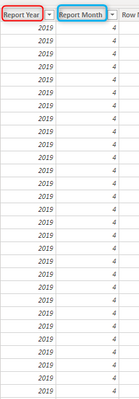
Hi Greg, @Greg_Deckler  - my bad, I looked more closely at the data in this dashboard, its a little but different. There is this filings table, I am trying to create a measure to count total filings based on the last/max month-year in this dataset, which right now is December of 2019

pfarahani_0-1627574487292.png


@pfarahani OK, how about this one:

Column IsCurrentMonth = 
  VAR __MaxYear = MAX('Table'[Report Year])
  VAR __MaxMonth = MAXX(FILTER('Table',[Report Year] = __MaxYear),[Report Month])
RETURN
  IF([Report Year]=__MaxYear && [Report Month]=__MaxMonth,1,0)


Follow on LinkedIn
@ me in replies or I'll lose your thread!!!
Instead of a Kudo, please vote for this idea
Become an expert!: Enterprise DNA
External Tools: MSHGQM
YouTube Channel!: Microsoft Hates Greg
Latest book!:
DAX For Humans

DAX is easy, CALCULATE makes DAX hard...

Hi Greg, @Greg_Deckler I am having success with this:


Value on Last Year/Month =
CALCULATE(
COUNT( 'JBSIS Probate Filings'[Case Number] ),
FILTER( 'JBSIS Probate Filings', 'JBSIS Probate Filings'[Report Year Month] = MAX( 'JBSIS Probate Filings'[Report Year Month] ) )
)

@pfarahani Yep, I can see how that would work too!


Follow on LinkedIn
@ me in replies or I'll lose your thread!!!
Instead of a Kudo, please vote for this idea
Become an expert!: Enterprise DNA
External Tools: MSHGQM
YouTube Channel!: Microsoft Hates Greg
Latest book!:
DAX For Humans

DAX is easy, CALCULATE makes DAX hard...

Helpful resources

Announcements
FabCon and SQLCon Barcelona 2026

FabCon & SQLCon – Barcelona 2026

Join us in Barcelona for FabCon and SQLCon, the Fabric, Power BI, SQL, and AI community event. Save €200 with code FABCMTY200.

60 days of Data Days Carousel

Data Days 2026

Join Fabric Data Days 2026: 60 days of free live/on-demand sessions, challenges, study groups, and certification opportunities.

Power BI DataViz World Championships carousel

Power BI DataViz World Championships - June 2026

A new Power BI DataViz World Championship is coming this June! Don't miss out on submitting your entry.