cancel
Showing results for 
Search instead for 
Did you mean: 

The Power BI Data Visualization World Championships is back! Get ahead of the game and start preparing now! Learn more

Reply
andywil456
Advocate II
Advocate II

calculate formula

I trying to pull through the total sales from another table but i want it to show the break down as per each payment category which is cross referenced by index numbers. The formula i'm using is Column = CALCULATE(SUM('customer payment data'[ Customer Amount]),Table1[Index]) but this is only pull down part of the values. 


I have tried to add screenshots but for some reason i can't get these to upload. 

6 REPLIES 6
Habib
Continued Contributor

Apply filter on your referenced table within CALCULATE funtion it might work as I am not sure about exact error.

Hi Habib,

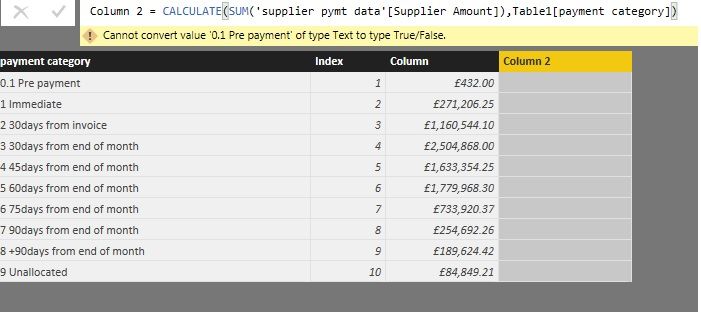
Below is a screenshot of the table i have created and the error message.

What i'm after is a breakdown of the total supplier spend by payment category. 


Untitled.jpg

Habib
Continued Contributor

@andywil456CALCULATE function expect filter as second parameter but in your scenario your are providing column value. Please add some filter option like ALL or ALLSELECTED.

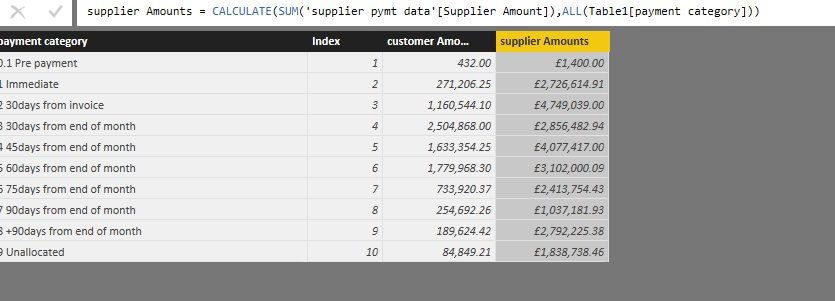
Thank you @Habib, now i'm getting another issue. Using either filter ALL or ALLSELECTED i'm getting a total value of £26m but the supplier amounts should only total £8.5m.

I have applied the same formula to my customer amounts and they match. Untitled1.jpg

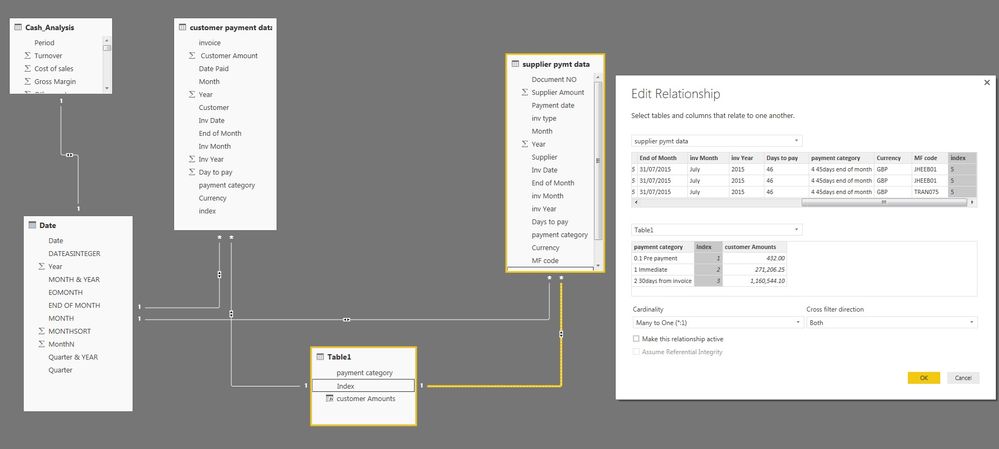
The step up between each table is the same apart when i select "make this relationship active" i get this error message Untitled1.jpg

Untitled.jpg

@andywil456


In this scenario, since you have build the relationship between Table1 and 'supplier pymt data', you just need to use ALLEXCEPT to get the data from 'supplier pymt data'  group on [payment category]. The DAX can be like:


=CALCULATE(SUM('supplier pymt data'[Supplier Amount]),ALLEXCEPT(Table1,Table1[payment category]))

See my sample below:

Capture66.PNG

Regards,

jahida
Impactful Individual

If you want that relationship to work you need to make many of the other relationships (and that one) one-way. An easy way to think about is that there should be no loops in your relationships (cycles in graph terminology). The relationship you're trying to create would create a loop.


In terms of the CALCULATE formula, if you want to keep it simple, just go with:


CALCULATE(SUM('supplier pymt data'[Supplier Amount]), ALL('supplier pymt data'), 'supplier pymt data'[payment category] = Table1[payment category])


Then you don't have to worry about the relationship at all (for this step at least). The reason you're getting a weird result right now is that because of the 2-way filtering, the filters are going through the Customer payment -> Date -> Supplier payment, which is giving you unexpected results. Switching to 1-way filtering should fix that. So would the ALL statement above.

Helpful resources

Announcements
Power BI DataViz World Championships

Power BI Dataviz World Championships

The Power BI Data Visualization World Championships is back! Get ahead of the game and start preparing now!

December 2025 Power BI Update Carousel

Power BI Monthly Update - December 2025

Check out the December 2025 Power BI Holiday Recap!

FabCon Atlanta 2026 carousel

FabCon Atlanta 2026

Join us at FabCon Atlanta, March 16-20, for the ultimate Fabric, Power BI, AI and SQL community-led event. Save $200 with code FABCOMM.