Don't miss your chance to take exam DP-600 or DP-700 on us!
Request nowLearn from the best! Meet the four finalists headed to the FINALS of the Power BI Dataviz World Championships! Register now
Hi,
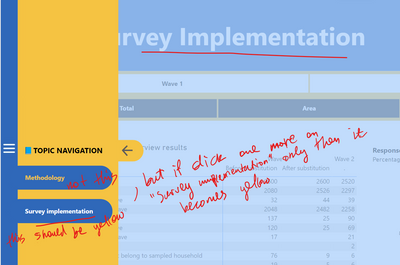
I am having an issue with selected style for the bookmark navigator. When clicked on the Navigator, it opens the correct page, but text of the selected option doesnt change into the Selected style, which is yellow color in my case. It gets the Selected style on when clicked 2 times.
Anyone having same issue? Is it a bug or am I doing something wrong?
With thanks,
Hope to hear from anyone soon
Hi @Anonymous ,
I made a test on my side and it seems work fine.
Can you provide me with some "bug" screenshots?
Best Regards,
Stephen Tao
If this post helps, then please consider Accept it as the solution to help the other members find it more quickly.
Thanks @Anonymous for the reply and apologies that it took some time to get back to you.
Below is the screenshot, hope it is self-explanatory and really wishing that there is some solution for it, otherwise it makes not possible to use this nagivator due to the potential confusion for end-users, otherwise it actually simplifies lots of manual setting up of such navigator.
With best,
Zula
That bug has been around for a while. You can raise an issue at https://issues.powerbi.com . If you have a Pro license you can consider raising a Pro ticket at https://powerbi.microsoft.com/en-us/support/pro/
Share feedback directly with Fabric product managers, participate in targeted research studies and influence the Fabric roadmap.
Check out the February 2026 Power BI update to learn about new features.
| User | Count |
|---|---|
| 54 | |
| 45 | |
| 38 | |
| 16 | |
| 15 |
| User | Count |
|---|---|
| 86 | |
| 69 | |
| 38 | |
| 29 | |
| 26 |