Get certified for free when you join Fabric Data Days 2026 and dive into Fabric, Power BI, SQL, AI, and other essential data skills.
Join nowData Days is here! Join us now for 60+ days of learning, challenges, and connection. Learn more
Hi @sandraemma ,
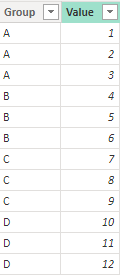
I created some data:
Here are the steps you can follow:
1. Create measure.
Find the entire data maximum:
ALL_Max =
MAXX(
ALL('Table'),[Value])Find the maximum value of the data for each grouping:
Group_Max =
MAXX(
FILTER(ALL('Table'),
'Table'[Group]=MAX('Table'[Group])),[Value])
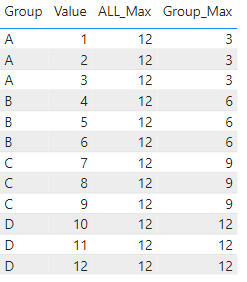
2. Result:
Best Regards,
Liu Yang
If this post helps, then please consider Accept it as the solution to help the other members find it more quickly
Hi @sandraemma ,
I created some data:
Here are the steps you can follow:
1. Create measure.
Find the entire data maximum:
ALL_Max =
MAXX(
ALL('Table'),[Value])Find the maximum value of the data for each grouping:
Group_Max =
MAXX(
FILTER(ALL('Table'),
'Table'[Group]=MAX('Table'[Group])),[Value])
2. Result:
Best Regards,
Liu Yang
If this post helps, then please consider Accept it as the solution to help the other members find it more quickly
Hi,
you should just be able to use a MAX expression:
Don't miss out on Data Days, June 15 through August 7. Learn Fabric, Power BI, SQL, AI and more.
Check out the May 2026 Power BI update to learn about new features.
| User | Count |
|---|---|
| 23 | |
| 23 | |
| 21 | |
| 17 | |
| 14 |
| User | Count |
|---|---|
| 58 | |
| 50 | |
| 37 | |
| 29 | |
| 24 |