
Get certified for free when you join Fabric Data Days 2026 and dive into Fabric, Power BI, SQL, AI, and other essential data skills.
Join nowTry your skills in the Power BI Dataviz World Championship! Round one ends June 26. Join now
Hi frds,
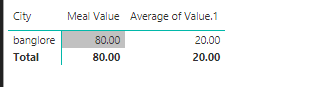
here i am attaching data and results .
Meal value = sum(meal Value)
expected output = 20.
Value1 = average(value1)
expecte out =20 and is correct
please help me to get the meal value as 20 after summing . please have a look at below picture
sum(meal value) should be 20.
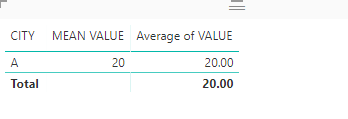
Does this meet your goal?
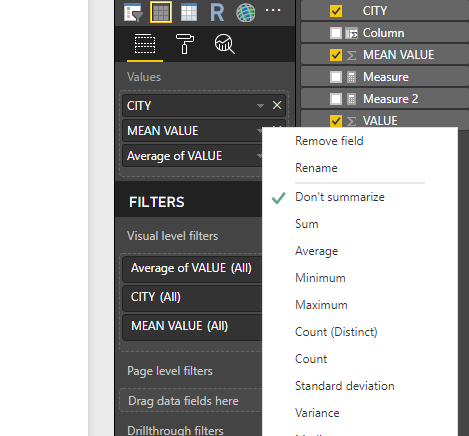
To get it, select ‘Don’t summarize’ as follows
Additionally, I can’t make myself clear about “get the meal value as 20 after summing”, whether it means to click on the column ‘mean value’ in the values field and select ‘Sum’, or sum ‘mean value’ column based on the column ‘city’, ‘Attribute.1’,’Mean type’ using forluma
Measure = SUM(Table1[MEAN VALUE])
Best Regards
Maggie Li
Hi,
Why not use Average of MEAL values as well
or
MIN(TableName[Meal Value])
or
MAX(TableName[Meal Value])
| User | Count |
|---|---|
| 23 | |
| 21 | |
| 20 | |
| 17 | |
| 11 |
| User | Count |
|---|---|
| 55 | |
| 53 | |
| 41 | |
| 36 | |
| 32 |