Join us at FabCon Atlanta from March 16 - 20, 2026, for the ultimate Fabric, Power BI, AI and SQL community-led event. Save $200 with code FABCOMM.
Register now!The Power BI Data Visualization World Championships is back! Get ahead of the game and start preparing now! Learn more
hi, i'm trying to display the number of workers today, I have a start date and a leaving date, so i need to show today's active workers and then with a slicer I want to show the same information by month, hope someone can help me.
example data:
| Worker ID | start date | leaving date |
| 19311196 | 2003-06-15 | 2018-01-24 |
| 11424431 | 2005-07-26 | 2018-01-28 |
| 10574322 | 2009-09-17 | 2018-01-31 |
| 10240660 | 2001-10-03 | |
| 18264874 | 2001-07-28 | |
| 17692937 | 2004-10-02 | |
| 12298585 | 2011-07-03 |
(date yyyy-mm-dd)
the ones with no leaving date, means that are still working on the company.
thank you
Solved! Go to Solution.
Hi @Anonymous,
Sample for your refernce, please check the following steps as below. If I misunderstood your request, kindly share your excepted result to me.
1. Crete a date table and one calculated column in it.
date = CALENDARAUTO()
YearMonth = YEAR('date'[Date]) &" " &FORMAT('date'[Date],"mmm")
2. Create two measures to get the result as we need.
today's active workers =
CALCULATE (
COUNTROWS ( Table1 ),
FILTER ( ALL ( Table1 ), Table1[leaving date] = BLANK () )
)
by month =
VAR mindate =
CALCULATE ( MIN ( 'date'[Date] ), ALLSELECTED ( 'date'[YearMonth] ) )
RETURN
CALCULATE (
COUNTROWS ( Table1 ),
FILTER (
Table1,
OR (
Table1[start date] <= mindate
&& Table1[leaving date] >= mindate,
Table1[start date] <= mindate
&& ISBLANK ( Table1[leaving date] )
)
)
)
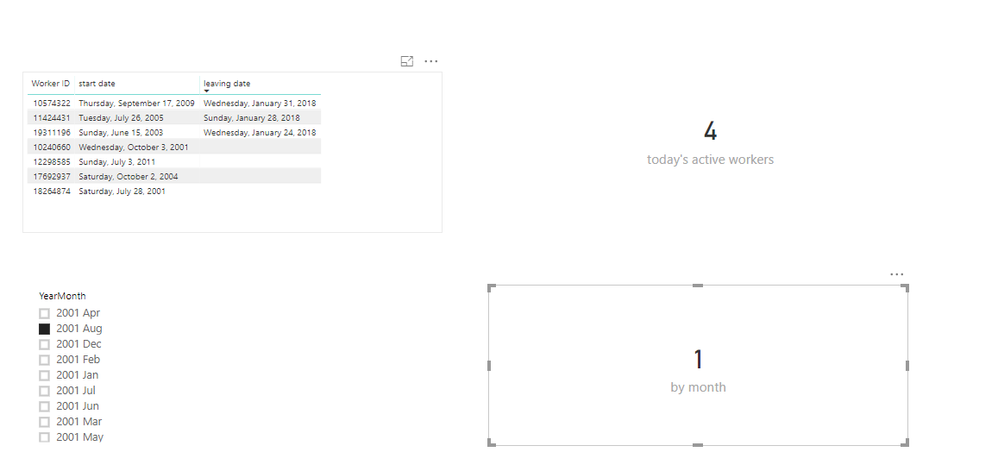
For more details, please check the pbix as attached.
Regards,
Frank
Hi @Anonymous,
Sample for your refernce, please check the following steps as below. If I misunderstood your request, kindly share your excepted result to me.
1. Crete a date table and one calculated column in it.
date = CALENDARAUTO()
YearMonth = YEAR('date'[Date]) &" " &FORMAT('date'[Date],"mmm")
2. Create two measures to get the result as we need.
today's active workers =
CALCULATE (
COUNTROWS ( Table1 ),
FILTER ( ALL ( Table1 ), Table1[leaving date] = BLANK () )
)
by month =
VAR mindate =
CALCULATE ( MIN ( 'date'[Date] ), ALLSELECTED ( 'date'[YearMonth] ) )
RETURN
CALCULATE (
COUNTROWS ( Table1 ),
FILTER (
Table1,
OR (
Table1[start date] <= mindate
&& Table1[leaving date] >= mindate,
Table1[start date] <= mindate
&& ISBLANK ( Table1[leaving date] )
)
)
)
For more details, please check the pbix as attached.
Regards,
Frank
Check out the November 2025 Power BI update to learn about new features.
Advance your Data & AI career with 50 days of live learning, contests, hands-on challenges, study groups & certifications and more!